Overview
Learn how to play EA SPORTS FC™ with friends on the Nintendo Switch™.
Can you play EAS FC on Nintendo Switch™ or Nintendo Switch™ 2 with other platforms?
No, the Nintendo Switch™ doesn’t support cross-play for EAS FC—you can only play with other Switch players. You can’t play on Switch against someone playing on a PC, PlayStation®, or Xbox.How to play with other Nintendo Switch™ players
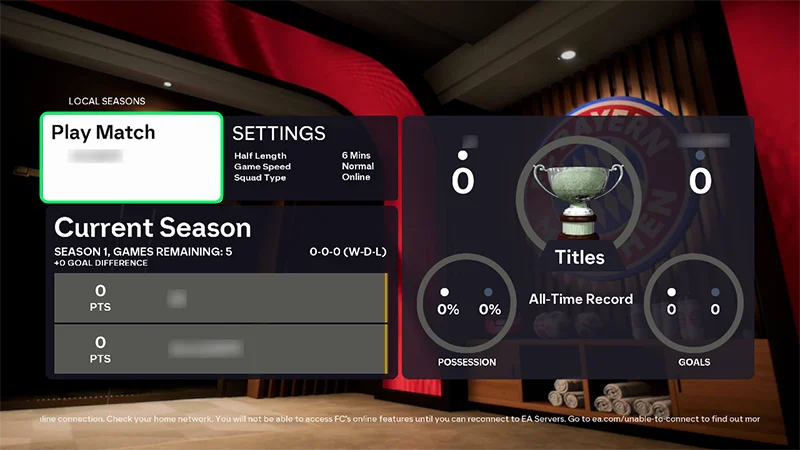
You can play multiplayer on the same Switch by connecting a second pair of Joy-Cons or a Pro Controller. Go into Kick-Off or any single-player mode and select a side with each pair of Joy-Cons or the controller.You can also use the Split Joy-Con feature to play 1v1 or 1+1 Co-op without any extra equipment.Check out the Nintendo Switch™ website for a guide to setting up multiplayer with your Joy-Cons. You can also play in Local Seasons, which means you can play the same FC title with someone else who has a Nintendo Switch™ if they’re within 10 meters.To play Local Seasons:- 1Make sure both Nintendo Switch™ consoles are within a 10-meter range and have Wi-Fi enabled.
- 2Launch the same EAS FC title on both consoles.
- 3Go to the main menu.
- 4Choose Local Seasons at the same time on both consoles. This should take you to the Local Seasons Hub.
- 5In the Local Seasons Hub, select Ready on both consoles, then Play Match.
How to play with other Nintendo Switch™ players online
To play with other Nintendo Switch™ players online, you’ll need a Nintendo Switch™ Online membership. Head to Nintendo.com to learn more.
- The quickest way to play with other Nintendo Switch™ players online is to go to Seasons and search for an opponent.
- In Ultimate Team™, you can create a Club and access an Online Mode, such as Rivals, Champions, Online Draft, Friendlies, or Rush.
- In Clubs, you can play a Drop-In, League, or Rush match.
- If you have a friend on the Nintendo Switch™, you can play Online Friendlies by inviting them into your game session.
- If you’re within 10 meters of another active Nintendo Switch™, you can play Local Seasons by searching for an opponent at the same time.
- In VOLTA FOOTBALL™ (EA SPORTS FC™ 24), you can create an avatar and play SQUADS or ARCADE.
How to play with other Nintendo Switch™ 2 players
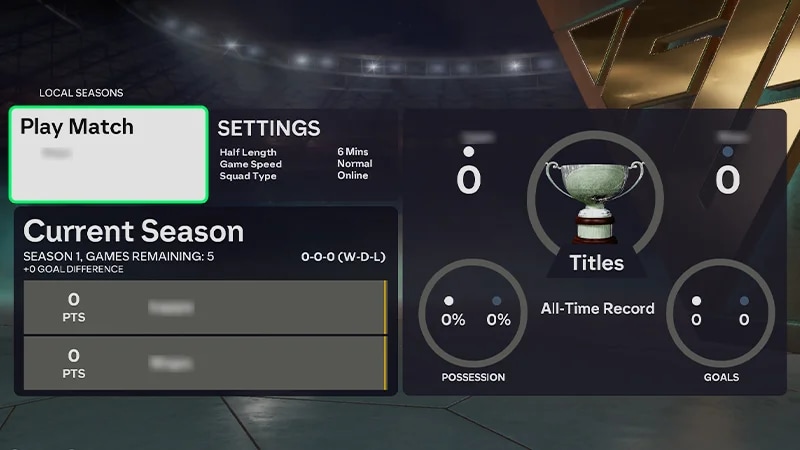
You can play multiplayer on the same Switch by connecting a second pair of Joy-Cons or a Pro Controller. Go into Kick-Off or any single-player mode and select a side with each pair of Joy-Cons or the controller. Or, you can use the GameShare feature that’s exclusive to the Nintendo Switch 2. You can play with anyone on a Nintendo Switch or Nintendo Switch™ 2 as long as they’re in close proximity to you—they don’t need a copy of the game to play. You can also use the Split Joy-Con feature to play 1v1 or 1+1 Co-op without any extra equipment.You can also play in Local Seasons, which means you can play the same FC title with someone else who has a Nintendo Switch™ if they’re within 10 meters.To play Local Seasons:- 1Make sure both Nintendo Switch™ consoles are within a 10-meter range and have Wi-Fi enabled.
- 2Launch the same EAS FC title on both consoles.
- 3Go to the main menu.
- 4Choose Local Seasons at the same time on both consoles. This should take you to the Local Seasons Hub.
- 5In the Local Seasons Hub, select Ready on both consoles, then Play Match.
How to play with other Nintendo Switch™ 2 players online
You can play Kick-Off online with a friend using the GameShare feature on Nintendo Switch 2.To join, the other player just needs to:- be on your Nintendo friends list
- have an online connection.
To play with other Nintendo Switch™ players online, you’ll need a Nintendo Switch™ Online membership. Head to Nintendo.com to learn more.
- The quickest way to play with other Nintendo Switch™ players online is to go to Seasons and search for an opponent.
- In Ultimate Team™, you can create a Club and access an Online Mode, such as Rivals, Champions, Online Draft, Friendlies, or Rush.
- In Clubs, you can play a Drop-In, League, or Rush match.
- If you have a friend on the Nintendo Switch™, you can play Online Friendlies by inviting them into your game session.
- If you’re within 10 meters of another active Nintendo Switch™, you can play Local Seasons by searching for an opponent at the same time.
- In VOLTA FOOTBALL™ (EA SPORTS FC™ 24), you can create an avatar and play SQUADS or ARCADE.