Overview
Learn how to find your Ally Code, add friends, and manage Ally requests in STAR WARS™: Galaxy of Heroes.
What’s an Ally Code?
Your STAR WARS: Galaxy of Heroes Ally Code is a unique number that lets you connect and team up with other players. You can use Ally Codes in 2 ways.- Share your Ally Code with a friend and ask them to send you an Ally request.
- Use a friend’s Ally Code to send them an Ally request.
Your Ally Code is different from your STAR WARS: Galaxy of Heroes Player ID. Your Ally Code lets you connect with friends. Your Player ID is a unique identifier that helps us find your game and account details.
How to find your Ally Code
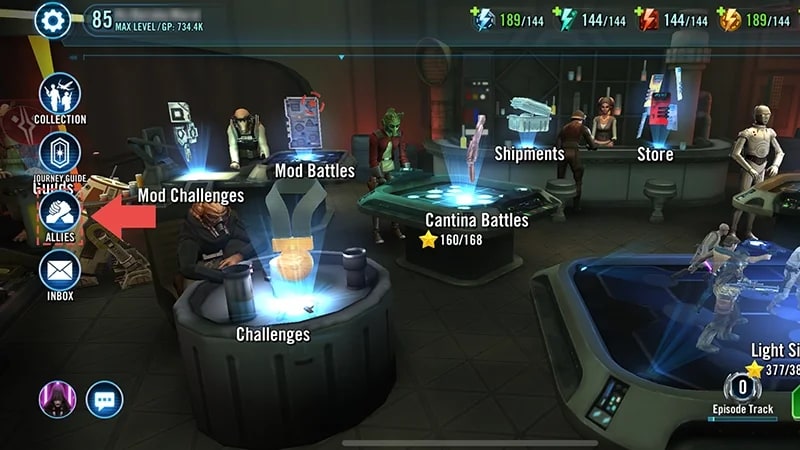
- 1On the Cantina screen, select Allies.
- 2At the top-left of the Allies screen, find your nine-digit Ally Code listed next to My Ally Code.
- 3Copy or take a screenshot of your Ally Code.
How to use a friend’s Ally Code
If you already have a friend’s Ally Code, you can send them an Ally request. You won’t need to share your Ally Code with them to do this.- 1On the Cantina screen, select Allies.
- 2Choose the Invite tab.
- 3Enter your friend’s Ally Code into the Enter Ally Code Here box and select Invite.
How to find Ally requests
- 1On the Cantina screen, select Allies.
- 2Choose the Request Status tab. You’ll find your pending Ally requests here.
How to remove an Ally
Here’s how to remove an Ally after accepting their Ally request.- 1On the Cantina screen, select Allies.
- 2Go to the Manage tab.
- 3Find the Ally you want to remove and select Remove.
- You can also remove all Allies at once by choosing Select All and then Remove.
If an Ally breaks the rules, learn how to report a player in STAR WARS: Galaxy of Heroes.