Overview
Getaways in The Sims 4 Adventure Awaits Expansion Pack let your Sim escape their day-to-day life and experience something new. It could be a stay away at kids camp, a rejuvenating fitness retreat, or a chance to get competitive in an elimination-style Getaway. Whichever you choose, they’re completely customizable, with Custom Venues, schedules, and Roles to fill. Here’s our guide for tips and tricks on attending, building, or hosting a Getaway.
Getaway Builder
How to send your Sim on a Getaway:- Using the phone select the Social app > Plan a Getaway.
- Using the computer select Household > Plan a Getaway.
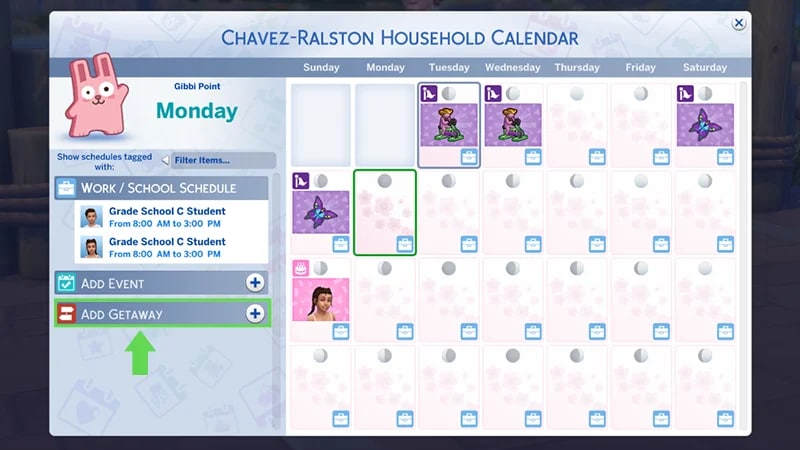
- Using the calendar, select Add Getaway on the left side. From here you can also choose to plan a Getaway in advance, and make it Recurring Weekly.
Getaways can’t be scheduled on the calendar during these events:
- Funeral Event if you own The Sims 4 Life & Death
- Wedding Event if you own The Sims 4 Wedding Stories and if you’re running a Base Game Wedding Event
- High School Graduation Event if you own The Sims 4 High School Years.
Place
First, you’ll select where you want the Getaway to take place. On the left side, you’ll select the location, which can be filtered by Lot Type and World. Getaways can be scheduled on a Custom Venue Lot or on existing Lot types. If you schedule a Getaway on a Custom Venue Lot, it’ll already have a preset schedule, but this can be modified. On the right side you can choose how many nights your Getaway will last, what time it begins and ends. You’ll also have the option to set this to Recurring Weekly and select which days of the week.When a Getaway is scheduled at a specific venue, Sims are brought there, where they’ll stay and live until the Getaway ends.Schedule & Roles
Next, choose a schedule for your Getaway.- Use the schedule to plan things like when Sims eat and sleep, or for fun activities like Work Out or Enjoy the Outdoors. The schedule can be as packed or as light as you want!
- In the Select Schedule Preset dropdown, choose a preset schedule like a Fitness Retreat, Outdoor Kids Camp, or Romantic Competition.
- Preset schedules can be edited, or you can create your own custom schedule from scratch.
- Schedules are broken down into Time Slots, each with an activity, Roles, and a start time. Each Time Slot has to be a minimum of three in-game hours.
- Each Getaway needs a minimum of one assigned Role (this can be your Sim), but can have up to 20 Sims.
- Choose from the Role Library, which has Roles like Baker, Staff, or Instructor.
- Or, create a totally custom Role and save it to the Role Library for future use.
- Each Role can have up to five tasks assigned.
- You can choose activities like Cook, Care and Mentor Children, or Clean.
- Roles can have criteria like Age, Skill Level, Gender, Romantic Orientation, Region, Trait, Occult, Career, and Relationship Status.
- Roles can be assigned a specific outfit and name.
Rules
The final tab of the Getaway Builder is Rules, which add a bit of a challenge to your Getaway.- Getaways can have no Rules at all, or a maximum of five.
- Only one Elimination Rule can be active at a time.
- Sims will be eliminated if they don’t meet certain requirements during their stay.
- One elimination will take place per day of the Getaway.

Premade Getaways
You can create Custom Getaways, but to get started, there are three premade Getaways linked to Custom Venue Lots. These are ready to play as soon as you launch into The Sims 4 Adventure Awaits. So there’s no need to set up activities or scheduling—you can get straight into the fun! The Pack comes with three preset Getaways, each with a Custom Venue Lot and schedule:- a Fitness Retreat (Revive & Thrive)
- an Outdoor Kids Camp (Camp Gibbi Gibbi)
- and a Romantic Competition (Highland Escape).
- Cooking Competition
- Cozy Bed and Breakfast
- Creativity Retreat
- Senior Living Community
- Teen Popularity Contest
Custom Venues
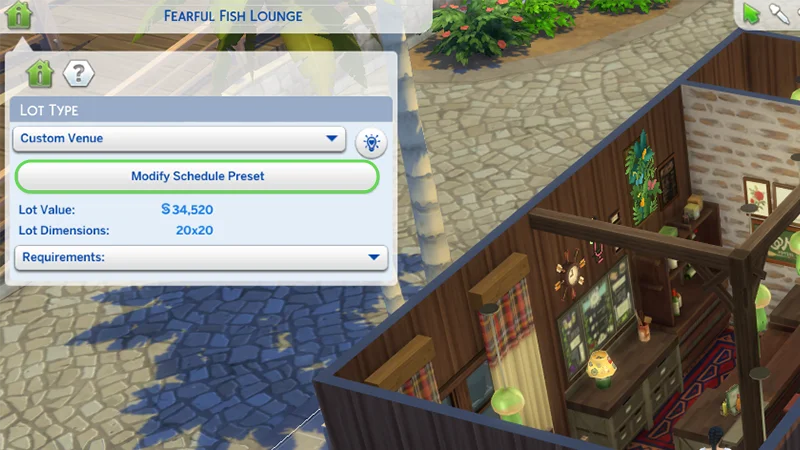
Instead of a Lot having one designated Lot Type, like a Museum or a Bar, a Custom Venue Lot lets you build and design your own venue types. To make a Custom Venue Lot:- 1In Build Mode, open the Venue Info menu in the top left of the screen.
- 2In the Lot Type dropdown, choose Custom Venue.
- 3Choose Modify Custom Schedule to customize the schedule, roles, and behavior for Sims who visit the Lot.