Phishing is a technique used by scammers to get your account information and passwords.Scammers will try to use your login or other account information to access your account and payment info. Avoid giving your info to phishers and scammers by only logging in on official EA sites and platforms.If you’re having trouble or notice things are missing from your account, contact us.
We’ll never ask you for your password, verification codes, or login credentials through email, social media, forum messages, or console messaging systems. If you think you may have given your login information to a phishing site, find out how to secure your account.If you can't access your account or think someone else has changed your account details, learn how to recover access to your EA Account.
Phishing techniques to look out for
If you get an email that appears to come from us asking for your account information, it’s a scam.
If you get a private message on our forums asking for your account information, it’s not us.
Scammers sometimes use names that sound legitimate, like “EA Admin” or “EA Developer.” If you get a message like this, report it to a forum moderator.
If you get a private message through your console’s online messaging system claiming it’s us, it’s fake.
We’ll never contact you through your console’s messaging system for any reason. Report the details of console phishing messages through Xbox Live and PlayStation™Network.
If you use social media, make sure you only talk to our verified accounts.
Scammers will try to scare you into thinking your account has been compromised when it hasn’t.
We’ll never send you a message asking for your login information.
Phishing techniques that offer items, cheats, and hacks
You may come across scams and phishers when you click, visit, or try to make purchases from third-party sites. These sites will try to get you to visit them by advertising great deals on games, in-game currency, gamer accounts, ways to disable digital rights management (DRM), or hacks to modify game content.
We don’t sell in-game currency that you can earn by playing our games, so the sale and purchase of those as well as EA Accounts themselves are against our User Agreement. It's not worth the risk to your personal security or your account, and players who use these sites can end up banned.
Only buy games from trusted retailers. Otherwise, we won’t be able to help you when something goes wrong.
We don’t need your login information to grant you in-game content like packs, players, or coins. If we give out any in-game content, it’ll be automatically added to your account. We won’t ask for your account info to give you prizes or rewards.
If passkeys are available for your EA Account, consider setting one up and regularly review your account security settings to make sure only trusted devices can access your account. Passkeys offer a more secure way to sign in because they use your device's built-in security features instead of a password. To help keep your EA Account secure, never share your login information, passwords, verification codes, or passkeys with anyone.
Redirecting is a technique where a scammer embeds something in a link that initially takes you to the real site, but then moves you to a fake page that looks identical.There are many examples of this, but one simple thing to look out for in any URL is the word “redirect.” For example: http://www.ea.com/redirect?url=http://fakesite.comThis means that this link will take you away from the official EA site. We’ll never redirect you from http://www.ea.com to another site.
How to recognize fake emails and copycat websites
EA sends emails from addresses that include “ea.com.” Be cautious of any email addresses that don't use “ea.com” as the domain name.Even if they include "ea" somewhere in the email address, make sure it’s from an official subdomain.All ea.com subdomains will lead with the subcategory, then ea.com.
Correct: www.help.ea.com
Incorrect: www.ea.help.com
If you see the domain or subdomain written in any other way, this isn’t an official EA website.
Yes, e.ea.com is an official EA email address. Keep in mind that e.ea.com isn't an email address you can send messages to. If you receive an email from an address ending in e.ea.com, it's from EA. If you're unsure whether an email is legitimate, double-check the sender address and make sure any links lead to an official ea.com website.
If you get a phishing email or message, don’t panic. Your account may not have been compromised. All the phisher may have is your email address, which can be pretty easy to find.Scammers can duplicate the images and text from an official EA email. If you get a suspicious-looking email, always check who the sender is and where the links in the email are taking you.
If you're receiving verification codes, password reset emails, or welcome emails for an EA Account you didn't create, it doesn't always mean someone has access to your email account.This can happen when:
someone accidentally enters the wrong email address when creating an EA Account
someone tries to sign in using your email address by mistake
someone is attempting to create or access an account using your email address.
If you didn't request the email:
don't select any links in the message
don't share any verification codes with anyone
check the sender address to make sure the email came from an official EA domain
change your email password if you believe your email account may have been compromised.
If you're concerned that an EA Account was created using your email address without your permission, contact us for help securing your account.
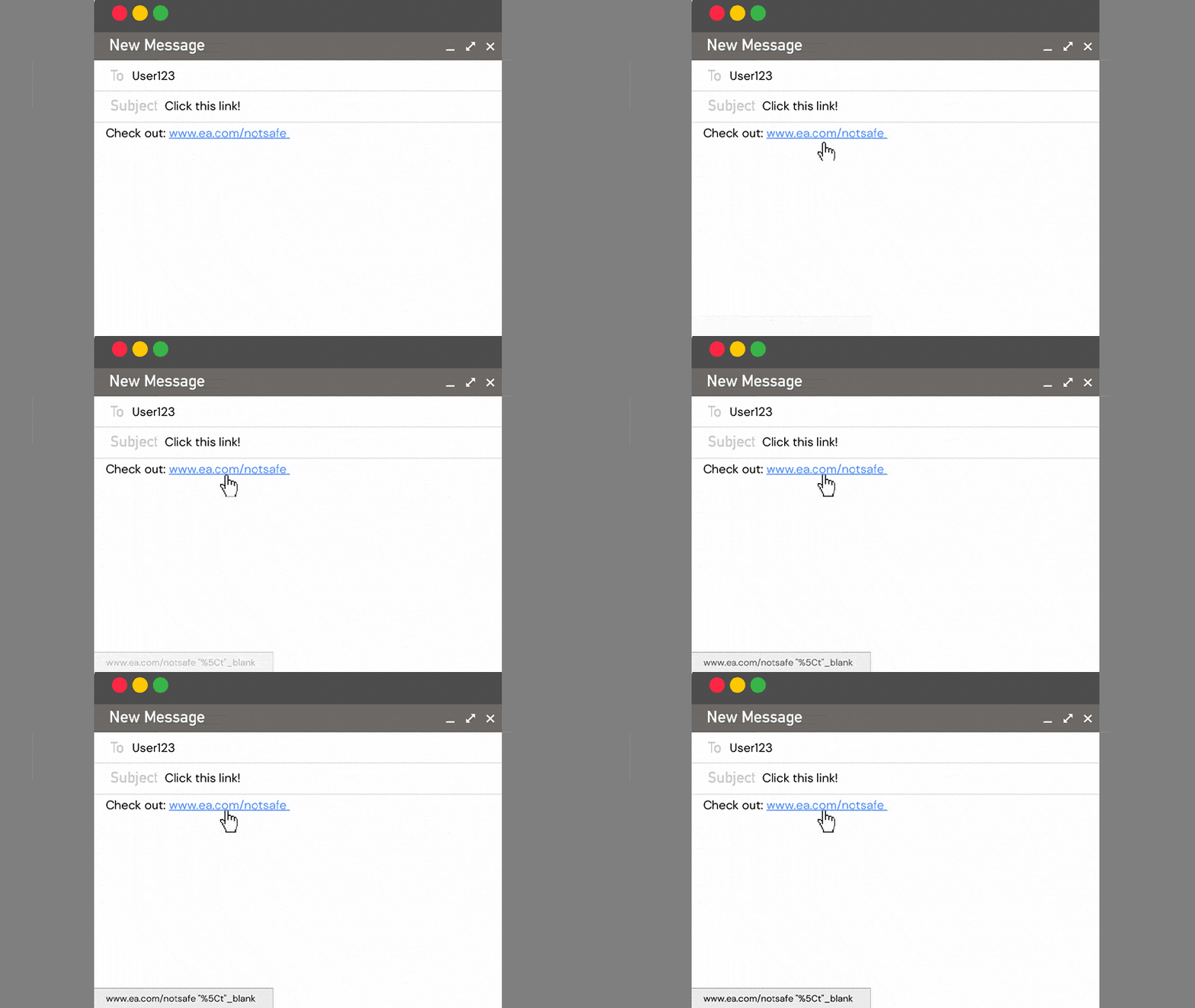
The official EA website uses the URL https://www.ea.com. Be aware of any links that don't use “ea.com” as the domain name. Even if they include "ea" somewhere in the URL, make sure it’s from an official subdomain, just like with email addresses.The text of a hyperlink may have a URL that's different from the URL it actually links to.Notice in the image below, when you hover your mouse over the link, the URL in the text box in the bottom left doesn’t match the original one we’ve hovered over.Depending on your browser or email client, you can check links like this at the bottom of your screen or in a small text box that hovers over the link.Make sure that any link you click leads to the place it claims it will take you.
Protect your account
Learn how to protect your EA Account from suspicious activity.