Overview
Get help building a loadout for each class in Battlefield 6. Learn about attachment points, attachment symbols, and recommended weapon pairings for each class.
Build a loadout
To get started, go to the Loadout tab, then choose the class you want to customize. Once finalized, your loadout appears in all game modes except locked weapon modes, where classes can only use their assigned weapons. No matter how you build your loadout, your selected class gets a signature gadget and signature trait that’s unique to them. Check out our class guide for help picking who to play.Pick a Primary Weapon
Each class needs a primary weapon, and each class has a weapon that complements their skills.| Class | Primary Weapon | ||
| Assault | Assault rifle (AR) | ||
| Engineer | Submachine gun (SMG) | ||
| Support | Light machine gun (LMG) | ||
| Recon | Sniper |
- Carbines are well-balanced weapons that work well in mid-range combat.
- Designated marksman rifles offer long-range accuracy with a higher fire rate than a sniper.
- Shotguns are hugely powerful and can kill enemies in one shot at close range.
Customize your primary weapon
You have up to 100 points to customize your weapon with attachments. Each attachment costs a different amount to use.Here’s an overview of some attachments and how they impact your weapon.- Barrels modify things like aim-down-sights speed, aiming speed, and hipfire accuracy.
- Under barrel attachments modify things like recoil control.
- Muzzles modify things like recoil, how audible gunfire is, and muzzle flash (the light from your gun as it fires).
- Magazine attachments usually increase your gun’s capacity.
- Ammunition attachments modify bullets, including things like damage and penetration.
- Ergonomic attachments improve factors like reload speed.
- Optics enhance your weapon’s visual precision, like reducing scope glint or improving your zoom.
- Top and right accessories improve lasers and flashlights.
What do attachment stats and symbols mean?
Here’s an overview of how to read your weapon’s stats. On the left hand side, you’ll see:- DMG for damage per shot
- ROF for rate of fire
- MAG for magazine capacity.
- Hipfire: your accuracy if you shoot without aiming-down-sights.
- Precision: your accuracy when you shoot while aiming-down-sights.
- Control: the amount of recoil from your weapon.
- Mobility: how quickly you can aim and shoot your weapon.
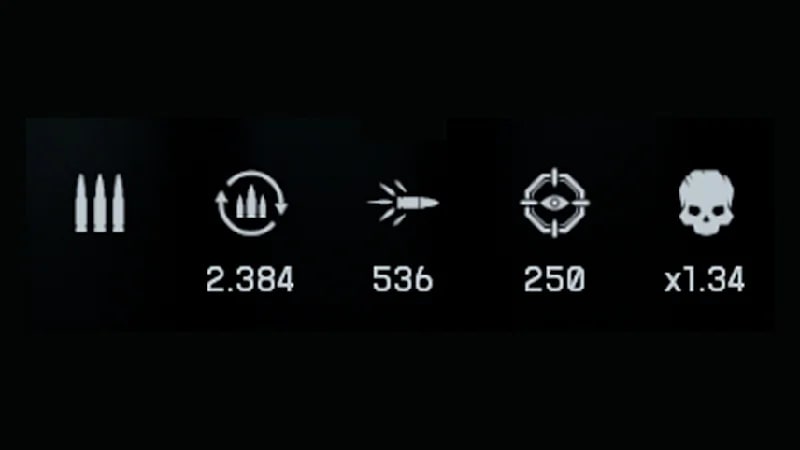
- The bullets symbol shows your weapon’s fire mode (how many bullets it shoots each time you pull the trigger).
- The bullets inside the arrows shows your reload time in seconds.
- The fired bullet symbol shows your muzzle velocity (how quickly a bullet leaves the muzzle of your gun) in meters per second.
- The cross-hairs symbol shows how long it takes to aim-down-sights in milliseconds.
- The skull symbol shows your headshot multiplier (the bonus damage applied when you shoot a headshot).
Pick a secondary weapon
Secondary weapons give you a backup option if you need to switch up your combat or you’ve run out of ammo. Your secondary weapon is usually a revolver or pistol.Learn more about what weapons you can use at ea.com.Pick your gadgets
Gadgets provide specific skills that can give your team a unique edge. Each class gets certain types of gadgets to choose from. You can pick two gadgets. Here are some examples of available gadgets in each class. Pick gadgets strategically for the map you’re playing or your role in the squad.| Assault | Assault ladder, grenade launcher, deploy beacon, shotgun | ||
| Engineer | Rocket launcher, supply crate, mine | ||
| Support | Supply pouch, deployable cover, defibrillator, grenade intercept system | ||
| Recon | Drone, laser designator, C-4, tracer dart |
Pick a throwable
Each class can choose between certain class-assigned grenades. Here’s an overview of what you can choose from.- Frag grenades can aggressively target enemies behind cover and are often deadly at close range.
- Flash grenades create an intense blast that temporarily blinds nearby enemies.
- Smoke grenades create a temporary smoke screen. They block your enemies from spotting targets, clear spotted markers from all infantry inside the smoke radius, and can help cover Support while they revive a downed ally.
Pick a melee weapon
The last thing you need to pick for your loadout is a melee weapon. You can choose between a:- combat knife
- sledgehammer
- hunting knife.
- Hit delay is the amount of time between an attack starting and damage being dealt.
- Damage is the amount of damage an attack causes.