Overview
Missing Items or Packs in EA SPORTS FC™? Check out our tips to help you find them.
What to check first
If you lost something from your Ultimate Team™, try these steps to see if you can find your missing content.- 1Restart Ultimate Team™.
- 2Make sure you didn’t Quick Sell the Player or Player Item.
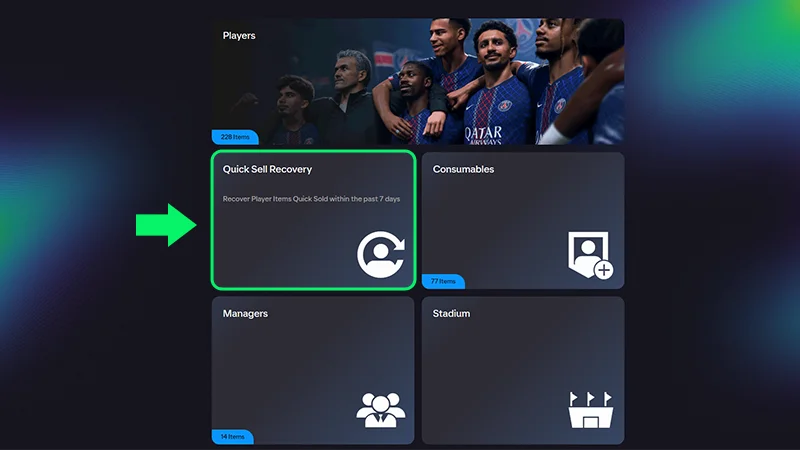
- You can undo up to 5 Quick Sells for Player Items per 31-day period. To do this, use our Quick Sell Recovery tool in the Web and Companion Apps.
- 1Restart your PC or console, launch EAS FC, and check if the content is still missing.
- 2Check out the EAS FC Direct Communication channel on X and on WhatsApp for issues that might be preventing your missing Items from appearing.
Player Items that have been discarded or submitted into a Squad Building Challenge (SBC) can’t be recovered. EA Advisors can't restore a Quick Sold player or Items you’ve submitted into an SBC.
How to find a missing Item
Here’s what to do if you’re missing an Item you obtained from the Transfer Market or got in a Pack, like Player Items, Consumables, Stadium Items, or Staff/Managers.- 1Double-check your Club to make sure it’s not there.
- 2Check the Store to see if you have any unclaimed Items.
- 3Check Transfer Targets to see if your Player Item purchase in the Transfer Market was successful.
- 4Check your Won Items and Expired Items to see if it’s there.
- If a Player Item gets stuck after you’ve acquired it from the Transfer Market, it should be automatically corrected within 72 hours. After that time, check your Transfer Targets to see if your Item appears.
- 5Make sure you didn’t Quick Sell the Player.
- You can undo up to 5 Quick Sells for Player Items per 31-day period. To do this, use our Quick Sell Recovery tool in the Web and Companion Apps.
- Note: You’ll need to have sufficient Coins to recover a Quick Sold Item.
- 6Once you submit Items to Squad Building Challenge (SBC), they’re permanently removed from your Club in exchange for rewards.
- If an Item was used in an SBC, we can't reverse it.
- Make sure to check your Squad before submitting it to an SBC.
How to find a missing Pack
After trying our basic troubleshooting steps, go to the Ultimate Team™ Store and select My Packs to check for your missing Pack.In EA SPORTS FC™ 24 VOLTA FOOTBALL™, you’ll find it in the Change Outfit section under Customise.
Get support with your missing Items or Packs
If you still can’t find your missing EAS FC Items or Packs after 72 hours, we’ll need some information from you to help investigate:- the content you’re missing
- the mode you’re missing content from (Rivals, Champions, Objectives, etc.)
- the email address on your EA Account
- your platform account ID (PSN ID, Xbox ID, etc.)
- the time and date that the content went missing
- your time zone
- the platform you play on (PC, PS5, Xbox Series X|S, etc.).