Overview
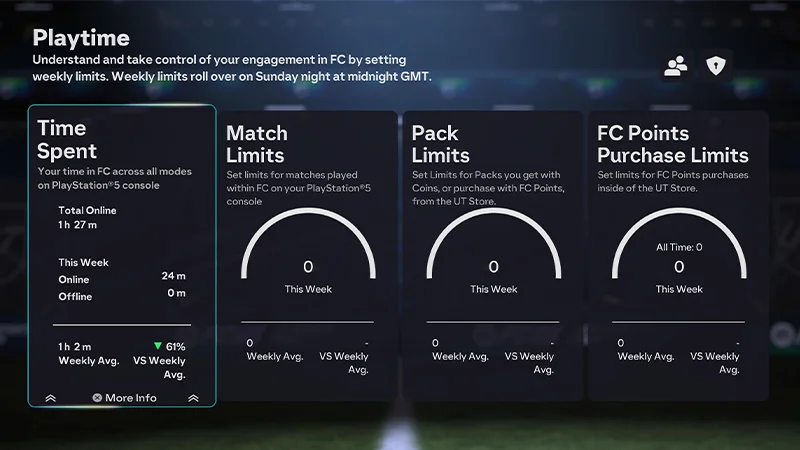
EA SPORTS FC™ Playtime lets you see how much time you put into your game, how many matches you play per week (excluding Simulated Career Mode matches), and how you engage with FC Points and Packs in Ultimate Team™. Set it up to see gameplay info and customize your gaming experience.
How to enable Playtime
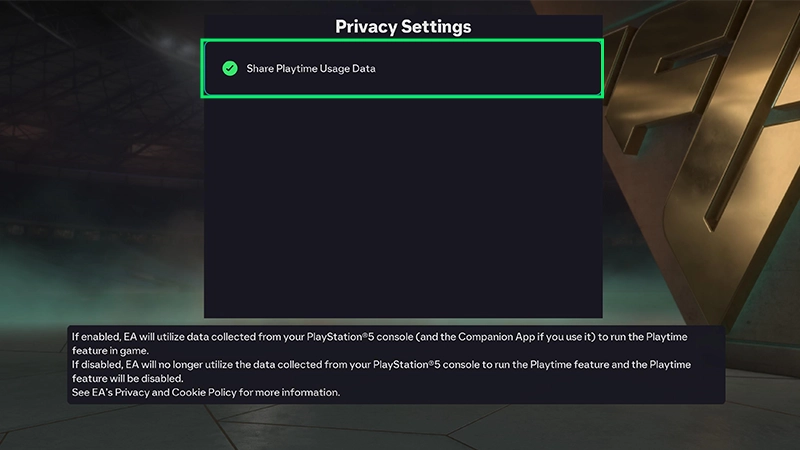
EAS FC Playtime isn’t enabled by default, so you have to opt in before you can use it.From the main menu
- 1Go to Settings from the main menu.
- 2Go to Online Settings.
- 3Go to Privacy Settings.
- 4Choose Share Playtime Usage Data.
From Ultimate Team™
- 1Enter Ultimate Team™.
- 2Select the Club tab.
- 3Select Settings.
- 4Select Playtime.
From the Web and Companion Apps
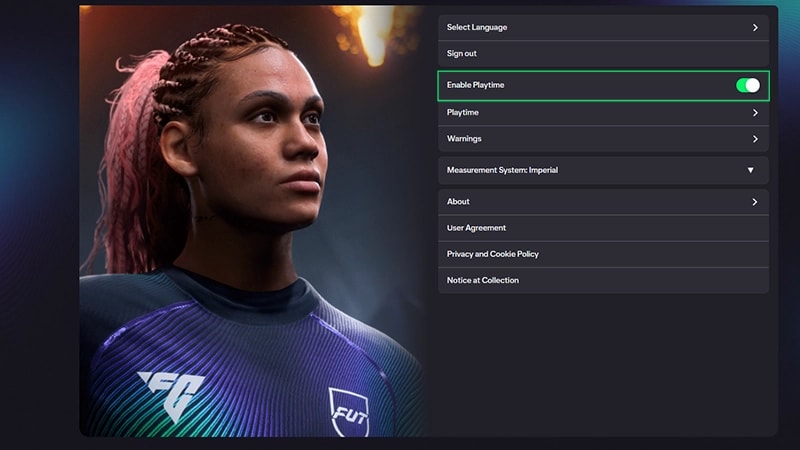
For EA SPORTS™ FC26: - 1Launch the EAS FC Web or Companion App.
- 2Go to Settings.
- 3Enter the Playtime menu.
- 4Toggle on the Enable Playtime option.
How to see Time Spent and Matches Played
Time Spent
Time Spent includes time spent in matches and menus. Time is split across Online and Offline.- Online Time. When you’re connected to EA Servers and EAS FC is active. When the session times out, the counter stops.
- Offline Time. When you have the game open, but you’re not connected to EA Servers. Offline Time is saved to a local file and never uploaded. It’s reset back to zero each week.
- Xbox: The timer stops instantly in Suspend Mode and disconnects after a few minutes of EA Server inactivity in Constrain Mode.
- PlayStation®: The timer stops instantly in Rest Mode (inactive) and pauses after a minute in Rest Mode (active).
- Nintendo Switch™: The timer stops instantly in both Suspend and Constrain Modes.
Matches Played limit
Set personal limits for Matches Played. Match Limits are shared across all game modes. Follow these steps:- 1From the main menu, open Settings.
- 2Go to Playtime.
- 3Go to Match Limits.
- 4Select Edit Limit.
- 5Using the on-screen keypad, set the number of games you want to play per week before you get a reminder message.
- You can also reset your limits back to the default (unlimited).
Viewing and setting limits
- You can view your limits on the EAS FC Web and Companion Apps, but Match Limits can only be set from the in-game Playtime menu on console and PC.
- You can set or adjust your limits for Ultimate Team™ Packs and FC Points on the EAS FC Companion and Web App.
How to see EAS FC Points information and set limits
EAS FC Points purchase limits are only accessible when Playtime is accessed through Ultimate Team™.
- 1On the Ultimate Team™ Main Menu, go to the Club tab.
- 2Select the Settings tile.
- 3Select and enter the Playtime tile.
- 4Select Points Purchase Limit.
- 5Select Edit Limit.
- 6Using the on-screen keypad, set a limit for how many EAS FC Points you can buy per week.
- You can also reset your limits back to the default (unlimited).
How to see Ultimate Team™ Pack info and set limits
When you access EAS FC Playtime through Ultimate Team™, it lets you see how many Packs you’ve opened in Ultimate Team.- Only Packs opened through EAS FC Points or Ultimate Team™ Coins are tracked here. Reward Packs are not.
- For example, if you open five Squad Building Challenge Reward Packs and then go to the Ultimate Team™ Store to open three Packs with Ultimate Team™ Coins, your Playtime menu will show that you’ve opened three Packs.
- Ultimate Team™ Pack opening limits are only accessible when accessing Playtime through Ultimate Team™.
Pack Previews in Ultimate Team™ don’t count towards Playtime limits or the number of Packs you open. You need to get a Pack with Ultimate Team™ Coins or FC Points to count towards Playtime.
- 1Open the Ultimate Team™ Main Menu
- 2Go to the Club tab.
- 3Select the Settings tile.
- 4Select and enter the Playtime tile.
- 5Select Pack Purchase Limit.
- 6Select Edit Limit.
- 7Using the on-screen keypad, set a limit for how many Ultimate Team™ Packs you can get per week.
- You can also reset your limits back to the default (unlimited).