Overview
Learn everything you need to know about Plants vs. Zombies Heroes, including how to get help in-game, finding your Player ID, saving your progress, probabilities for random content, and playing multiplayer.
How to save progress in Plants vs. Zombies Heroes
Link your game to Game Center, Google +, Facebook, or your EA Account to save your progress.- 1Launch the game.
- 2Go to the main menu and tap the Cog icon in the upper right-hand corner.
- 3Select the Settings tab.
- 4Choose which platform you want to link to.
- You can sign into multiple accounts for extra places to sync data.
- 5Select Connect, then follow the steps to sign in.
If you don’t link to an account, your progress will be lost if the game is uninstalled or removed. Learn more about the risks of playing on a guest account.
How to get help in Plants vs. Zombies Heroes
To get help with Plants vs. Zombies, contact support directly from the game. We’ll need your Player ID to help.- 1Tap the Settings cog icon.
- 2You’ll see your Player ID at the bottom of the screen.
- 3Tap Help & About.
- 4Tap Contact Support to visit EA Help.
Can’t access the game?
Need help because you’re locked out of your game or have lost your device? We’ll need your Player ID to help.How to play ranked multiplayer in Plants vs. Zombies
In ranked multiplayer mode, you move through the ranks by earning stars. You start at rank 1 in the Wood league.When you win a ranked game, you gain stars. When you lose, you lose stars (except in the Wood league). You won’t lose a star if it would cause you to lose your rank.Ranked multiplayer takes place over Seasons. At the end of each Season, all ranks reset.
How to find info and probabilities of Card Packs
There are a few different types of Packs you can get in-game, like Hero Packs, Ally Packs, and Tribe Packs. Each Pack shows how many cards it includes and the drop rates for each rarity category.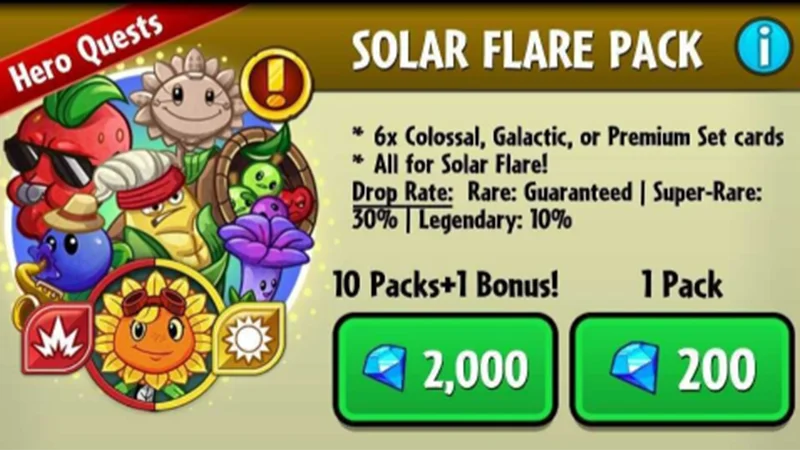
Drop rates:
- Slot 1: Uncommon guaranteed
- Slot 2: Uncommon guaranteed
- Slot 3: Uncommon guaranteed
- Slot 4: Rare guaranteed (100%)
- Slot 5: Super Rare 30% | Uncommon 70%
- Slot 6: Legendary 10% | Uncommon 90%
Drop rates:
- Slot 1: Uncommon guaranteed
- Slot 2: Uncommon guaranteed
- Slot 3: Rare guaranteed (100%)
- Slot 4: Super Rare 30% | Uncommon 70%
- Slot 5: Legendary 10% | Uncommon 90%
- Slot 6: Hero 3% | Uncommon 97%
Drop rates:
- Slot 1: Legendary 10% | Uncommon 90%
- Slot 2: Super Rare 45% | Uncommon 55%
- Slot 3: Rare guaranteed (100%)
- Slot 4: Rare 50% | Uncommon 50%
- Slot 5: Hero 5% | Uncommon 95%
- Slot 6: Uncommon guaranteed
- Slot 7: Uncommon guaranteed
- Slot 8: Uncommon guaranteed
- Slot 9: Uncommon guaranteed
Drop rates:
- Slot 1: Event Card guaranteed
- Slot 2: Event Card guaranteed
- Slot 3: Event Card guaranteed
- Slot 4: Rare guaranteed (100%)
- Slot 5: Super Rare 30% | Uncommon 70%
- Slot 6: Legendary 5% | Uncommon 95%
How to earn bonus stars
Some leagues give you a bonus star if you win multiple games in a row. The amount of stars you win or lose is based on your rank/league.Here’s an overview of leagues and ranks:- Win: +2 stars
- Loss: 0 star
- Streak bonus: +1 star
- Stars to next rank: 10
- Win: +2 stars
- Loss: -1 star
- Streak bonus: +1 star
- Stars to next rank: 10
- Win: +2 stars
- Loss: -1 star
- Streak bonus: +1 star
- Stars to next rank: 10
- Win: +1 star
- Loss: -1 star
- Streak bonus: 0 star
- Stars to next rank: 20
- Win: +1 star
- Loss: -1 star
- Streak bonus: 0 stars