Overview
Turn your city into an Epic one by completing Epic Projects and upgrading your residential buildings into masterpieces.
How to start Epic Projects
- 1Get approval for Epic Projects and build your Department of Epic Projects. Find it in the Government - Services menu.
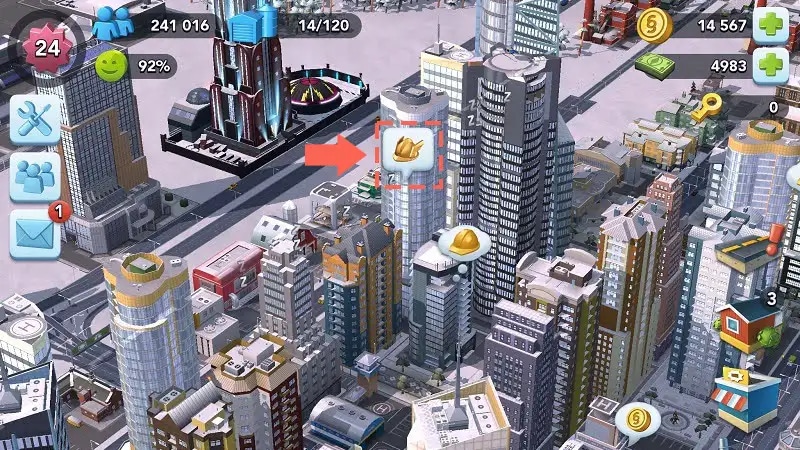
- 2Look for bubbles with the winged golden helmet icon near your Specialization buildings.
- 3Tap it and then drag the required Simoleons to the buildings to start your Epic Projects.
What is an Epic Project?
Epic Projects convert a regular fully upgraded residential building into an Epic Building. Epic Buildings hold more citizens and produce Shop Speed-Up Token Parts that can be used to speed up crafting in your commercial buildings.Shop Speed-Up Tokens accelerate your crafting. Learn how to use your Shop Speed-Up Tokens.You can only work on one Epic Project at a time. After you complete that Epic Project, there’s a cooldown before you can start another.You have a limited time to complete an Epic Project once you start it. When the timer runs out the project tier you reached (Bronze, Silver, or Gold) will determine what type of building you get and what type of Shop Speed-Up Tokens it generates.
How to complete Epic Projects
In the Epic Project window:- Select Show Tasks.
- Select the Epic Task bubbles with the star token icon to begin helping your community and earning Project Points.
- Bronze Tier (Turtle symbol)
- Silver Tier (Llama symbol)
- Gold Tier (Cheetah symbol)