A Guild is a group of players who join forces in STAR WARS: Galaxy of Heroes to compete in activities to earn rewards. Joining a Guild lets you participate in Guild-exclusive events like Territory Battles, Territory Wars, and Raids. Guilds can have up to 50 members.Guilds are unlocked at level 22, allowing you to join an existing Guild or create your own.
What are member ranks in Guilds?
Guilds have three different types of member ranks. These ranks help structure the Guild, making it easier to organize and manage.
Guild Leader: This is the highest rank in a Guild. The Guild Leader manages the Guild, sets policies, and organizes events. If you create a Guild, you’ll automatically become its Guild Leader.
Officer: Members that the Guild Leader has promoted to help manage the Guild, including coordinating events and moderating member activities.
Member: Regular participants who contribute to Guild activities and events.
How to join a Guild in STAR WARS: Galaxy of Heroes
1
Select the Guilds icon on the Cantina screen.
2
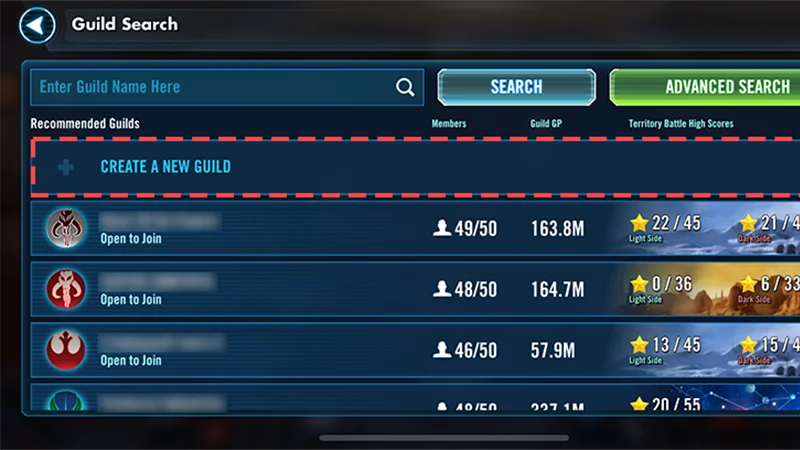
Choose Guild Search.
If there’s a specific Guild you’d like to join, use the Enter Guild Name Here box and select Search.
Otherwise, browse the Recommended Guilds section and choose a Guild to join.
Here’s some useful info to consider when joining a Guild.
Some Guilds are open to everyone, and some require an application or invitation to join. Check out the Guild's rules and requirements to make sure it’s a good fit.
You can only apply to one Guild at a time.
If you’re waiting for membership approval, you can cancel your application if you want to try joining another Guild.
If you leave one Guild to join another, you won’t earn Guild rewards for 48 hours. This includes Territory Battle, Raid, or Guild Activity rewards that other members earn during that time.
How to create a Guild in STAR WARS: Galaxy of Heroes
To start a Guild, you need at least 300,000 Credits. If you create a Guild, you’ll automatically be a Guild Leader.
1
Select the Guilds icon on the Cantina screen.
2
Choose Guild Search and select Create a New Guild.
3
Customize the settings of your Guild.
Choose a Guild name, logo, and color scheme.
Set the Guild to Open to Join or Invite Only. When set to Open to Join, players who join your Guild will automatically be added. When set to Invite Only, you’ll have to manually review applications before accepting players as Guild members.
Set any entry requirements, such as minimum player level or Galactic Power.
4
When you’ve finished customizing your Guild, select Create.
What game modes can Guilds take part in?
Guilds can take part in Territory Events and Raids.
Territory Wars are events where Guilds are matched to battle against other Guilds using player-versus-player squads and fleets. If you’re level 65 or higher and are part of a Guild with at least 25 members, you can opt-in to participate when a Territory War is active. Territory War phases
Join and preview: Players who are part of a Guild can choose to participate, and rosters are locked in. Guilds are matched with another Guild based on the number of members participating and roster strength.
Setup: Set your defenses on the territory map. Units placed in defensive squads aren’t available for use in the attack phase.
Attack: Guild members work together to attack your opponent’s defense squads.
Review: check your results and see where to improve strategies for next time.
Territory War rewards
To earn rewards, you have to be in the Guild at the end of the war.
If the Territory War started before you joined the Guild, you won’t be able to participate or get rewards.
You won’t get rewards if you leave a Guild and rejoin it, even if you participated in the Territory War before leaving the Guild.
You won’t get rewards if you leave or are removed from the Guild before rewards are distributed.
All Guild members who participate will get the same reward when the event ends.
Your Guild's rewards depend on Galactic Power and what place it ranks when the event ends.
Territory Battles are events where you and other Guild members work together using your entire roster of units to earn rewards for everyone. You have to be at least level 65 to join a Territory Battle. The goal is to earn enough Territory Points to win at least one star (out of a possible three) in the active Territory before moving to a new Territory in the next phase.How to join a Territory Battle
1
Select the Guilds icon on the Cantina screen.
2
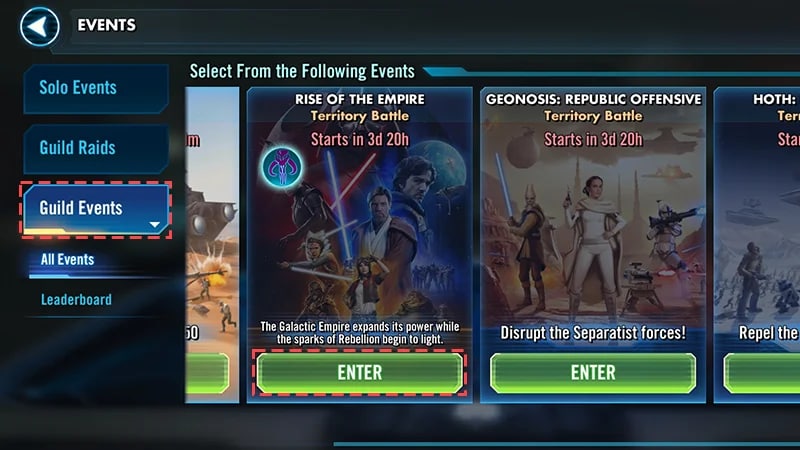
Choose Guild Events.
3
Choose the Territory Battle you want to join and select Enter.
How to earn Territory Points and starsAll Territory Points count towards the stars your Guild can earn. Here’s how you can earn for your Guild.
Platoons: Use named units to fill out Platoons to earn Territory Points and bonus abilities for your Guild. If you assign a unit to a Platoon, you can’t use it in Combat Missions or deploy it elsewhere until the phase ends.
Combat Missions: Use units from your roster to battle waves of enemies. You only get one chance at each mission and earn Territory Points for each wave you defeat. If you use a unit in Combat Missions or deploy it in a different sector, you can’t reuse it somewhere else.
Special Missions: Complete Special Missions to earn Character Shards or other rewards for everyone in your Guild. These missions are shorter but more challenging than Combat Missions, and you only get one attempt at them.
Shards are delivered to your inbox at the end of the phase rather than at the end of the Territory Battle. You don’t earn Territory Points for Special Missions.
How to check Territory PointsHere’s how to check how many Territory Points your Guildmates have earned.
1
Select the Guilds icon on the Cantina screen.
2
Choose Guild Events.
3
Select Enter on the Guild event you’re playing and choose the Stats tab.
Territory Battle rewards
Your rewards are determined by the total number of stars your Guild has earned by the end of the Territory Battle.
Select the Rewards tab to see which rewards match each star total.
Every Guild member who participates gets the same reward.
If you’re in a Guild and leave it before the Territory Battle ends, you won’t earn rewards for that Battle.
If your Guild merges with another one, you’ll lose rewards you hadn’t claimed.
Territory Battle strategy tips
If there’s more than one active sector, your Guild should aim to earn a star in each one so you can continue your progress across the map.
Use the Details tab to learn about your opponents in Combat and Special Missions.
Use Guild Chat to talk about strategy and where to focus your attention and units.
To check the required units for each active sector, select the sector and review the Platoon and Combat or Special Mission requirements.
Your Guild’s actions are shown on the map, which updates in real-time. Select a sector on the map to get a breakdown of your progress.
Raids are multi-stage fights where players from the same Guild work together to slowly defeat a boss. To launch a Raid, your Guild needs a specific number of Raid Tickets. Guild members can earn Raid tickets by completing daily challenges. Only Guild Leaders or Officers can start Raids on behalf of a Guild. Raids are often more challenging than other Guild events, but they’re the source of the best Gear in the game. Types of RaidsThe main Raids available are:
The Pit (Rancor)
Tank Takedown (AAT)
The Sith Triumvirate (Sith)
Krayt Dragon Hunt
Speeder Bike Pursuit.
Damage scores and Raids
At the end of a Raid battle, you’ll get a pop-up notification that details how much damage you did.
Your final damage rank can be found on the Raid leaderboard.
Only certain types of damage count towards your damage score. For example, damage to protection doesn’t count, but the following does:
direct damage done to a boss’s health
Damage Done Over Time (DOT) and extra damage from the Expose debuff.
Minions don’t count in the damage total. Some examples include:
the extra Gamorrean guards in phase one of The Pit
the B1 battle droids in phase three of Tank Takedown
the Sith assassin and troopers in phase two of the Sith Triumvirate raid.
Raid simming
Guild Leaders or Officers can use the sim option to auto-complete Raids and get rewards sent out to all Guild members. Everyone gets the same rewards.
You can find simmed raids in the Raids tab along with standard Raids. They’re marked with a simmed indicator.
To be able to sim a raid, a Guild needs to:
have enough Raid tickets to launch a Heroic Rancor Raid
complete the Heroic Rancor raid 50 times
have at least 35 players that own a seven-star Han Solo in the Raid.
Galactic Power (GP) is a measure of the strength of your full collection of units. Your GP increases each time you train, equip gear, and add or upgrade mods on a unit.
Your Guild’s Galactic Power is the combined individual GP of all its members. To find out how much GP your Guild has, select the Guildsicon on the Cantina screen and check the number under the Guild name.
To check the GP of other Guilds competing in a Territory Battle, go to the leaderboard and select a Guild name. Here, you’ll find details on that Guild’s GP and how they’re progressing in the Territory Battle.
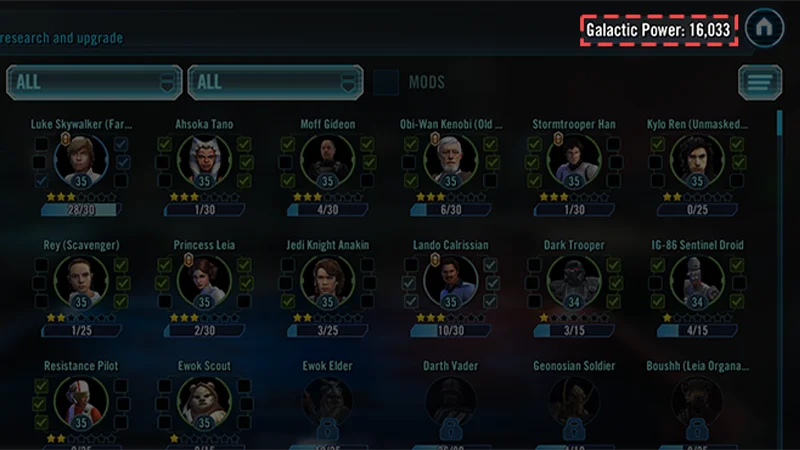
You can check your own GP on the Characters screen.