Overview
Learn the default shortcuts for playing The Sims: Legacy Edition on PC.
General controls
Need a little help getting back into The Sims 1? It’s been a while, so here’s a guide to PC controls for all in-game actions and cheats to help you get going.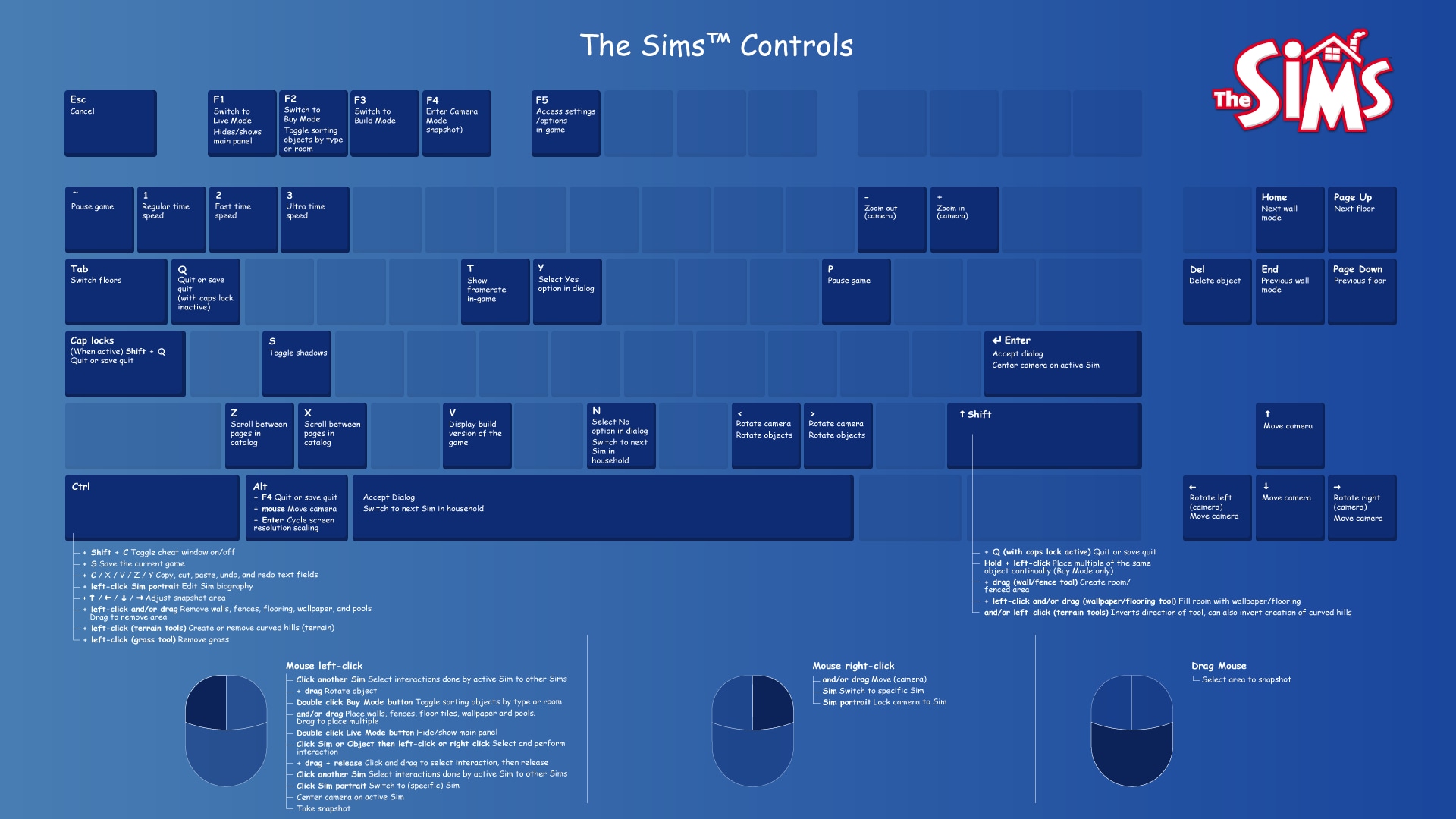
| Keys | Action | ||
| Alt + Enter | Cycle Screen Resolution Scaling | ||
| Esc | Cancel | ||
| Ctrl + Shift + C | Toggle cheats window on/off | ||
| F1 | Live Mode | ||
| F2 | Build Mode | ||
| F3 | Buy Mode | ||
| F4 | Enter camera mode (snapshot) | ||
| Enter or Space | Accept dialog | ||
| Y/N | Select Yes or No option in dialog | ||
| Ctrl + S | Save game | ||
| Q | Quit | ||
| Alt + F4 | Save quit | ||
| Ctrl + C | Copy text fields | ||
| Ctrl + X | Cut text fields | ||
| Ctrl + V | Paste text fields | ||
| Ctrl + Z | Undo text fields | ||
| Ctrl + Y | Redo text fields |
| Keys | Action | ||
| Page Up/Page Down | Next/previous floor | ||
| Home/End | Next/previous wall mode | ||
| Tab | Switch floors |
| Keys | Action | ||
| +/- or mouse scroll wheel | Zoom in/out | ||
| Press Shift + < | Rotate left | ||
| Press Shift + > | Rotate right | ||
| Right-click and/or drag or Alt + mouse or ↑ / ← / ↓ / → | Move camera |
| Keys | Action | ||
| F4 | Enter Camera Mode (snapshot) | ||
| Ctrl + ↑ / ← / ↓ / → | Adjust snapshot area | ||
| Drag mouse | Select area to snapshot | ||
| Left-click mouse | Take snapshot |
Build/Buy Mode controls
| Keys | Action | ||
| F2 or double-left-click Buy Mode button | Toggle sorting objects by type or room | ||
| </> or left-click and drag | Rotate objects | ||
| Delete | Delete object | ||
| Hold Shift + left-click | Place multiple of the same object continually (Buy Mode only) | ||
| Z/X | Scroll between pages in catalog | ||
| Select Wall/fence tool then press Shift + drag | Create a room/fenced area | ||
| Selecy Wallpaper/flooring tool then press Shift | Fill room with wallpaper/flooring | ||
| Left-click and/or drag | Place walls, fences, floor tiles, wallpaper and pools. Drag to place multiple. | ||
| Ctrl + left-click and/or drag | Remove walls, fences, flooring, wallpaper, and pools. Drag to remove area. | ||
| Terrain tool: Ctrl + left-click | Create or remove curved hills (terrain) | ||
| Terrain tool: Shift and/or Ctrl + left-click | Inverts direction of tool, can also invert creation of curved hills (terrain) | ||
| Grass tool: Ctrl + left-click | Remove grass |
Live Mode controls
| Keys | Action | ||
| F1 or double-left-click Live Mode button | Hide/show main panel | ||
| Left-click Sim or object then left-click or right-click | Select and perform interaction | ||
| Left-click + drag + release | Click and drag to select interaction, then release | ||
| Left-click another Sim | Select interactions done by active Sim to other Sims | ||
| Space or N | Switch to next Sim in Household | ||
| Left-click Sim portrait or right-click Sim | Switch to (specific) Sim | ||
| Right-click Sim portrait | Lock camera to Sim | ||
| Enter or left-click active Sim portrait | Center camera on active Sim | ||
| Ctrl + left-click Sim portrait | Edit Sim biography | ||
| P or ~ | Pause game | ||
1/2/3 | Regular/fast/ultra speed |
Misc shortcuts
| A | Toggle anti-aliasing | ||
| T | Show framerate in-game | ||
| S | Toggle shadows | ||
| V | Display build version of the game | ||
| F5 | Access settings/options in-game | ||
| F7 | SimsWebCam/Stalker camera (removed in later expansions) |
The Sims 1 cheats
To open the cheat bar in The Sims 1:- 1Hold down Ctrl + Shift + C.
- 2Type in the cheat code you want to use and select Enter.
| Keys | Action | ||
| autonomy (0-100) | Sets the Sim’s free-thinking or IQ level | ||
| bubble_tweak (number) | <Z offset> Sets, in pixels, how far from a Sim’s head the thought bubble appears | ||
| draw_all_frames on | Enables draws all frames | ||
| draw_all_frames off | Disables draws all frames | ||
| draw_floorable on | Enables floorable grid | ||
| draw_floorable off | Disables floorable grid | ||
| history | Saves family history file. Find where the game is installed under FamilyHistory.txt | ||
| interests | Displays the interests of selected Sim | ||
| log mask | Sets events logging mask | ||
| move_objects on | Turns on ability to move any object | ||
| move_objects off | Turns off ability to move any object | ||
| nessie | Brings up the Loch Ness monster on the Downtown, Old Town, and Vacation neighborhood view | ||
| prepare_lot | Fixes required Lot objects | ||
| rosebud | Increases Household funds by 1,000 Simoleons | ||
| rotation (0-3) | Rotates camera | ||
| set_hour (0-23) | Sets the hour of the day | ||
| sim_log begin | Starts Sim logging | ||
| sim_log end | Stops Sim logging | ||
| sim_speed (-1,000 to 10,000) | Sets gameplay speed |