Overview
Learn how cross-play and cross-progression work in EA SPORTS FC™.
How does cross-play work?
Cross-play lets you and your friends play together on different platforms. For EAS FC, cross-play is available on:- PC
- PlayStation®
- Xbox.
- current-generation consoles (PlayStation®5, Xbox Series X|S, and PC)
- old-generation consoles (PlayStation®4 and Xbox One).
What about Nintendo Switch™?
Nintendo Switch™ and Nintendo Switch™ 2 don’t support cross-play for EAS FC, but you can check out our article on how to play with other Nintendo Switch™ players.Which modes have cross-play?
Cross-play is available in the following modes within each game:EA SPORTS FC™26
EA SPORTS FC™ 25
EA SPORTS FC™ 24
- Clubs
- Clubs Drop-in
- Clubs Friendlies
- Clubs League
- Clubs Playoffs
- Clubs Practice
- Clubs RUSH
- Co-op Season
- Co-op Season Cups
- Live Events
- Online Friendlies
- Online Season
- Online Season Cups
- Ultimate Team™
- Division Rivals
- Champions
- Online Draft
- Play A Friend
- RUSH
- Competitive
- Champions
- Ultimate Team™ Co-Op: Squad Battles, Rivals, Friendlies.
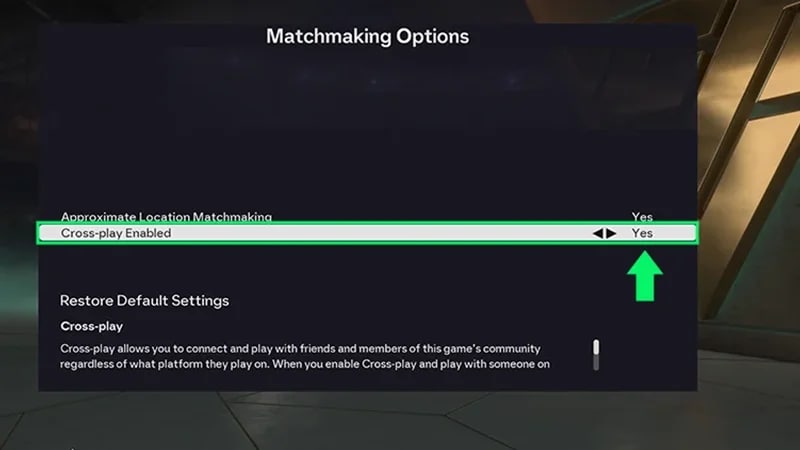
How to turn off cross-play
- 1From the Main Menu, open EA connect. Find this option on the bottom-right side of your screen.
- 2Open Social settings.
- 3Select Cross-play, then Cross-play settings.
- 4Under Cross-play Enabled, toggle to No to turn cross-play off. To turn it back on, toggle to Yes.
Is there cross-progression in EA SPORTS FC™?
Cross-progression on PlayStation® is only available in Ultimate Team™.