Overview
Learn to manage your F1® 24 cross-play settings and compete with other players on the track.
What is cross-play?
Cross-play lets you compete with friends and other players, even if they’re playing on a different platform. For example, if you’re playing F1® 24 on PlayStation®, turning on cross-play lets you race against players using Xbox.What platforms support cross-play in F1® 24?
Cross-play for F1® 24 is available on the following platforms.- PC
- PlayStation®4
- PlayStation®5
- Xbox One
- Xbox Series X|S
When F1® 24 cross-play is set to Enabled, you can race players from other platforms in online modes. When cross-play is set to Disabled, you’ll only see players using the same platform as you.
What F1® 24 modes have cross-play?
Cross-play is available in F1® 24 across all competitive online modes. Whether you want to land a top spot on the Challenge Career global leaderboard or battle your friend in Racenet Leagues, cross-play lets you race with other F1 fans.Having issues with another player while cross-playing? Learn how to report a player or League if they break the F1® 24 rules.
How to turn cross-play on or off in F1® 24
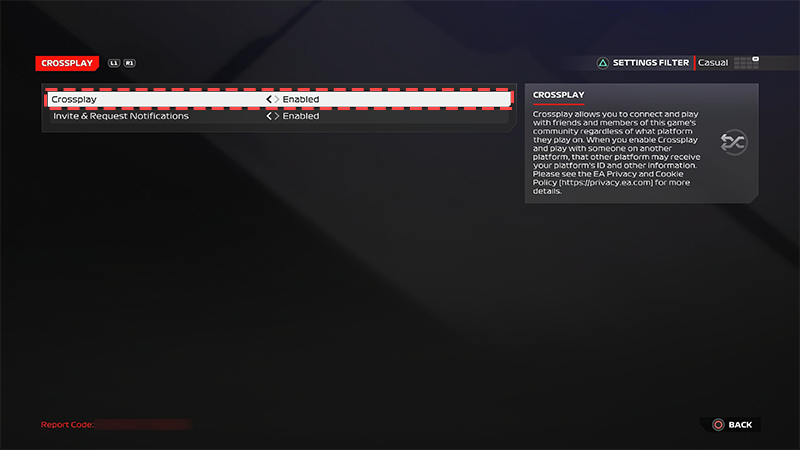
You’ll have the option to turn cross-play on or off when you launch F1® 24 for the first time. Toggle cross-play to Enabled or Disabled and select Confirm.You can also turn cross-play on or off at any time by following these steps:- 1From the main F1® 24 menu, choose Settings.
- 2Select Crossplay.
- 3Toggle cross-play to Enabled or Disabled.