Overview
A guide to Events in The Sims 4: how to join, how to claim your rewards, and where to find them.
What are Events?
Events are time-limited, themed challenges in The Sims 4. When you take part you can earn unique rewards that you can use in-game, either in Build Mode, Live Mode, or Create a Sim. Events are available across all platforms: PC, Mac, Xbox, and PlayStation®.There are two types of Events:
- Gameplay Events let you earn Event Points by completing Quests in The Sims 4 over a set period of time. You can redeem these Points for free rewards. Find out more about how Gameplay Events work with our video guide.
- Login Events let you earn rewards by logging in to The Sims 4 over a set period of time. Find out more about how Login Events work with our video guide.
How to earn rewards in The Sims 4
Earn rewards through Gameplay Events
- 1Launch the game, and make sure you’re online.
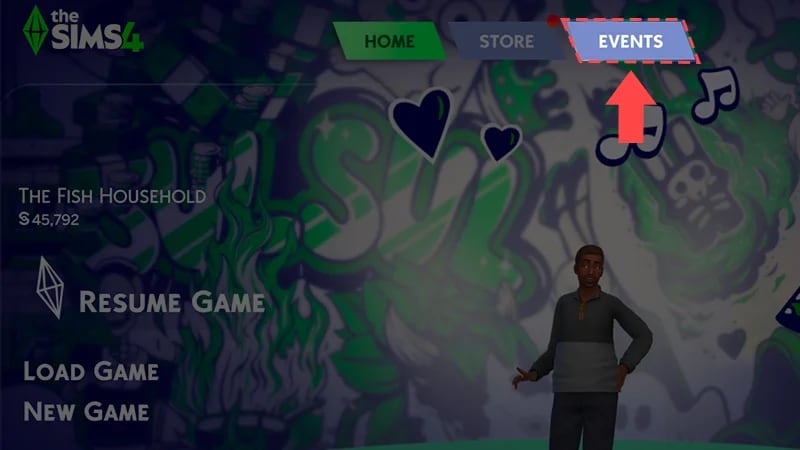
- 2Select the Events Tab in the Main Menu to view the Events Screen.
- 3Enter Live Mode.
- 4After unpausing the game, a pop-up will guide you into the first Quest.
Started the Event late or missed a week? There’s always extra time built into the Event, giving you more weeks than Quests to catch up on anything you missed.
Some Quests are Pack-specific, so you’ll only see them if you have the Pack installed. For example, if you have the Paranormal Stuff Pack installed, you may get Pack-specific Quests that use features and Items from that Pack. If you don’t have that Pack installed, these Quests won’t appear for you.
Packs and Pack-specific Quests are not required to complete an Event.
Packs and Pack-specific Quests are not required to complete an Event.
You can check in on your progress and rewards by opening the Event Icon in the upper left of Live Mode. When you unlock a reward, a Wall Notification will prompt you to open the Event Screen to claim your reward.
Earn rewards through Login Events
When you launch the game, select the Events Tab in the Main Menu to bring up the Events Screen and claim your first reward.Login Events run for several weeks. You’ll need to log in multiple times throughout the Event to unlock all rewards. Each Login Event may run for different periods of time, so the amount of times you’ll need to log in will vary from Event to Event. You can claim different rewards each week. Once you’ve claimed the rewards for that week, you’ll need to come back the following week to claim more.
How to claim rewards in The Sims 4
- 1Open the Events Screen through:
- the Main Menu by selecting the Event Tab.
- Live Mode by selecting the Event Icon in the top-left corner.
- 2Select Claim on your available rewards
If the Claim button is grayed out or isn’t there, you don’t have enough Event Points to claim this reward. To earn more Event Points, you’ll need to complete more objectives.
Have multiple rewards to claim? You can claim these all at once by selecting Claim in the Event Screen.
All rewards earned through Gameplay Events are linked to your EA Account. If you uninstall The Sims 4, you’ll still have your rewards if you reinstall and log in with the same EA Account you earned them on.
Where to find rewards
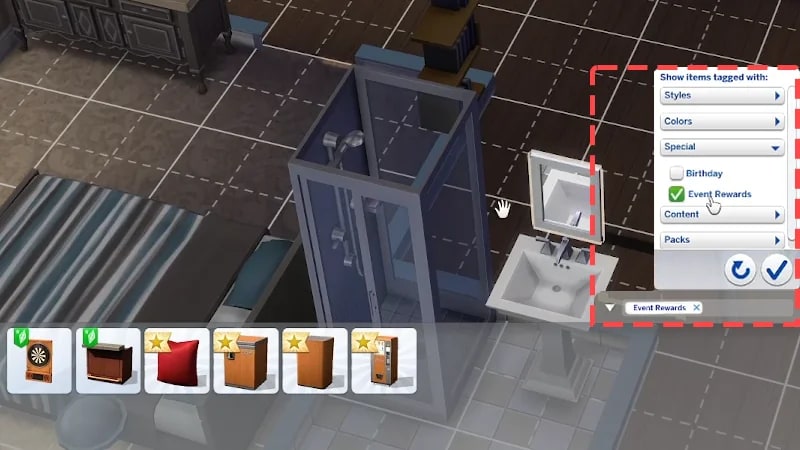
After claiming your rewards, you can find them in Build Mode or Create a Sim. All reward Items are marked with a Plumbob icon.To find Items in Build Mode:
- 1Open Build Mode and select Filter Items.
- 2Open the Special drop-down and check Event Rewards. This will filter Build Mode to only show reward Items.
- 1Open Create a Sim.
- 2Select the Filter Items menu.
- 3Choose the Special drop-down and check Event Rewards. This will filter Create a Sim to only show reward Items within each category.

Consumables and collectibles like plants, potions, and crystals, can only be unlocked in Live Mode. Enter Live Mode and open the Event Screen by selecting the Event Icon in the top-left corner. Then, select Claim.
Once you claim these rewards, you’ll find them in your Sim’s personal inventory. In Live Mode, select the storage box icon from the bottom left to access your Sim’s personal inventory. If you sell or delete a collectible reward you unlocked, you can buy it through Buy Mode.