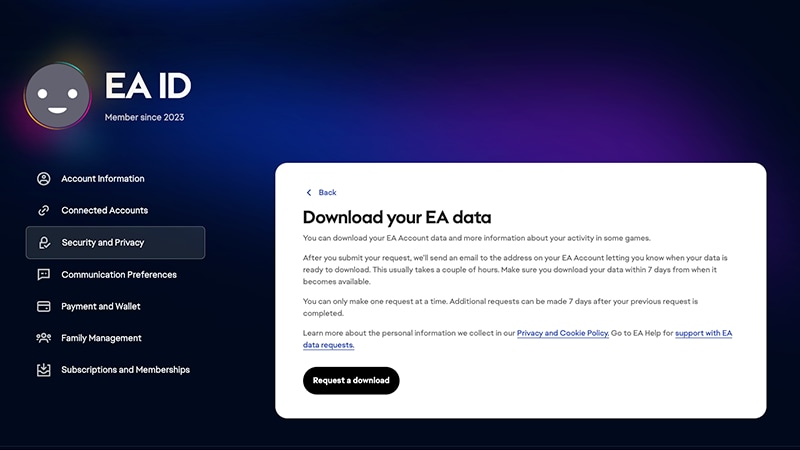
EA collects data when you set up your EA Account and interact with our products and services. You can see what data we collect and how we use this information in our Privacy and Cookie Policy.You can download and review your EA Account data at any time by following our instructions below.
Log in to your EA Account and go to your EA Account settings.
2
Select Security and Privacy.
3
Scroll down to Download your EA data, and select the arrow to the right.
4
Select Request a download.
Your data will usually be ready to download in less than two hours. It will be available as HTML for you to download to your computer so you can review it.
Your EA Account includes any payment methods you’ve saved.Payment history information includes:
credit card information
the last four digits of your credit card
expiration date
country
zip/postal code
your first and last name
phone number, if you added it
PayPal Account Name, typically your email address
information for any other saved payment methods that are available in your region
EA Wallet
any available balance
your EA Wallet activity, including the date, description, and total.
You can join the Electronic Arts PlaytestingProgram by opting in to the games you’d like to test.View your data in the Electronic Arts Playtesting section of your EA Account Subscriptions and Memberships tab.
These include monthly spending limits on games, expansions, and microcontent.Manage your Player Controls on the Family Management tab in your EA Account settings.
Manage your family and add teen accounts to your family to stay in control of what your teens spend.Access the Family tab in your EA Account settings.
You can view your connected accounts, like your linked PlayStation™ Network IDs and Xbox gamertags, and any apps you’ve authorized for your account in Connected Accounts.Find information about your connected accounts on the Connected Accounts tab in your EA Account settings.
You can see the IP address for the devices that you play on.
You can see your game-specific ID and Friends lists.Game-specific mobile IDs are only available in certain games. Check out our list of mobile games that use mobile IDs.Friends lists may vary by game.
Still having issues?
Get in touch with our customer support team for more help.