Overview
A beginner guide to romance in Dragon Age™: The Veilguard.
Some information in this article will include story spoilers.
Romancing companions
Romance in Dragon Age™: The Veilguard can be fun and flirty but also useful for gamplay. Romances offer deeper connections, unlock dialogue, and more intimate insights into your companions.How you interact with a companion character determines your ability to romance them. You can choose to romance a character by selecting a flirtatious quip when asked a question, by siding with your companion and choosing to go with them on quests, and even by purchasing them gifts. Whatever your strategy, it’ll take patience to build a genuine relationship with them and unlock their bond.Commitment
You can romance multiple companions in Dragon Age™: The Veilguard, but eventually you’ll have to commit to one romantic partner. Some companions will respond quicker to romance than others. Remember to engage in companion quests and flirt when you have the opportunity. This will increase the chances of a bond.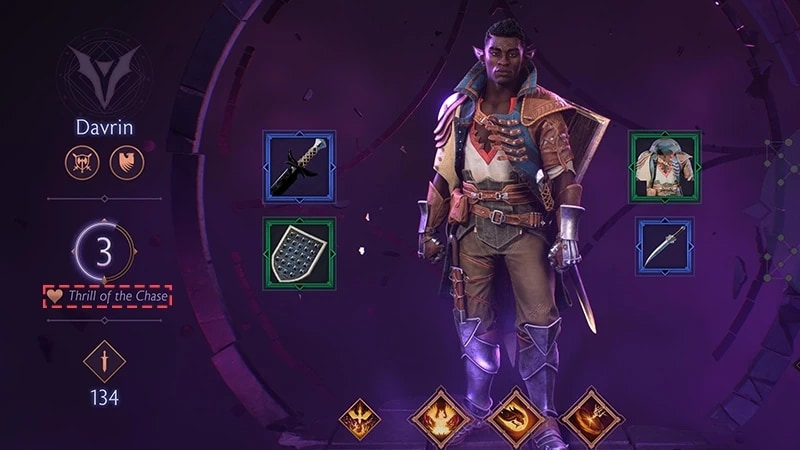
Gender and nudity
The companions in Dragon Age™: The Veilguard are canonically pansexual and can potentially romance each other and/or Rook regardless of race, faction, class, or gender. All seven companions are possible romantic partners.Keep in mind that aspects of nudity and gender expression are a default part of character romancing. To turn off nudity in the game, follow these steps.
- 1Go to Settings.
- 2Select the Options menu.
- 3Scroll down to the Nudity setting and toggle Off.
Companion-specific romance guides
Lace Harding is the first companion Rook meets and it’s easy to build approval with her early in the game. Harding responds best to a straightforward approach, both in action and romance. Remain supportive as Harding uncovers her own magic and grapples with the connection between elves and dwarves. Gift her the Hinterlands Cloak, a relic from her homeland. You can find it at the Black Emporium in Minathrous.
Davrin is a confident, self-assured elf who’ll pursue Rook easily given a little flirtation. He bonds especially well with a Rook as he is as confident and determined to defeat the elven gods as he is. Davrin is also a deeply honorable companion. When introduced to the griffon cub in his care, don’t try to spoil it but respond positively to Davrin’s responsibility. You can gift Davrin the Display on Ancient Griffons. It can be purchased at Grey Hold in the Hossberg Wetlands.
Rook meets Bellara Lutara early in the game and quickly discovers her magical expertise. You can flirt with Bellara often, but a romance with her will take a while to develop. She’s driven by fixing things and teamwork, so engaging in her companion side-quests is the best way to endear her to you. You’ll encounter the Veil Jumpers merchant in the Arlathan Forest. Here you can pick up an Elven Frog Figurine for Bellara.
Taash is a young, bold, dragon-hunting Qunari warrior. She’s easy to flirt with and romance given her straightforward nature. She likes an equally straightforward Rook who is honest and quick to lead. Given her age, Taash is still figuring out aspects of her identity. Her vulnerability means she’s more likely to bond with a supportive Rook. Gift this treasure hunter with a Set of Trinkets from the Lords of Fortune merchant.
Lucanis Dellamorte is one of the most difficult characters to romance in the game. Your every response needs to be considered carefully. For example, if you choose Minrathous over saving Treviso in the early part of the game, you’ll be immediately locked out of Lucanis’ romance. If you get past this stage, Lucanis favors a Rook who takes action and isn’t afraid to get their hands dirty. When romancing Lucanis, keep in mind that he’s a loyal-to-a-fault member of the Antivan Crows and he has insecurities about being possessed by the demon Spite. Gift him the Antivan Tea Seat from the Antivan Crows merchant in Treviso.
Emmrich Volkarin is a human necromancer with a more mature, intellectual romance. He’ll only bond with a Rook who is curious, open-minded, and kind. In particular, Rook’s interactions with Manfred, Emmrich’s re-animated skeleton friend and butler, will influence the companion’s bond. You can gift Emmrich the Haunted Statuette, which can be purchased in the Necropolis Halls.
Neve Gallus is another one of the companions Rook meets at the beginning of the game. Though your early choices may encourage her approval, Neve will not be easily romanced. Neve is slow to trust and prefers an honest, clever Rook who puts the needs of the team above their own interests. If you choose to save Treviso over Minrathous, Neve will disapprove but it won’t necessarily bar you from romancing her. Make sure you team up with her on side quests, take her side where applicable, and gift her Collected Evidence from the Shadow Dragons merchant.