Overview
If someone isn’t playing by the rules, you can block, kick, or report them. Here’s how.
How to report a player
If a player has an offensive name, you can report them from any of these places in GRID Legends:- the Player Lobby
- your Friends list
- the Online Sessions tab
- the list of Online Players
- the pre-race auction screen
- the Pause menu during a race
- the results screen at the end of a race.
- 1Open the list of player names from any of the places above.
- 2Select the player’s name from the list and choose Report name.
- 3Confirm the pop-up to send the report through to us.
How to kick a player from Multiplayer
- 1Press Pause.
- 2Select Player List.
- 3Find their name in the list and select it.
- 4Choose Kick and confirm that on the pop-up.
How to block a player
Blocking someone means you won’t be matched up with them in Multiplayer anymore.- 1Open the Options menu.
- 2Select Social.
- 3Select Options.
- 4Select Online Players.
- 5Find them in the list and select their name.
- 6Select Block and confirm that on the pop-up.
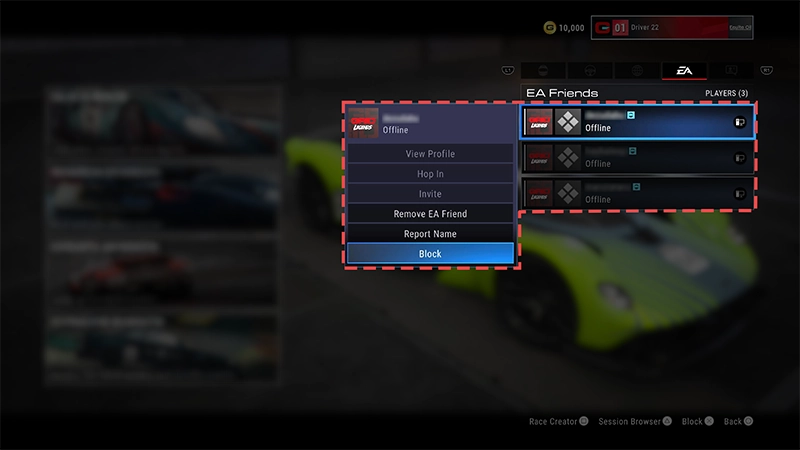
- 1Open the Options menu.
- 2Select Social.
- 3Select Friends.
- 4Find them in your Friends list and select their name.
- 5Select Remove Friend.
Want to learn more about our rules? Check out our article on EA rules to know and follow.Find out how to report players or illegal content in other EA games and services.