Overview
Dynasties in The Sims 4 Royalty and Legacy Expansion Pack let you create multi-generational stories filled with power struggles, alliances, and rivalries. Learn how to found your own Dynasty, manage members, and earn prestige to unlock unique perks. Whether you're uniting rival families or building your legacy from scratch, this guide covers everything you need to get started.
What is a Dynasty?
Dynasties are a key part of The Sims 4 Royalty and Legacy Expansion Pack. Increase the drama, intrigue, and create rich lore for your Sims by creating stories of forbidden love, feuding families, and outcasts. Dynasties have their own set of values, making them ideal for players who love immersive storytelling. Some of the basics you need to know:- Within each Dynasty, there are three key roles: Dynasty Head, Outcast, and Heir.
- A Sim can only be a member of one Dynasty at a time.
- A Dynasty can be spread across multiple Households; they don’t all need to live on the same Lot.
- There’s no limit to how many Sims can be in a Dynasty.
- A single Household can include Sims who are members of different Dynasties. For example, a couple can be married, but both belong to different Dynasties.
- The name of the Dynasty can be customized; the default option is the Founder’s last name.
- Create a family crest with icons and backgrounds; this can be displayed on the Dynasty Crest Shield from Build Mode.
- Dynasties can earn Prestige by following their set values. This levels up a Dynasty and unlocks Perks.
Dynasty Head
This Sim is the family leader, and their role is to keep the Dynasty on the path to prestige.- They decide who can join the Dynasty
- They assign perks
- They encourage and discourage behaviour
- They choose their Heir and Outcast
It’s important for the Dynasty Head not to fall behind in rank. If they do, other ambitious Sims can challenge them for the role of Head.
Outcast
An Outcast is a Sim that defies the values of the Dynasty or rejects the authority of the Dynasty Head and has been exiled. There can be more than one Outcast.- They’re cut off from Dynasty Perks
- They’ll have less impact on the Dynasty’s Prestige
- They can repent by following the Dynasty’s values and be redeemed by by the Head
Heir
The Heir is the Sim chosen by the Dynasty Head to take over leadership.- They take over once the Dynasty Head steps down or dies
- Their actions (when aligned with Dynasty values) boost prestige more than other Sims
- Their actions (when not aligned with Dynasty values) decrease prestige more than other Sims
Dynasty Values and Prestige
Dynasty Values
Each Dynasty has its own set of customizable values that define it, made up of skills and ideals, which are set by the Dynasty Head. These shape how Sims in the Dynasty act in the world. When members follow these values, they strengthen their Dynasty’s Prestige; if they defy them, they decrease Prestige.- Skills: Choose up to three skills to include in your Dynasty’s values. Choose skills from across the Base Game or any Pack.
- Ideals: These are how a Dynasty expects its members to behave. They’re tied to specific careers, activities, and actions.
Dynasty Prestige
Each Dynasty has a prestige score, which can increase or decrease through gameplay. Earning prestige progresses a Dynasty through the ten levels and unlocks Dynasty Perks. Decisions made by the Dynasty Head or Heir have more weight, so their actions can significantly increase or decrease prestige. All members of a Dynasty can contribute to increasing or decreasing prestige. Here’s how to increase Prestige:- Doing activities that align with the Skills and Ideals of the Dynasty
- Working in careers that align with the Skills and Ideals of the Dynasty
- Getting good grades at school
- Making new Friends and Good Friends
- Hosting Social Events
- Marrying members of other Dynasties
- Starting Alliances & Rivalries
- Being Friendly to Dynasty Allies
- Being Mean to Dynasty Rivals
- Doing activities that don’t align with the Skills and Ideals of the Dynasty
- Working in careers that don’t align with the Skills and Ideals of the Dynasty
- Ending Alliances & Rivalries
- Scandals about Dynasty members. Want to learn more about how Scandals work? Check out our guide.
- The Creative Affinity Trait: Babies born to Dynasty members while this Perk is active will inherit a Trait that boosts their creative skills.
- Nepotism: A social advantage that speeds up a Sim’s Career Performance.
- Tutor: The ability to hire a Tutor to help a Child or Teen Sim with their homework, and for any Sim to level up their skills.
How to join a Dynasty
With The Sims 4 Royalty and Legacy Expansion Pack, there are already some pre-made Dynasties in the World of Ondarion. These Dynasties will already have defined ideals, lore, and relationships, so you can jump straight in and play! Sims are eligible to join an existing Dynasty through family ties:- They can marry an existing Dynasty member. A Sim who has married into a Dynasty can’t then invite their blood relatives to join too.
- If these Sims later divorce, the non-blood relative and any children from previous relationships are automatically removed from the Dynasty.
- Through adoption. It’s now possible to adopt Teen, Young Adult, and Adult Sims.
- If they’re a Child or Stepchild of a Dynasty Member.
How to set up a Dynasty
Want to set up a Dynasty from scratch? Here’s how.Found a new Dynasty
Sims who are Young Adult or older can establish a brand-new Dynasty; they’ll become both the Founder and the Dynasty Head. Any family, spouse, and descendants they have will automatically join too. Open the Social Groups tab in the bottom-right of Live Mode. From here, you can View Dynasties and Found a Dynasty. Selecting View Dynasties opens a pop-up that lists all existing Dynasties across your saved game. You can see the names, descriptions, and Dynasty Crest. Selecting the ‘i’ icon next to a Dynasty will open up more information, including their prestige, unity stability, members, Skills, Ideals, and their Alliances & Rivalries.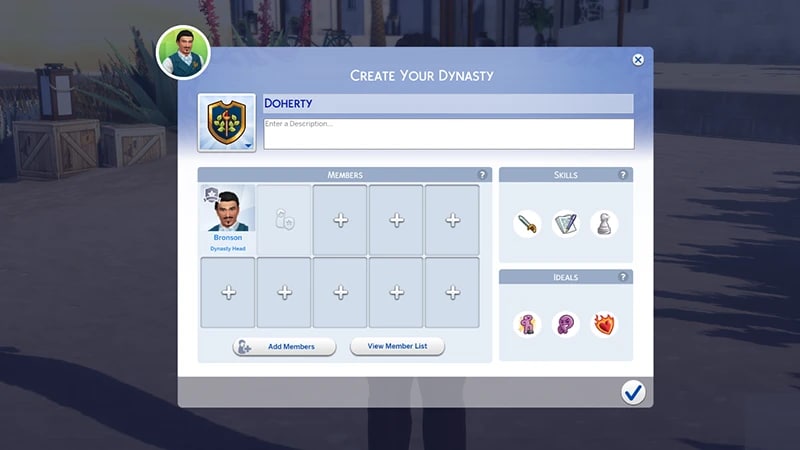
- Name your Dynasty
- Design a Dynasty Crest
- Add members
- If your Sim has no blood relatives, dependents, or spouse, there won’t be an option to add Sims to your Dynasty
- Add skill
- Add ideals
- Choose Dynasty Heir
- Write a description of your Dynasty