Overview
Take your Sims to the slopes and master the Skiing skill in The Sims 4 Snowy Escape. This guide covers everything you need to know about building the skill, unlocking new tricks and gear, and using cheats to get ahead. Whether your Sim wants to start small on the Bunny Slope or tackle the Ludicrous Slope, you’ll find tips and tricks to help them become skiing pros.
About the Skiing skill
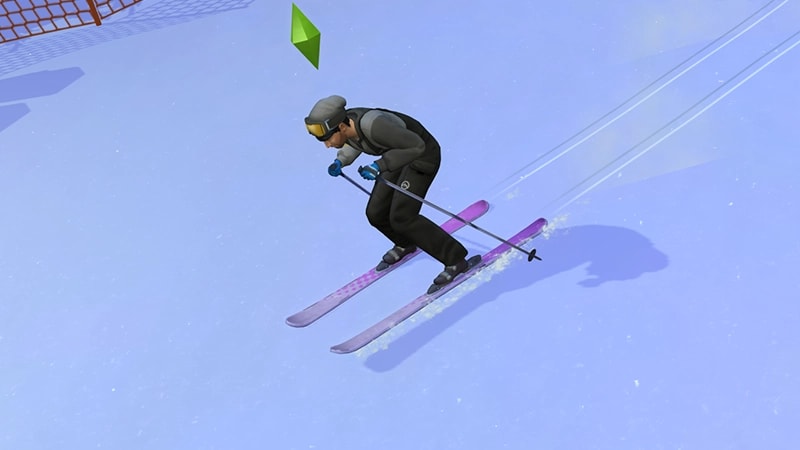
- The Skiing skill comes with The Sims 4 Snowy Escape Expansion Pack, and is a 10 level skill.
- Elder, Adult, Young Adult, and Teen Sims can all build this skill.
- Child Sims can ski but it will build their Motor skill instead. For more info on how Child skills work, check out our guide.
How to build the Skiing skill
There are multiple ways for your Sim to build the Skiing skill. Some interactions are only unlocked when your Sim reaches a certain level.The best way to build this skill is to hit the slopes with your skis! You’ll find them in the Yukimatsu neighborhood in the World of Mt. Komorebi.There are four different slope types: Bunny, Easy, Intermediate, Expert, and Ludicrous. The Bunny Slopes are the best place to start. When you’re building skill on the slopes, select Continuously so you don’t have to queue multiple actions.Your Sim doesn’t need to own skis to begin. The first time they use the slope, you’ll get a notification letting you know they’re using loaner skis. But, if you want to level up, you can:
- buy skis from Build Mode
- You’ll find them in the Hobbies & Skills section.
- buy them from the Bits’n Bobbles Vending Machine. Be warned! Using the vending machines can lead to an untimely death for your Sim.
- You’ll find these throughout the world of Mt. Komorebi.
Reading skill books will work towards building skills, but is slower than other methods. Books will only get you as far as level 9 of a skill. To buy skill books:The skill books are:
- 1Select a bookshelf and choose Purchase Books.
- 2In the pop-up, select the drop-down at the top-left that reads Show All.
- 3Choose Skill and scroll through to find the book you want to buy. These will be added to your Sim’s bookshelf.
- Mastery of Skiing Vol 1: Balance and Taking Off
- Mastery of Skiing Vol 2: Analyzing Paths and Stop Points
- Mastery of Skiing Vol 3: Style and Finesse.
If you own The Sims 4 Jungle Adventure Game Pack, the Peace and Quiet Lot Trait helps your Sim build skill faster when reading skill books.
If you own The Sims 4 Discover University Expansion Pack, your Sim can attend skill-building classes. These are rabbit-holes, so your Sim will leave the Lot for some time and then come back when the class is over. Note: Skill Classes are only available between 9 a.m.– 9 p.m.
- 1In Live Mode, select your Sim’s phone.
- 2Open the Business app (the briefcase icon).
- 3Choose Sit in on Skill Class (§250).
- 4In the pop-up menu, choose Skiing. Your Sim will leave the Lot and gain Skiing skill while at the class.
If you own The Sims 4 Businesses & Hobbies Expansion Pack, your Sim can learn or teach the Skiing skill using the Sharing is Caring Whiteboard. You’ll find this in Build Mode.
Skiing skill levels
As your Sim builds the Skiing skill, they’ll unlock new abilities and interactions along the way. A green progress bar will appear above your Sim’s head and gradually fill up as they’re building a skill. You can also check their progress by:- 1Entering Live Mode.
- 2Selecting the Sim Panel (bottom left).
- 3Selecting the Skills tab.
This level unlocks Beginner runs on the Bunny and Easy Slopes at Low, Medium, and High Intensity levels.
This level unlocks:
- Inquire about Powder Conditions interaction
- new ski pants in Create a Sim.
This level unlocks:
- Low and Medium Intensity on the Intermediate Slope
- Research the Art of Skiing on the computer
- Max’s SlopeMaster 3000 Skis in Build Mode.
This level unlocks:
- Low, Medium, and High Intensity on the Expert Slope
- Prepare for the Moment self-interaction
- new tricks.
This level unlocks:
- Low, Medium, and High Intensity on the Ludicrous Slope
- Discuss Past Ski Experiences interaction
- new ski jacket in Create a Sim.
This level unlocks:
- X2 Icebender Skis in Build Mode
- New trick.
You can Blog about Skiing on the computer at this level.
This level unlocks:
- Deliberate Ski Style interaction
- New trick.
This level unlocks:
- Give Advice on Avoiding Wipeouts interaction
- New trick.
This level unlocks:
- coaching other Sims
- Offer Ski Expertise interaction
- Teach a Ski Class
- Unlimited Powder Skis in Build Mode.
Skiing skill cheats
When using skill cheats, type in the number of the level you want to reach. For example, putting stats.set_skill_level major_skiing 7 into the cheat bar will get your Sim’s Skiing skill up to level 7.PC and Mac
PlayStation®
Xbox
- 1Press Control + Shift + C to open the cheat dialogue box.
- 2Type testingcheats true and press Enter to turn on cheats.
- 3Type stats.set_skill_level major_skiing [skill level] and press Enter.