Overview
WooHoo is how Sims turn sparks into stories in The Sims 4. Whether you’re building a slow-burn romance, jumping into something spontaneous, or discovering some very unexpected WooHoo locations, this guide covers everything you need to know. Who can WooHoo and how to start, to the Packs that unlock even more memorable (and sometimes ghostly) moments.
What is WooHoo?
WooHoo is a romantic interaction between Sims that they can do after building up a romantic relationship with each other. Your Sims must have had their First Kiss before the option to WooHoo becomes available.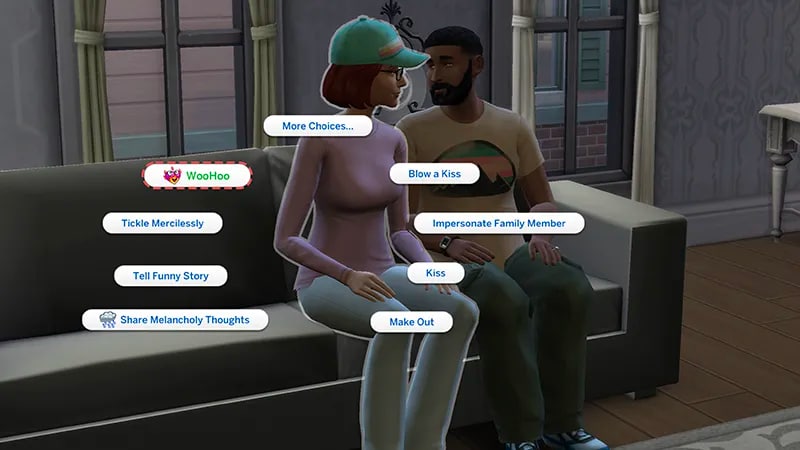
Who can WooHoo?
Any Sim that’s a Young Adult and older can WooHoo with other adult Sims across any gender or occult type. Can Teen Sims WooHoo? No, but they can Mess Around with other Teen Sims.How to WooHoo in The Sims 4
Before you can build a romantic relationship with another Sim, they need to be compatible in sexual orientation and Romantic Interests.If your Sim is interested in another Sim, they can ask them about their WooHoo or Romantic Interests. Make sure you have a high enough friendship with your Sim of choice, or you might offend them! You don’t have to discover another Sims’ WooHoo and Romantic Interests before you begin a romantic relationship with them, but it helps to avoid your Sim getting rejected and experiencing an Embarrassed moodlet.Finding out another Sim’s WooHoo Interests will let you know if they’re interested in male or female Sims.
- 1Select a Sim.
- 2Go to More Choices > Relationship > Ask about WooHoo Interests.
- 1Select a Sim.
- 2Go to More Choices > Relationship > Ask about Romantic Interests.
- Male Sims
- Female Sims
- Both Male and Female Sims
- No One
- Exploring.
- 1Select the Sim you want to WooHoo with.
- 2Go to More Choices > Romance > Physical Intimacy > WooHoo.
- 1While on a lot, select the location where you want your Sim to WooHoo.
- 2Choose WooHoo with…
If you want your Sims to have a baby, select More Choices > Romance > Physical Intimacy > Try for a Baby.For more help check out our Sims 4 pregnancy guide.
If two Sims are friends, they can become WooHoo partners, which lets them WooHoo without having any romantic relationship. They’ll need to be good enough friends first before becoming WooHoo partners. Doing this won’t create a romantic relationship: your Sims will stay just friends. WooHoo partner status is automatically removed if they become romantic with each other.
- 1Select the Sim you want to be WooHoo partners with.
- 2Click More Choices > Relationship > Change Relationship.
How to WooHoo with the Grim Reaper in The Sims 4
The most difficult part of trying to WooHoo with Grim is finding him! To find Grim, Sims need to be nearby at the moment another Sim dies and wait for Grim to arrive for the reaping. If you own The Sims 4 Life & Death Expansion Pack it’s a little easier to find him. To find Grim, you can:- travel to the Mourningvale Neighborhood in Ravenwood for a chance to spot him
- join the Reaper Career, where Grim will be your boss.
Ghostly WooHoo
Ghostly WooHoo happens inside an Object, making it look possessed. These WooHoo types are included in The Sims 4 Life & Death Expansion Pack.Transcendent WooHoo
If your Sim earned the Burning Soul Trait and is reborn, one of the rewards is Transcendant WooHoo. This means they (a living Sim) can WooHoo with a Ghost Sim. Sims have to complete the Dreams Fulfilled tier in their Soul’s Journey to unlock this Trait. Find out more about how to do this in our Soul’s Journey guide. If a Ghost Sim unlocked the Transcendant WooHoo Ghost Mastery Ability, they can WooHoo with living Sims.Possess WooHoo
If two Ghost Sims WooHoo, it’s called Possess WooHoo, and they can do this in multiple different objects.WooHoo locations
Wondering where your Sims can WooHoo? Here are all the locations and which Packs you’ll need to find them.| Pack | Location | ||
| Base Game | Double bed, Rocketship, Hot Tub, Observatory, Shower | ||
| Get Together | Closet, Bush | ||
| Cats & Dogs | Lighthouse | ||
| Seasons | Leaf Pile | ||
| Get Famous | Sleeping Pod, Money Vault | ||
| Island Living | Waterfall | ||
| Eco Lifestyle | Dumpster | ||
| Snowy Escape | Ice Cave, Hot Spring | ||
| Cottage Living | Animal Shed | ||
| High School Years | Photo Booth, Carnival Rides | ||
| Growing Together | Treehouse | ||
| Lovestruck | Romantic Blanket, Motel, Venue Closet | ||
| Life & Death | Crypt, Inside Objects, Coffin | ||
| Enchanted by Nature | Fairy Woohoo can happen anywhere there’s room for your Sims to stand! | ||
| Adventure Awaits | Any swimmable body of water | ||
| Royalty & Legacy | Secret passageways | ||
| Outdoor Retreat | Tent | ||
| Spa Day | Sauna | ||
| Vampires | As a bat, Coffin | ||
| Star Wars™: Journey to Batuu | Black Spire Dwelling |
How to use cheats to increase romance level in The Sims 4
If you want to build a romantic relationship between two Sims faster, you can cheat your way there.- 1Press Control + Shift + C on PC at the same time to open the cheat dialogue box.
- On PlayStation: press L1, L2, R1, and R2 at the same time.
- On Xbox: press LB, LT, RB, and RT at the same time.
- 2Type testingcheats true into the cheat dialogue box and press Enter to turn on cheats.
- 3Type modifyrelationship [YourSimFirstName] [YourSimLastName] [TargetSimFirstName] [TargetSimLastName] X LTR_Romance_Main and press Enter.
- Replace the X value in the cheat with the level or romance you want your Sims to have. For example, to have a Level 100 romance between Nancy Landgraab and Bob Pancakes, you’ll input: modifyrelationship Nancy Landgraab Bob Pancakes 100 LTR_Romance_Main
Heads-up: if you use testingcheats on console, achievements will be disabled for the current save game.
- To increase by any other amount, replace 100 with a different figure.
- To decrease, add a minus in front of the number you want to decrease by.