Overview
Learn how Season Pass works in EA SPORTS FC™, what Premium Pass adds, how to earn Season Points (SP), and where to find and claim your rewards.
How Season Pass works in EA SPORTS FC™
Season Pass lets you earn rewards by completing Objectives across:- Ultimate Team™
- Clubs
- Career Mode
- Daily Objectives
- Weekly Objectives
- Seasonal Objectives
- Campaign Objectives.
How do I check my Season progress?
- 1Go to the FC Hub.
- 2Select Season in the bottom-right corner.
- 3View your progress on the Seasonal Track.
- 4Open the Season Objectives tab to see available challenges.
- in Ultimate Team™, go to Objectives
- in Manager Career, go to the Office tab
How do I claim Season Pass rewards?
- 1Go to the FC Hub.
- 2Select Season.
- 3Highlight the unlocked reward.
- 4Select Claim.
- in Ultimate Team™, check your Store or Inventory
- in Clubs, check your Inventory
- in Career Mode, go to Customize in Manager or Player Career.
What do I get when I upgrade to Premium Pass in EA SPORTS FC™?
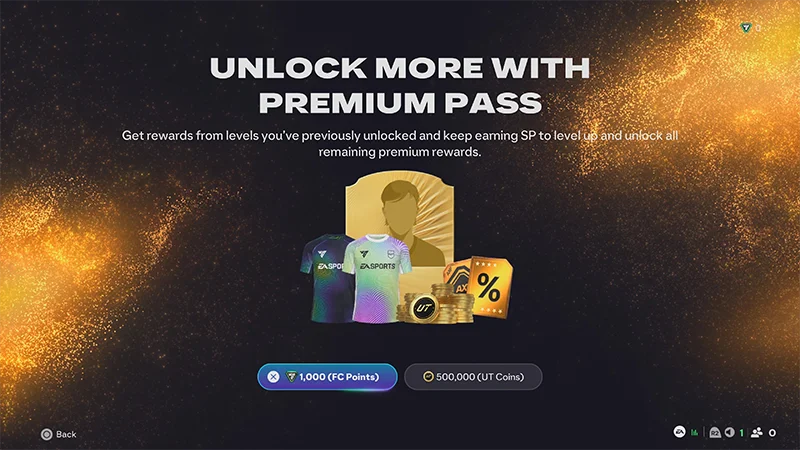
Premium Pass is an optional upgrade to Season Pass.It unlocks an additional reward track that runs alongside the free Season Pass track. Both tracks use the same SP progression.Here’s what you’ll get when you upgrade to Premium Pass.- Exclusive Players
- Exclusive Cosmetics
- PlayStyle+ EVO Consumables
If you upgrade to Premium Pass mid-Season, you’ll instantly unlock all Premium rewards for the levels you’ve already reached.
How do I get Premium Pass in EA SPORTS FC™?
To get Premium Pass, go to the FC Hub and select Upgrade to Premium. You can unlock Premium Pass using:- EA SPORTS FC™ Points
- You can use EA SPORTS FC™ Points to unlock Premium Pass in supported modes.
- Ultimate Team™ Coins
- You can use Ultimate Team™ Coins to unlock Premium Pass when playing in Ultimate Team™.
- Generic Tokens
- Generic Tokens can be used to unlock Premium Pass for any currently available season. If you get a Generic Token and you already have the current Season of Premium Pass unlocked, you can use your Generic Token for the next Season.
- Season Tokens
- If you’ve earned Season Tokens, they’ll automatically redeem at the start of the Season listed. Season Tokens only work for a specific Season. For example, a Season 2 Token can only unlock the Premium Pass for Season 2.
- the mode you’re playing
- whether you already own Premium Pass
- whether you already have available tokens.
Where can I find my Season Points and rewards?
You can access your SP in the FC Hub. You’ll also find your current SP balance at the top of the screen in Ultimate Team™ and Clubs.Can’t find a reward after claiming it?- Make sure you’ve entered the correct game mode.
- Double-check your Store, Inventory, or Customize tab.
- Restart the game and check again.
Frequently asked questions about Premium Pass and Season Pass
Season Pass is free and lets you earn rewards by gaining SP. Premium Pass is a paid upgrade that unlocks extra rewards on the same Seasonal Track.
Premium Pass purchases and token activations are usually final.Before confirming your purchase, double-check:If you think there was a problem with your purchase, contact EA Help.
- the currency or token selected
- the season you’re unlocking
- whether you already have available tokens.
No. SP resets at the start of each new season.
No. The SP boost applies only to the current season.
First, check the Seasonal Track to confirm your level. Then, make sure you’ve selected Claim on each unlocked reward. If rewards still don’t appear, restart the game and check again in the correct mode.If you still can’t find your rewards, contact us at the bottom of this page.
No. The available currencies and token options can vary depending on where you access Premium Pass.Depending on the mode and screen, you may see:
- Ultimate Team™ Coins
- EA SPORTS FC™ Points
- Generic Tokens.
Generic Tokens can unlock Premium Pass for any eligible season in the current EA SPORTS FC™ game cycle.Season Tokens only work for one specific season.