Overview
See what the connection indicators in EA SPORTS FC™ mean about your in-game connection and what you can do to improve it.
What do the connection monitoring icons mean?
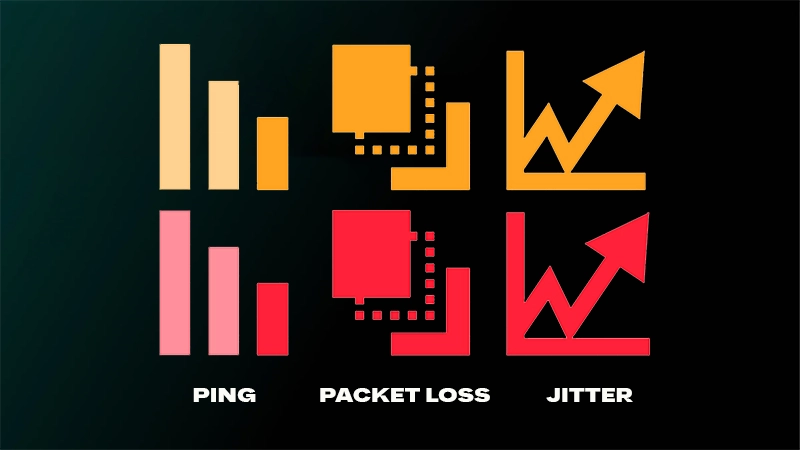
These icons indicate that your current Connection Quality might impact your online gameplay experience.- High ping: You’re currently experiencing a high ping value.
- Packet loss: You’re experiencing potentially impactful packet loss.
- Jitter: You’re experiencing jitter, a sudden and significant change to your ping within a short window of time.
Why you’re seeing these icons
When one or more of these icons display during a match, you may be experiencing some impact to your online gameplay due to your Connection Quality.If you see one or more of these icons displayed throughout the entire match, your connection is likely unstable and struggling with a solid gameplay experience.How does connection monitoring work?
Connection monitoring in FC is turned on automatically. This feature enables in-game icons that appear during a match about your Connection Quality.You’ll also get notifications when we think you're experiencing game-impacting Connection Quality issues.How to customize the connection monitoring icons
- 1Go to Customise.
- 2Open Settings.
- 3Go to Game Settings.
- 4Go to Visual.
- 5Near the bottom of the list, go to Connection Monitoring.
- Ping only. Displays your current roundtrip ping in milliseconds on the screen during an applicable match. This value updates every second.
- Connection indicators only. Displays icons on-screen during an applicable match, when certain connection thresholds are met.
- Ping and connection indicators. Displays both the ping number and the connection indicators on the screen in appropriate situations during an applicable match.
- Off. Neither the ping number nor the connection indicators will be displayed on the screen during a match.