개요
Age check is required in EA SPORTS™ Madden NFL for certain players in Brazil. Learn how to confirm your age for full access to content and purchases.
How to confirm your age in Madden NFL
Effective March 2026, Brazil’s ECA Digital Law requires verified age check for certain games. To access some content and features, players will need to:This applies to the EA app and some console and mobile games.Access to social features and user-generated content (UGC) in-game on the EA app will be restricted to adult accounts. These requirements apply only to players in Brazil and only to affected games. Learn more in our age check article.
- 1Log in to or create an EA Account.
- 2Confirm they’re 18 or older.
EA app
Console
- 1Select Learn more in the banner at the top of your screen.
- 2Scan the QR code or continue on your device.
- 3Carefully read the age check information, then select Start.
- 4Once you’ve successfully confirmed your age, select Close or Continue.
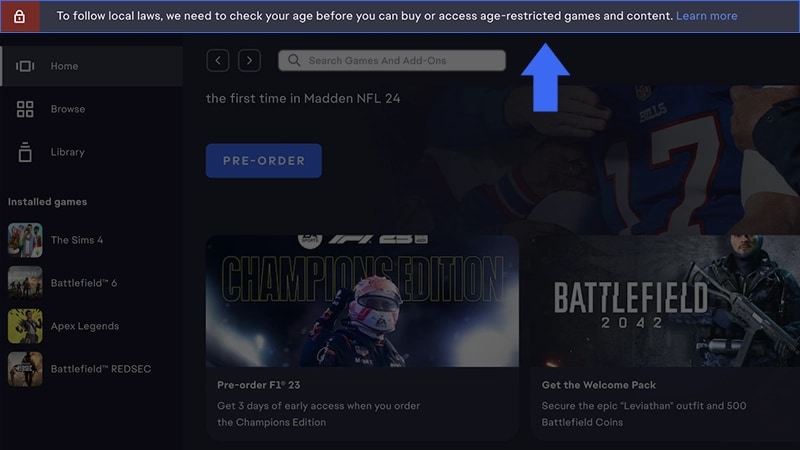
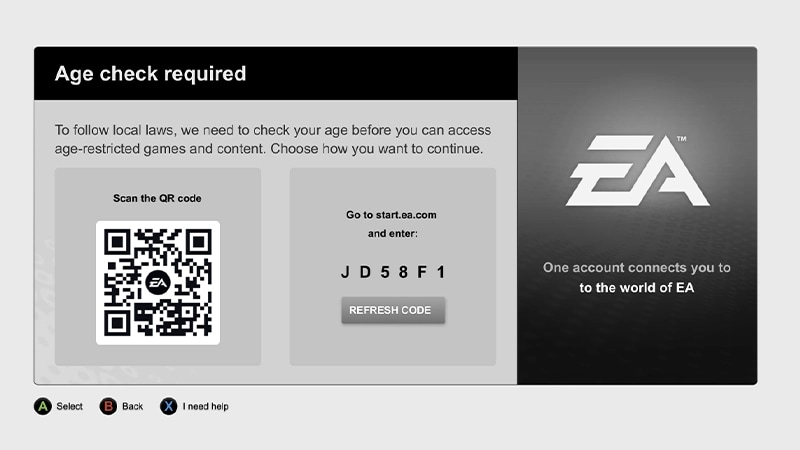
If verification fails, try the following:
- try a different age check method
- double-check that your name and date of birth match your legal ID
- make sure your photo is clear.
- blurry or cropped images can cause processing errors.
- if you're using a passport, scan the photo page only
- for other IDs, include both front and back.
Once confirmed, your EA Account will display an Adult label under your date of birth in your EA Account settings.Your confirmed status applies across supported EA platforms and games.
If you choose not to complete age check, you may not be able to:
- access certain content
- purchase premium currency
Parental consent doesn’t automatically confirm an account as an adult. Without a confirmed age check, restrictions may still apply. Learn more about parental consent and age check impacts on child accounts.