How to confirm your age in Star Wars: The Old Republic if you’re in Brazil
1 min. om te lezen
Overzicht
An age check is required in Star Wars: The Old Republic for players in Brazil. Learn how to confirm your age for full access to content and purchases.
Effective March 2026, Brazil’s ECA Digital Law requires verified age check for certain games. To access some content and features, players will need to:
1
Log in to or create a SWTOR or EA Account.
2
Confirm they’re 18 or older.
This applies to the EA app, SWTOR, Steam, and some console and mobile games.Access to social features and user-generated content (UGC) in-game on the EA app will be restricted to adult accounts. These requirements apply only to players in Brazil and only to affected games.Learn more in our age check article.
How to confirm your age in Star Wars: The Old Republic
When prompted in the SWTOR launcher, follow these steps:
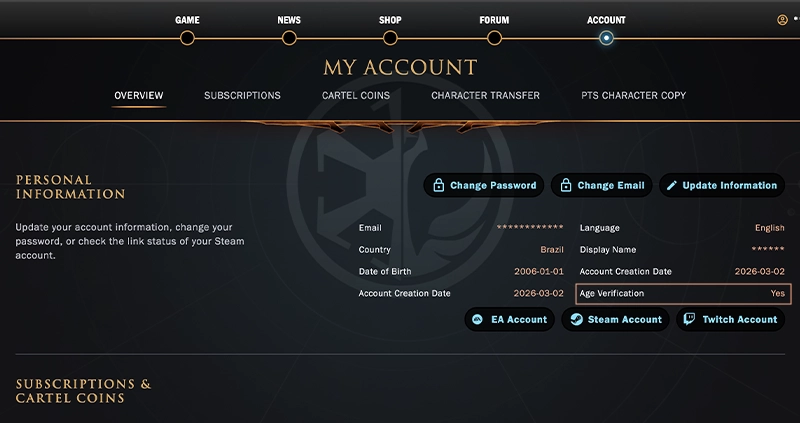
Start age check under PERSONAL INFORMATION and follow the instructions.
If verification fails, try the following:
try a different age check method
double-check that your name and date of birth match your legal ID
make sure your photo is clear.
blurry or cropped images can cause processing errors.
if you're using a passport, scan the photo page only
for other IDs, include both front and back.
Once confirmed, your SWTOR account will display Yes next to Age Verification under your Personal Information.If you created your SWTOR account before 2019, your confirmed status applies across supported EA platforms and games. If you created an account after this, your status won’t apply elsewhere.
If you choose not to complete age check, you won’t be able to access the game or make purchases.