Overview
The Battlefield 6 Battle Pass lets you earn rewards each season. Play through the free tiers, which are automatically available for every player, or upgrade to unlock extra content. Learn more about each tier and get help for missing content in our article.
What is the Battle Pass and how to get it
The Battle Pass is a seasonal reward system where you can earn free new weapons, gear, and progression boosts. A new Battle Pass comes out with each season of Battlefield 6, with three tiers to choose from: the free Battle Pass, Battle Pass, or Battlefield Pro.You automatically have access to the free* Battle Pass. You can buy the premium Battle Pass or Battlefield Pro in-game or through the Battlefield Official Store, along with other trusted retailers, which will unlock Battle Pass rewards.
Free*
Battle Pass
Battlefield Pro
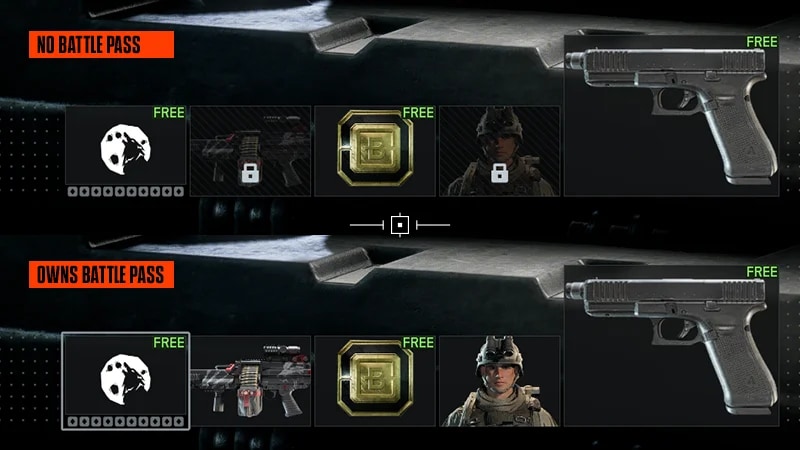
- Available to all players* who already own Battlefield 6 or Battlefield REDSEC, even if you haven’t bought the Battle Pass.
- You can unlock a limited set of Battle Pass Tier Rewards (Free) by playing and earning XP.
- Tiers or items you can’t earn will show a lock icon in the top-right corner of the reward tile.
- No bonuses, skips, or exclusive content are included.
See the latest Battle Pass and what it includes at the Battlefield Official Store.
What are Battlefield 6 events?
Battlefield 6 runs in-game Limited Events throughout its Seasons. Events typically offer a free and a premium path where you can unlock more content. You’ll need the Battle Pass or Battle Pass Pro to play premium tiers.You can see if there’s an event running by going to the Play menu. If there’s an event on, it’ll have its own section and a countdown showing when it ends. To earn event content, you need to complete the event’s objectives and weekly challenges within the time limit. You can see these under the Challenges menu.- Each event and weekly objective grant a number of bonus path points that go towards the event’s tiers.
- When you reach ten bonus path points, you’ll unlock a new tier reward from the event.
Missing Battle Pass rewards?
If your Battle Pass rewards aren’t showing up, try these quick checks first:- 1Restart your game and check again. Rewards sometimes take a few minutes, or a relaunch, to appear in your inventory or Battle Pass progress.
- 2Confirm you’re logged in to the correct EA account. Battle Pass progress and purchases are tied to the account used at the time of purchase.
- 3Check your Battle Pass section and tier progress. Make sure you’re viewing the correct section for the reward you’re trying to claim. Some rewards only unlock after completing specific tiers within that section.
- 4Verify your purchase.
- If you bought the Battle Pass, confirm the transaction shows in your platform’s purchase history and that Battlefield Coins were deducted.
- If you upgraded to Battlefield Pro, check the in-game Store to make sure the upgrade shows as active. If it failed, you’ll still see a prompt to Upgrade to Battlefield Pro on the screen.