Overview
Find out how to report, block, or mute Battlefield 6 players in-game or through EA connect.
Report a player
In-game
EA connect
- 1Pause your game.
- 2Select Squad and Players.
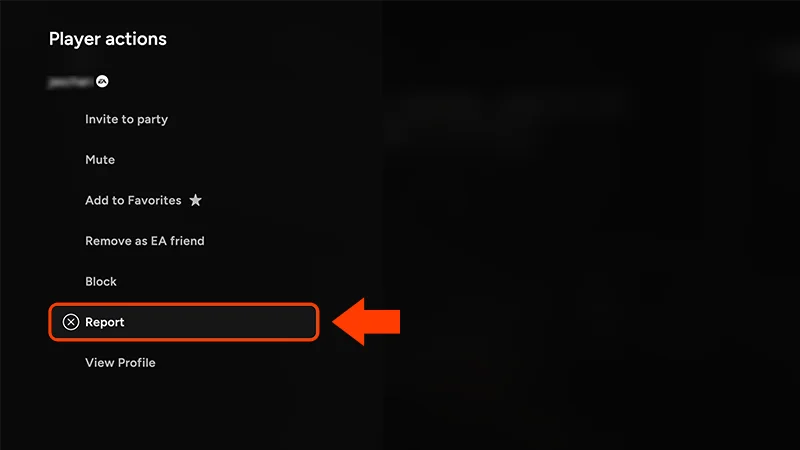
- 3Choose the player’s name from the list.
- 4Select Report.
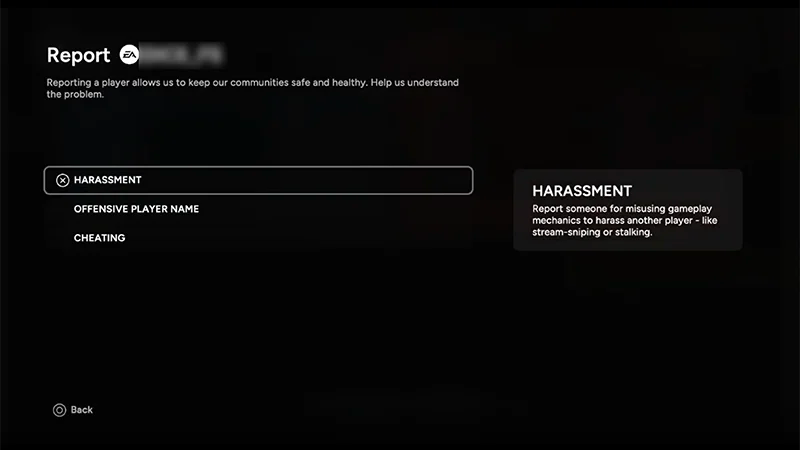
- 5Choose the option that matches what you need to report.
- 6Add information about what you’re reporting in the box, then select Send Report.
Make sure you choose the right option when you send a report.For example, if someone acts offensively through the in-game chat, make sure you choose Harassment. You can see a description beside each option.
How to report voice chat
You can only report players in your own squad or party, as voice chat is only available with them.- 1Open the Scoreboard by pressing Tab or holding the Menu button.
- 2Select a player to open Player actions.
- 3Choose Report.
- 4Choose Abusive Voice Chat.
- 5Select Confirm.
Voice chat moderation helps our support team review reports of harmful or offensive voice chats so they can take the right action. When you report a player, the support team will automatically get a recording of the session you want to report. After evaluating the recording, the support team will make a decision according to EA’s Positive Play Charter and enforce a solution.
To protect players, voice chat moderation can’t be turned off in-game, but you can choose not to use voice chat.
What happens after a player is reported
When you report a player, we’ll investigate and take action based on our Positive Play Charter.Lyst til å lese mer om reglene våre? Sjekk artikkelen vår om EA-reglene du burde kunne og følge.Finn ut hvordan du rapporterer spillere eller ulovlig innhold i andre EA-spill og -tjenester.