Overview
If you Quick Sold or discarded a Player Item in EAS FC Ultimate Team™ and want to get it back, you can use Quick Sell Recovery in the EA SPORTS FC™ Web and Companion Apps. You have up to seven days after the Quick Sell to get it back.
How to recover a Quick Sold Item
- Only Player Items are recoverable. No other Items can be recovered once they’re Quick Sold.
- If you delete your Club and create a new one, you can’t recover Player Items from your old Club in Quick Sell Recovery.
- We can’t restore your Ultimate Team™ if you delete it.
- You can’t undo Quick Sells for Loan Player Items.
- 1Log in to the Web or Companion App.
- 2Select Club.
- 3Select Quick Sell Recovery.
- 4Use the calendar icon to find the day you Quick Sold the Item you want to get back.
- 5Select the Player Item you want to recover.
- 6Select Recover.
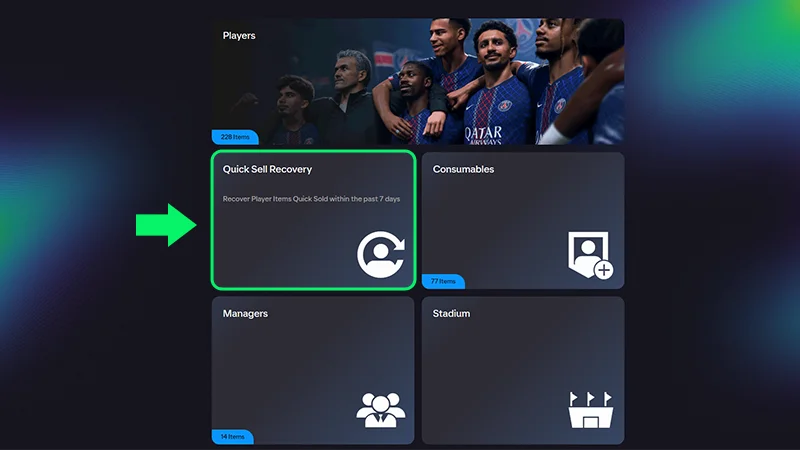
Quick sell recovery limits
To undo a Quick Sell, you’ll need to have at least the same Coin amount on your account that you got from the initial Quick Sell. That means if you got 500 Coins from Quick Selling a Player, you’ll need to have 500 Coins in your Club to be deducted once you get the Player back.
- You can undo five Quick Sells per 31-day period. Check the Web or Companion Apps to see how many Quick Sell recoveries you have left or how long until they reset.
- If you don’t use your five recoveries within 31 days, they don’t roll over to the next 31-day period.
- We can’t reset the timer or add more recoveries. Once all your resets are used, our advisors can’t restore a Quick Sold player.