Oversikt
If someone isn’t playing by the rules, you can block, kick, or report them. Here’s how.
How to report a player
If a player has an offensive name, you can report them from any of these places in GRID Legends:- the Player Lobby
- your Friends list
- the Online Sessions tab
- the list of Online Players
- the pre-race auction screen
- the Pause menu during a race
- the results screen at the end of a race.
- 1Open the list of player names from any of the places above.
- 2Select the player’s name from the list and choose Report name.
- 3Confirm the pop-up to send the report through to us.
How to kick a player from Multiplayer
- 1Press Pause.
- 2Select Player List.
- 3Find their name in the list and select it.
- 4Choose Kick and confirm that on the pop-up.
How to block a player
Blocking someone means you won’t be matched up with them in Multiplayer anymore.- 1Open the Options menu.
- 2Select Social.
- 3Select Options.
- 4Select Online Players.
- 5Find them in the list and select their name.
- 6Select Block and confirm that on the pop-up.
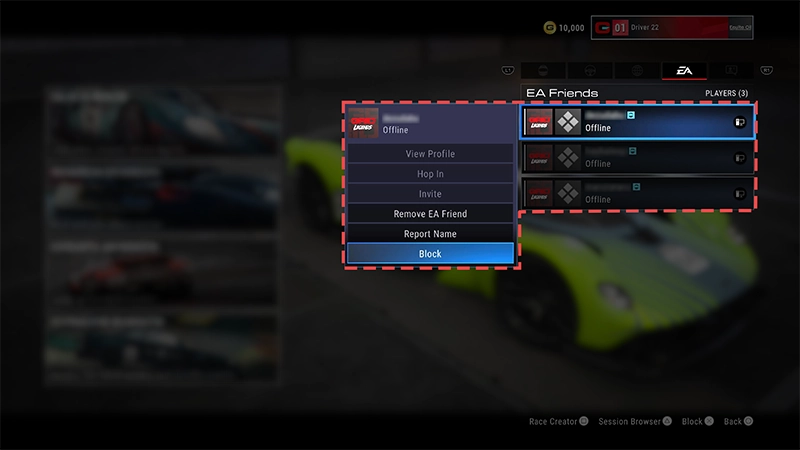
- 1Open the Options menu.
- 2Select Social.
- 3Select Friends.
- 4Find them in your Friends list and select their name.
- 5Select Remove Friend.
Lyst til å lese mer om reglene våre? Sjekk artikkelen vår om EA-reglene du burde kunne og følge.Finn ut hvordan du rapporterer spillere eller ulovlig innhold i andre EA-spill og -tjenester.