Overview
Learn how to create a new Avatar in Madden NFL 25’s Superstar mode or import an existing one from EA SPORTS™ College Football 25.
How to create a new Avatar in Madden NFL 25
Superstar mode is available in Madden NFL 25 on these platforms.
Superstar mode isn’t available on PlayStation®4 or Xbox One.
You have to be online and connected to the EA servers to access all Superstar modes.
- PlayStation®5
- Xbox Series X|S
- PC
You have to be online and connected to the EA servers to access all Superstar modes.
Here’s how to get started.
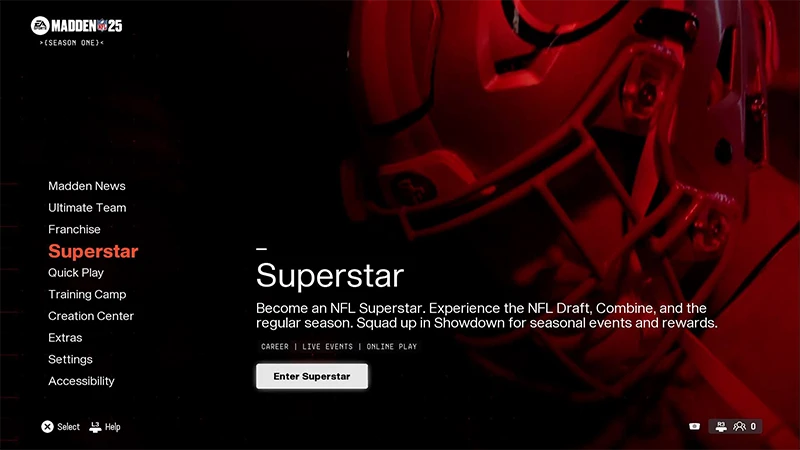
- 1Go to the main menu in Madden NFL 25 and choose Superstar.
- 2Select Enter Superstar.
- 1Choose one of five starting positions on the Continue or Start a New Career screen.
- Quarterback
- Halfback
- Wide Receiver
- Linebacker
- Cornerback
- 2Choose Select to continue.
- 1Customize these details for your Avatar on the Fill Out Your Info Screen.
- First Name
- Last Name
- Number
- Handedness (Left or Right)
- Hometown
- College
- 2Select Continue.
- 1Select an attribute to customize.
- Head & Tattoos: customize features like your Avatar’s face, skin tone, skin details, and tattoos.
- Hair: customize your Avatar’s hairstyle, hair color, and facial hair.
- 2Select Continue.
The options available in this category depend on the starting position you chose for your Avatar. Here are some examples of customization options for your player.
When you finish customizing these categories, select Continue to see a summary of your choices. Review this info and select Continue.
- Select an Archetype: This determines your player’s Key Abilities. You can choose from an existing starting position Archetype or create a custom one.
- Modify your physique: Select your Body Type and use the sliders to adjust your height and weight. The factors will determine your base physical stats and affect physical ratings, position-specific ratings, and core skill impacts.
- Customize your starting skills and physical ratings: Use Creation Points to choose skills and physical attributes you want your Avatar to begin with.
When you finish customizing these categories, select Continue to see a summary of your choices. Review this info and select Continue.
When you’ve finished creating your Avatar, you’ll have three options.
- Select Showdown to jump into competitive online events and games.
- Select The League to begin your Avatar’s NFL career.
- Select Customize to personalize your Avatar even more.
- You can tailor your Avatar’s uniform, jersey, headgear, and more from here.
- You can also equip your Avatar with your favorite showboating methods under the Animations tab. Choose personalized Celebrations, Emotes, and Gameplay Animations for your Avatar to use in-game.
How to import an Avatar from EA SPORTS™ College Football 25
Avatar import from Road to Glory in EA SPORTS™ College Football 25 to Superstar in Madden NFL 25 is only available on PlayStation®5 and Xbox Series X|S.
Learn more about transferring your Road to Glory player.
Learn more about transferring your Road to Glory player.
- you’re connected to the internet
- both games are fully updated
- you’re logged into both games using the same EA Account.
- 1Launch EA SPORTS™ College Football 25 and go to the Road to Glory menu.
- 2Select the Actions tab.
- 3Choose Leave for the NFL and then select Export Player to Madden.
- 4When you get confirmation your Avatar export was successful, launch Madden NFL 25.
- 5Go to the main menu and select Superstar.
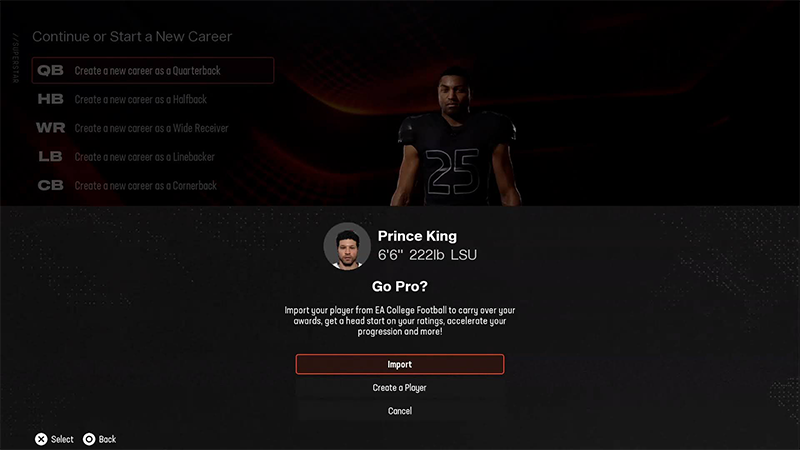
- 6Choose the position that matches the Road to Glory player you exported from EA SPORTS College Football 25.
- 7A pop-up will ask if you want to import your Road to Glory player. Select Import. Your Road to Glory Avatar is now ready to start their pro career in the NFL.
How to unlock new gear for an Avatar
Want to upgrade your Avatar’s gear? There are two ways to do this.- Get new items for your Avatar using Cred, an in-game currency. You can earn Cred by playing online matches in Superstar: Showdown mode.
- Use Madden Points to get new items. Madden Points are optional and can be bought in-game with real-world money on all platforms. You can also buy them from the Xbox Store or the PlayStation® Store.