Overview
New to Madden NFL Mobile or looking for a skill boost? Check out our guide with tips to take your game to the next level.
Before you start
What carries over to the new season?
If you played Madden NFL 24 Mobile, some parts of your game will transfer over to Madden NFL Mobile. Check out what transfers to Madden NFL Mobile.Link your account
The first thing you’ll want to do when playing Madden NFL Mobile is link your accounts.Linking accounts means you can save your progress, play across different devices, and recover your progress if it’s ever lost. If you linked your Madden NFL 25 Mobile account, your accounts will still be linked.- 1On the main menu, tap the cogwheel in the top-right corner to open Settings.
- 2Tap Link next to Link Accounts.
- 3Tap Link next to EA Account, Google Play Games, Apple Account, or Facebook.
How to play Madden NFL Mobile
The best place to learn about Madden NFL Mobile is in your game. Tap the cogwheel, scroll to Help & Feedback, then tap Support next to Customer Support to access our in-game help articles and find out more about Madden NFL Mobile.
Madden NFL game modes
There are two ways to play Madden NFL Mobile: Seasons and Ultimate Team.- Seasons: You’ll play a full 17-game schedule of football and compete for the Lombardi Trophy. You don’t earn rewards in Seasons mode.
- Ultimate Team: you can earn rewards by completing challenges.
- Madden Base: Complete events for Players, Training Points, or Coins. Events get more challenging as you play, but you earn better rewards as you progress.
- Journeys: Play a 30-node Journeys map to collect rewards. Journey events unlock as you go, so complete the previous challenge to unlock the next one.
- Arena: compete against other players in the Arena for leaderboard status and rewards.
- Leagues: play with friends against other teams in Leagues, and unlock special rewards through League achievements.
- The Weight Room: exchange Coins to activate a limited-time OVR boost, then use these OVR boosts to help you complete challenging events.
Madden NFL Field and Event Pass
Ultimate Team also lets you participate in the Field and Event Pass: limited time gameplay progression paths that offer new objectives, a playable journey, and unique rewards.- The Field Pass comes in a Free and VIP tier. You have to buy the VIP Field Pass with real-world money.
- The Event Pass comes in Free, Plus, and Premium tiers. Plus and Premium tiers give you higher quality rewards, and you have to buy them with real-world money.
Manage your lineup
Tap My Team from the top-left menu button to manage your lineup. You’ll see the players and Coach in your lineup.- View your Players under Offense, Defense, and Special.
- Tap View Items at the top-right to see your Players, Items, Wallet, and Unclaimed Items.
Upgrade your team
Want some new talent on your team? Use Madden Cash, Coins, and Gems to get Packs or players from the Store.- Madden Cash can be used to get Packs, premium content, and Bundles from the Store. You have to buy it with real-world money.
- Coins and Gems can be used to get Packs and players. You earn Coins and Gems by playing.
Missing something you earned or bought? The best place to get help is in your game. Tap the cogwheel, scroll to Help & Feedback, then tap Support next to Customer Support to check out our articles and get help with missing content.If you know your User ID, tap Contact Us in the footer. We’ll need your User ID to help you.
Playbooks
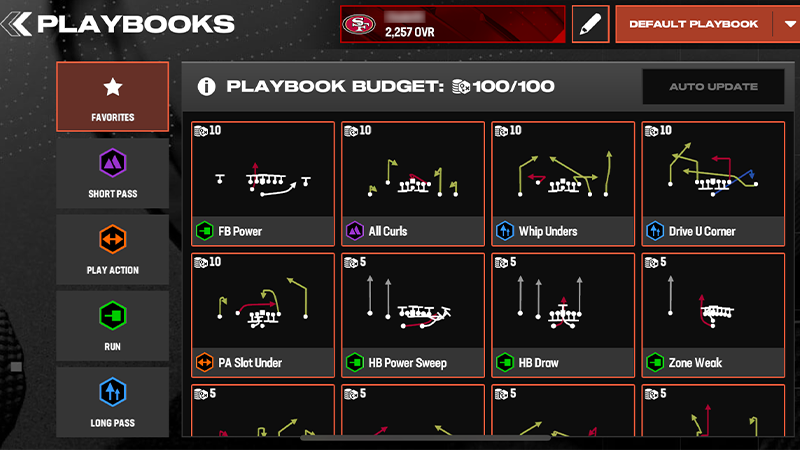
Your Playbook determines what kind of plays you can use on the field. Each playstyle has a default set of plays. You’ll have access to an extended Playbook and Playbook budget—Playbooks aren’t tied to Coaches anymore. Each play has a cost, and your total cost has to be within your Playbook budget. Your Playbook budget increases as your User level increases. Under the Playbook tab, you’ll see your Playbook Budget. The number in the top-left corner of each play is how much that play costs.. In the left-hand menu, you’ll be able to filter plays by:- Favorites
- Run
- Short Pass
- Long Pass
- Spread.