Overview
The Painting skill lets your Sims create artwork, earn Simoleons, and progress in the Painter career. This guide covers every way to build the skill, from painting on easels and digital sketchpads to reading skill books and attending classes. Learn what each Painting skill level unlocks and how to use skill cheats to jump ahead fast. Whether your Sim is a casual painter or aiming to become a Master of the Real, this guide will help you make the most of their artistic abilities.
About the Painting skill
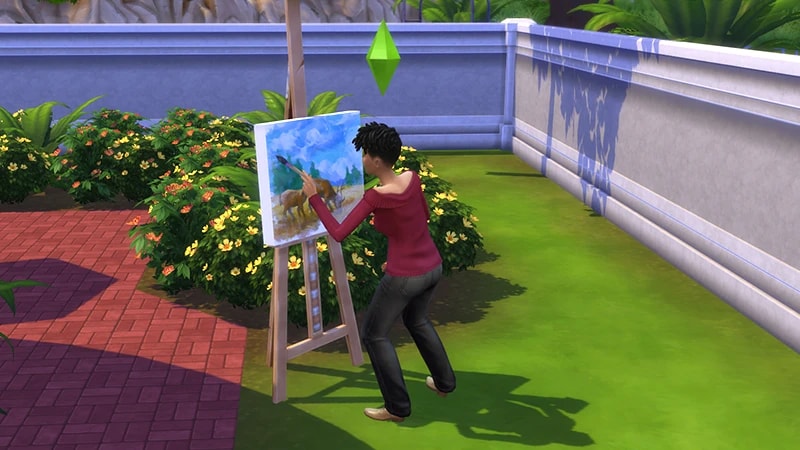
- The Painting skill comes with The Sims 4 Base Game, and is a 10 level skill.
- Elder, Adult, Young Adult, and Teen Sims can all build this skill.
- The Painting skill is needed to progress in the Painter career and to complete the Painter Extraordinaire Aspiration.
- Looking to earn some extra Simoleons? Sims can sell paintings by selecting a finished painting and choosing Sell to Collector.
- Level 1 of the Painter career unlocks the Sell to Gallery ability, where you can sell them for even more.
- Sims can paint depending on their current Moodlet. For example, if a Sim is feeling Confident, they can paint a Confident painting. This results in a higher-quality, more valuable painting.
- The following Lot Traits help with this skill:
- If you own The Sims 4 City Living Expansion Pack, the Home Studio Lot Trait increases how fast your Sim builds this skill and the quality of what they create.
- The Natural Light Lot Trait increases how fast your Sim builds this skill.
How to build the Painting skill
There are multiple ways for your Sim to build the Painting skill. Some interactions are only unlocked when your Sim reaches a certain level.The most straightforward way to build this skill is to practice painting. Sims can do this using an easel or a digital sketchpad. The Sims 4 Base Game comes with the E.A.S.L. Easel and the Digitalistic Sketchpad. Two more easels can be unlocked when you reach certain levels of the Painter career:More easels and sketchpads come with other Packs:
- The Easy-Breezy Easel at level four
- The Pre-Owned Painter’s Easel at level 8 of the Patron of the Arts branch
- The Deluxe All-Season Easel at level 8 of the Master of the Real branch
- The Rolling Easel by Independent Expressions Inc comes with The Sims 4 Artists Studio Kit
- The Rob Russ’ Happy Little Easel comes with The Sims 4 Discover University Expansion Pack and unlocks once your Sim becomes a Senior Member of the University of Brichester’s Art Organization
- The CreativePro Tablet comes with The Sims 4 Artists Studio Kit
- The Heirloom Easel of the Darong Family unlocks with the Lost Legacies Event.
Reading skill books will work towards building skills, but is slower than other methods. Books will only get you as far as level 9 of a skill. To buy skill books:The skill books are:
- 1Select a bookshelf and choose Purchase Books.
- 2In the pop-up, select the drop-down at the top-left that reads Show All.
- 3Choose Skill and scroll through to find the book you want to buy. These will be added to your Sim’s bookshelf.
- Painting Vol 1: The Fundamentals of Painting
- Painting Vol 2: The History of Painting
- Painting Vol 3: The Painting of Painting
If you own The Sims 4 Jungle Adventure Game Pack, the Peace and Quiet Lot Trait helps your Sim build skill faster when reading skill books.
If you own The Sims 4 Discover University Expansion Pack, your Sim can attend skill-building classes. These are rabbit-holes, so your Sim will leave the Lot for some time and then come back when the class is over. Note: Skill Classes are only available between 9 a.m.–9 p.m.
- 1In Live Mode, select your Sim’s phone.
- 2Open the Business app (the briefcase icon).
- 3Choose Sit in on Skill Class (§250).
- 4In the pop-up menu, choose Painting. Your Sim will leave the Lot and gain the Painting skill while at the class.
If you own The Sims 4 Businesses & Hobbies Expansion Pack, your Sim can learn or teach the Painting skill using the Sharing is Caring Whiteboard. You’ll find this in Build Mode.
Painting skill levels
As your Sim builds the Painting skill, they’ll unlock new rewards, abilities, and interactions along the way. As your Sim’s painting skill increases, they’ll move up from painting low-skill paintings to high-skill paintings. A green progress bar will appear above your Sim’s head and gradually fill up as they’re building a skill. You can also check their progress by:- 1Entering Live Mode.
- 2Selecting the Sim Panel (bottom left).
- 3Selecting the Skills tab.
At this level, your Sim can paint the following on an easel or digital sketchpad:
- Figure Painting (§100)
- Classic paintings in Small, Medium, and Large sizes
At this level, your Sim can:
- Paint a Landscape Painting (§100) on an easel or digital sketchpad
- Discuss Color Theory with other Sims
- Paint Illustrative paintings on a digital sketchpad
At this level, your Sim can paint:
- Low skill Pop Art paintings on an easel or digital sketchpad in Small, Medium, and Large sizes
- Paint from Reference on an easel or digital sketchpad
- Painting from Reference lets your Sim snap a photo of something in their surroundings and then paint it - a great way to paint family portraits!
At this level, your Sim can paint the following on an easel or digital sketchpad in Small, Medium, and Large sizes:
- Low skill Realism paintings
- Low skill Abstract paintings
At this level, your Sim can paint the following on an easel or digital sketchpad in Small, Medium, and Large sizes:Sims can also Mentor other Sims in this skill once they reach this level.
- Medium skill Pop Art paintings
- Low skill Surrealism paintings
- Low skill Impressionism paintings
At this level, your Sim can paint the following on an easel or digital sketchpad in Small, Medium, and Large sizes:
- High skill Classic paintings
- Medium skill Realism paintings
- Medium skill Abstract paintings
At this level, your Sim can paint the following on an easel or digital sketchpad in Small, Medium, and Large sizes:
- High skill Pop Art paintings
- Medium skill Surrealism paintings
- Medium skill Impressionistic paintings
At this level, your Sim can paint the following on an easel or digital sketchpad in Small, Medium, and Large sizes:Sims can also Describe Aesthetics with other Sims.
- High skill Realism paintings
- High skill Abstract paintings
At this level, your Sim can paint the following on an easel or digital sketchpad in Small, Medium, and Large sizes:
- High skill Surrealism paintings
- High skill Impressionistic paintings
At this level, your Sim’s odds of creating a Masterpiece are higher! Sims don’t paint Masterpieces very often, but when they do, they’re high-quality paintings and are worth more Simoleons.
Painting skill cheats
When using skill cheats, type in the number of the level you want to reach. For example, putting stats.set_skill_level major_painting 7 into the cheat bar will get your Sim’s Painting skill up to level 7.PC and Mac
PlayStation®
Xbox
- 1Press Control + Shift + C to open the cheat dialogue box.
- 2Type testingcheats true and press Enter to turn on cheats.
- 3Type stats.set_skill_level major_painting [skill level] and press Enter.