Podsumowanie
Dowiedz się więcej na temat kariery twórcy stylów w The Sims 4 – odkryj, jak zbierać koncepty, i poznaj wymagania dotyczące awansu oraz kody.
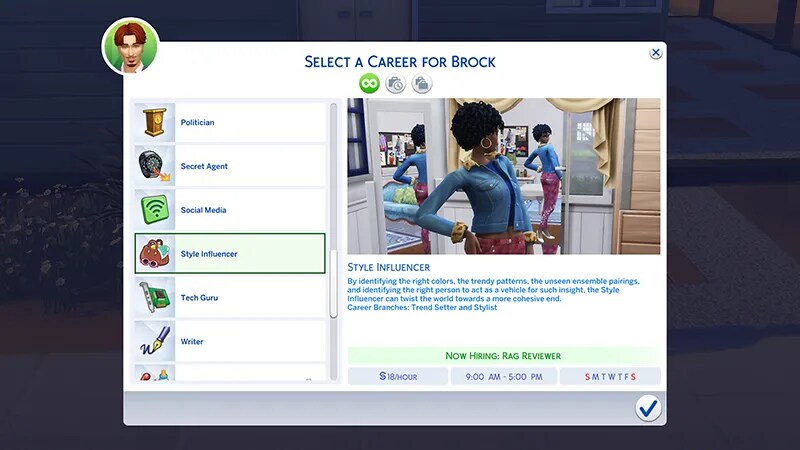
Informacje o karierze twórcy stylów w The Sims 4
Kariera twórcy stylów z Dodatku The Sims 4 Miejskie życie dzieli się na dwie ścieżki:- Dyktator trendów
- Stylista.

Aby uzyskać więcej informacji na temat karier i awansów w The Sims 4, zajrzyj do naszego przewodnika po karierach.
Zadania kariery twórcy stylów
Aby otrzymać awans w ramach kariery twórcy stylów, Twój Sim musi ukończyć zadania kariery. Zadania te zmieniają się w zależności od rangi Twojego Sima na ścieżce kariery twórcy stylów. Aby sprawdzić, które zadania musi wykonać Twój Sim, otwórz panel kariery (ikona walizki w prawym dolnym rogu ekranu) w trybie życia.Jak zbierać koncepty
Zanim zaczniesz zbierać koncepty, Twój Sim musi uzyskać premię „Koncept stylu”. W tym celu może szkicować koncepty na szkicowniku „Ultracyfrowym” lub przeglądać ubrania na telefonie albo komputerze.- 1Na telefonie otwórz aplikację „Rozrywka” (fioletowa ikona mikrofonu) i wybierz „Fotografuj koncept”.
- 2Dzięki temu Twój Sim poczuje się zainspirowany i uzyska premię „Koncept stylu”. Kiedy tak się stanie, zaznacz tablicę stylu „Trendziarską” i wybierz „Dodaj koncept”.
- Gdy podejmujesz karierę twórcy stylów, obiekt ten zostaje dodany do wyposażenia rodziny Twojego Sima.
- 3Powtarzaj tę czynność, dopóki zadanie codzienne nie zostanie oznaczone jako ukończone w panelu kariery.
Poziomy kariery twórcy stylów
- Dzienna pensja:152 simoleony
- Wymagania do awansu:Rozmawiaj o strojach albo modzie
- Nagrody zawodowe i nowe interakcje:Brak
- Dzienna pensja:240 simoleonów
- Wymagania do awansu:Rozmawiaj o strojach albo modzie, 2 poziom umiejętności literackich
- Nagrody zawodowe i nowe interakcje:370 simoleonów, cyfrowy aparat fotograficzny „Niewiele lepszy”
- Dzienna pensja:304 simoleony
- Wymagania do awansu:Rozmawiaj o strojach albo modzie, 3 poziom umiejętności literackich, 2 poziom charyzmy
- Nagrody zawodowe i nowe interakcje:465 simoleonów, szkicownik „Ultracyfrowy”
- Dzienna pensja:384 simoleony
- Wymagania do awansu:Rozmawiaj o strojach albo modzie, 4 poziom umiejętności literackich, 2 poziom umiejętności fotografowania
- Nagrody zawodowe i nowe interakcje:582 simoleony, wydajny PC „Wszystko w jednym”
- Dzienna pensja:616 simoleonów
- Wymagania do awansu:Rozmawiaj o strojach albo modzie, 5 poziom umiejętności literackich, 3 poziom umiejętności malowania, 3 poziom charyzmy
- Nagrody zawodowe i nowe interakcje:676 simoleonów, wysoka komoda „Willowdale”
6. Koneser kreacji7. Tekstylny taktyk8. Garderobiany geniusz9. Mistrz metamorfoz10. Architekt wizerunku
- Dzienna pensja:770 simoleonów
- Wymagania do awansu:Aktualizuj status w mediach społecznościowych, 6 poziom umiejętności literackich, 5 poziom charyzmy, 4 poziom umiejętności malowania, 3 poziom umiejętności fotografowania
- Nagrody zawodowe i nowe interakcje:921 simoleonów, podwójne lustro „Dziel i rządź”, możliwość wykonywania metamorfoz Simów
- Dzienna pensja:1694 simoleony
- Wymagania do awansu:Aktualizuj status w mediach społecznościowych, 7 poziom umiejętności literackich, 6 poziom charyzmy, 5 poziom umiejętności malowania
- Nagrody zawodowe i nowe interakcje:1521 simoleonów
- Dzienna pensja:2387 simoleonów
- Wymagania do awansu:Aktualizuj status w mediach społecznościowych, 8 poziom umiejętności literackich, 7 poziom charyzmy, 6 poziom umiejętności malowania
- Nagrody zawodowe i nowe interakcje:1999 simoleonów, cyfrowy aparat fotograficzny „Kryształowo przejrzysty”
- Dzienna pensja:2508 simoleonów
- Wymagania do awansu:Aktualizuj status w mediach społecznościowych, 9 poziom umiejętności literackich, 8 poziom charyzmy, 7 poziom umiejętności malowania
- Nagrody zawodowe i nowe interakcje:2845 simoleonów
- Dzienna pensja:3000 simoleonów
- Wymagania do awansu:Aktualizuj status w mediach społecznościowych, 9 poziom charyzmy, 8 poziom umiejętności malowania, 4 poziom umiejętności fotografowania
- Nagrody zawodowe i nowe interakcje:3720 simoleonów, możliwość tworzenia trendów
6. Spec od szyku7. Mistrz mody8. Najlepszy asystent ds. stylu9. Simkona10. Wcielenie klasy
- Dzienna pensja:651 simoleonów
- Wymagania do awansu:Zbieranie konceptów, 6 poziom umiejętności literackich, 5 poziom charyzmy, 4 poziom umiejętności malowania, 3 poziom umiejętności fotografowania
- Nagrody zawodowe i nowe interakcje:901 simoleonów
- Dzienna pensja:1575 simoleonów
- Wymagania do awansu:Zbieranie konceptów, 7 poziom umiejętności literackich, 6 poziom charyzmy, 5 poziom umiejętności malowania
- Nagrody zawodowe i nowe interakcje:1210 simoleonów, podwójne lustro „Dziel i rządź”, możliwość tworzenia trendów
- Dzienna pensja:2233 simoleony
- Wymagania do awansu:Zbieranie konceptów, 8 poziom umiejętności literackich, 7 poziom charyzmy, 6 poziom umiejętności malowania
- Nagrody zawodowe i nowe interakcje:1788 simoleonów, możliwość wykonywania metamorfoz Simów
- Dzienna pensja:2406 simoleonów
- Wymagania do awansu:Zbieranie konceptów, 9 poziom umiejętności literackich, 8 poziom charyzmy, 7 poziom umiejętności malowania
- Nagrody zawodowe i nowe interakcje:2467 simoleonów
- Dzienna pensja:2706 simoleonów
- Wymagania do awansu:Zbieranie konceptów, 9 poziom charyzmy, 8 poziom umiejętności malowania, 4 poziom umiejętności fotografowania
- Nagrody zawodowe i nowe interakcje:3100 simoleonów
Kody na awans w karierze twórcy stylów
Użycie tego kodu spowoduje awans Sima o jedną rangę na ścieżce kariery twórcy stylów. Możesz z niego korzystać wielokrotnie, aby dotrzeć na szczyt ścieżki kariery.PC i Mac
PlayStation®
Xbox
- 1Przytrzymaj jednocześnie klawisze Control + Shift + C, aby otworzyć okno kodów.
- 2Wpisz testingcheats true i wciśnij Enter, by uruchomić kody.
- 3Wpisz careers.promote styleinfluencer w oknie kodów i wciśnij Enter.