Overview
To play online, you’ll need to link your EA Account to your GRID Legends account. Here’s how to do it.
Link the first time you play GRID Legends
Link to your EA Account when you set up your game for the first time.- 1Choose Link Account.
- 2Sign in to your EA Account.
- If you’ve already linked an EA Account to your Gamertag/PSN ID/Steam account, use that account to keep all your games together.
- 3If you don’t have an EA Account, choose Create Account.
- 4Once signed in, you’ll get confirmation that your account is linked.
You have to link GRID Legends to an EA Account to play in multiplayer or join your friends’ races.

Link your accounts later
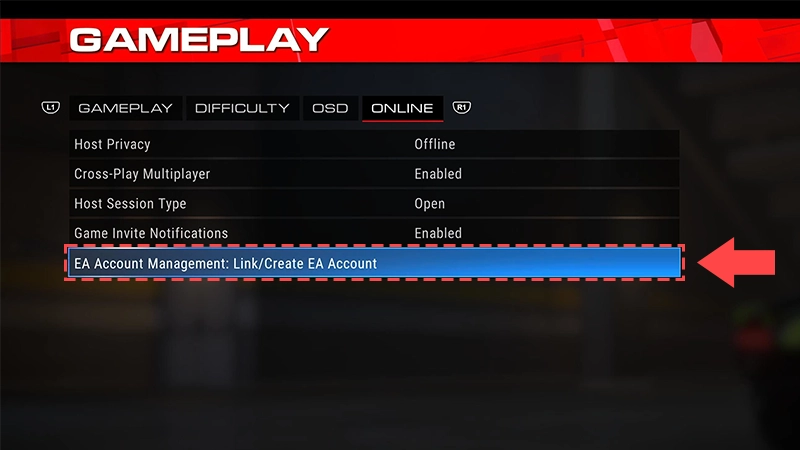
If you skipped linking your accounts when you were setting up your game, here’s how to do it later.- 1Open the Options menu.
- 2Choose Gameplay, then Online.
- 3Select EA Account Management.
- 4Sign in to your EA Account.
- If you’ve already linked an EA Account to your Gamertag/PSN ID/Steam account, use that account to keep all your games together.
- 5If you don’t have an EA Account, choose Create Account.
- 6Once signed in, you’ll get confirmation that your account is linked.