Overview
Want to connect with other Mass Effect players? Learn what you can use the BioWare Discord for, plus how to report players there or appeal a ban.
What’s the BioWare Discord?
The BioWare Discord is a community where you can connect with other Mass Effect players and chat about the games.Visit the BioWare Discord to join.The BioWare Discord is available globally, but only supports English in text channels.
How to report a player on the BioWare Discord
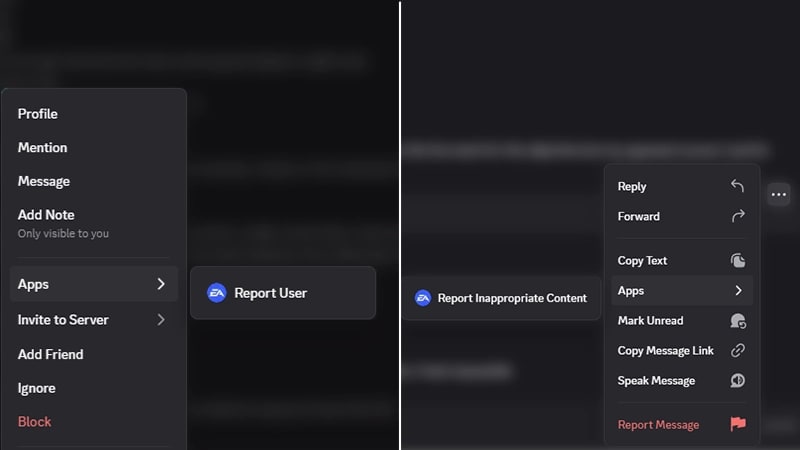
To report a player or a message that a player sent:- 1In a text channel, right-click on the username or message you want to report.
- If you’re using Discord on your phone, tap and hold the username or message.
- 2In the pop-up menu, go to Apps.
- 3If you’re reporting a player, select Report User to EA. If you’re reporting a message, select Report Message to EA.
How reporting works
Reports are processed by automation tools and sent to our team for review.Our team looks into the context of each report before deciding whether it follows our rules and what action to take. You’ll get a DM with an update on the outcome of your report, including whether we took action.For privacy reasons, we can’t share information about our investigation or what actions we take on another player’s account.How to appeal a ban on the BioWare Discord
If you think you were banned by mistake, you can appeal in your Discord direct messages (DMs) or on EA Help. After following the steps below to submit your appeal, someone from our Moderation team will review your submission.Appeal on Discord
Appeal on EA Help
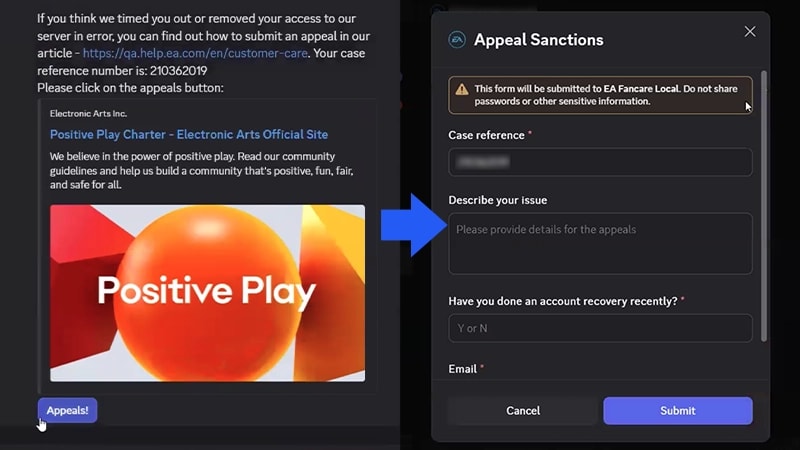
- 1Open your DM from EA Moderator.
- 2Select the Appeals button directly from the DM.
- 3Fill out the form.
- Your case reference number will be filled out for you. Add a description of your issue, if you've done an account recovery recently, and your email.
- 4Select Submit
To fill out the appeals form in your DMs, make sure you have direct messages in Discord enabled.