How does the Mayor’s Club work in SimCity BuildIt?
3 min read
Overview
Use this guide to learn about the Mayor’s Club in SimCity BuildIt. Read about Club roles, Contest of Mayors, how to wage Club Wars, and how to get and spend War Simoleons.
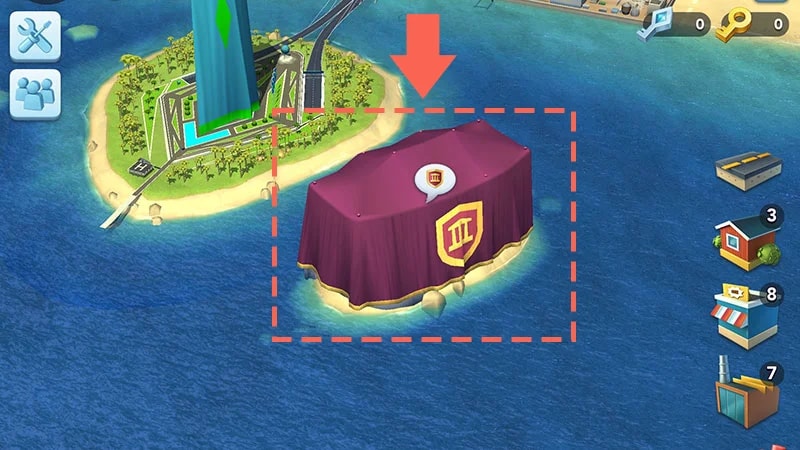
Once you reach Level 18, you can create your own Mayor’s Club or join a pre-existing Club.Find the Mayor’s Club House just off your city’s coast, near the Contest of Mayors Island.
How to create a club
1
Tap Create in the Club menu.
2
Choose a Club Name and add a Club Description.
3
Set the Club Type.
When you create a Club, you become Club President.
Can’t find or join an existing Club?
Double-check that you have the right Club name and search again.
The Club might be full (25 members) and can’t accept more players. In this case, you’ll see a Club is Full! message.
What are the Mayor’s Club roles?
Club President
Club Presidents can:
invite other Mayors to join a Club
accept or reject requests to join a Club
promote other Club members to Vice President or Senior roles
remove abusive or disruptive members.
To become Club President, you must be next in line when the current President leaves. This means that the Vice President with the most Plumbob points would become President.
Vice President
Vice Presidents can:
invite other Mayors to join a Club
accept or reject requests to join
promote other Club members to Senior
remove abusive or disruptive members.
Seniors
Seniors can accept or reject requests to join a Club.
Getting kicked out of a Club
If you get kicked out of a Club, you can still join another one, but you’ll have to wait. You’ll get an error message if you try to join a Club before you’re allowed to.Here’s how long you’ll have to wait before joining another club if you get kicked out.
Times kicked out of the Club
Waiting period
Once
30 minutes
Twice
24 hours
Three times
48 hours
Four times
72 hours
Five times or more
1 week
More Mayor’s Club info
Compete against other Mayors, complete assignments to earn Plumbob Points, and rise up in the Leagues to win premium currency and grow your city with special Platinum buildings.
Getting started
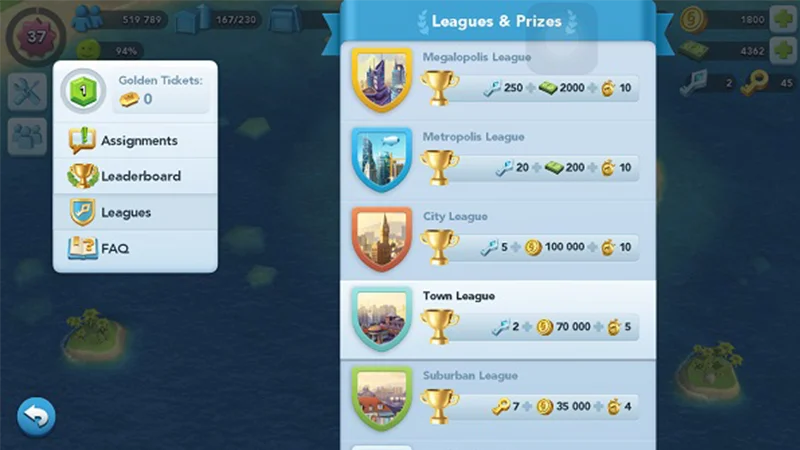
Tap Contest HQ to take part in the contest and find details about the Rules, Assignments, Leaderboards, and Leagues.Each Contest of Mayors lasts five days, with groups of Mayors competing against 100 randomly selected Mayors around the world.
Assignments
Pick an assignment and tap Accept. Each Assignment has its own time limit. The trickier the Assignment, the larger the Plumbob Point rewards.
Changing assignments
Tap on the red X icon to cancel an assignment and pick a new one. There’s a cooldown period before a new assignment replaces a canceled Assignment in your list, but you can skip it using SimCash. Just tap the Speed Up icon.
Streaks
You’ll get one Assignment at a time to complete a Streak and a chance to get bonus Plumbob Points if you can do it in the set time. The number of Assignments in a Streak and the bonus depend on the League you’re playing in.If you fail one of the assignments in the Streak, the current Streak ends and you’ll have to wait before starting a new one.
Leagues
There are six Leagues to move your way up through:
1
Neighborhood League
2
Suburban League
3
Town League
4
City League
5
Metropolis League
6
Megapolis League
Each week, the top-ranked players climb to a higher League, with bigger prices and Assignments available. The lowest-ranked players move down a League. Contest Rank: Your rank is based on your cumulative lifetime Plumbob Points. The higher you rank, the more Points you’ll need to rank even higher. As you rise to new ranks, you’ll also get Golden Tickets and Platinum Keys. Plumbob Points: You collect Plumbob Points as you complete Assignments. Tap Leaderboards to check your current Position and the rewards you can redeem.Golden Tickets: Your reward for rising to a new rank. Use them to buy more Assignments.Platinum Keys: A special prize in Contest of Mayors and Club Wars. Use them to buy premium buildings like Platinum Parks and Platinum Landmarks from the Specialization menus.
Club Wars is a real-time Player vs. Player (PvP) battle mode in SimCity BuildIt. Team up with your Mayor’s Club and wage war on other Clubs.To unlock Club Wars you need to be a member of a Mayor’s Club. To find Clubs that participate in Wars, check the Club descriptions before you join.Only Presidents, Vice Presidents, and Seniors of the Club can start Wars. You can do this through the War Map.
1
Tap on Vu Fortress or the star-shaped Club Wars icon on the bottom left of your city.
2
Play through the tutorial, which will guide you through the different phases of War: Preparation, Attack, and Claiming Rewards.
Arenas
Club Wars battles take place in Arenas. Each Club is placed in an Arena based on their Elo score and will move through different Arenas as their score improves. If your Club is starting from scratch, you’ll start in Arena 1, Mountainous Mayhem.
Rules and rewards
Each Arena has different rules that affect how fast energy regenerates for each player and how much damage a city can take before having to use a shield.Check out the rules, unique rewards, and Battle Boosters inventory for each Arena in the Club Wars menu.
Battle Boosters
Battle Boosters can give a friendly city a one-time boost or slow down an enemy city during a Club War.
1
Choose a city you want to target.
2
Head to your Battle Boosters list by tapping on the Boostericon in the bottom-left corner.
Available boosters are shown in color, unavailable ones are grayed out.
3
Tap the Booster type you want to use.
4
Drag the Booster Token on top of the city you want to attack.
Battle Boosters are not available in the Mountainous Mayhem Arena. They become available once you reach Arena 2, Desert of Destruction. Check out your inventory at any time by tapping on the Booster icon in the Club Wars menu. To get more Battle Boosters you’ll need to
buy them with War Simoleons in the War Store
collect them as rewards at the end of Club War matches.
Disaster Cards
To unleash disasters on enemy cities and earn War Points, you need to collect Disaster Cards. Each Disaster you launch earns you War Points. Players with the most War Points at the end win the War. Go to War Map > Cards to find your Disaster Cards and their requirements to launch.There are many Disaster Cards, each unique in:
the damage they cause
the War Points they earn
the energy cost needed for launching the Disaster
the War Supplies needed for launching the Disaster.
They are classified by six different Disaster Collections, in order of the degree of damage they can cause (Class A+ Cards are the most powerful).
Class S
Class M
Class L
Class XL
Class
Class XXL
Class A+
Knock Outs
If you attack all opponents’ cities to the point where they’re all under the Shield, the Knock Out timer appears, which shortens the duration of the War. This timer only remains active if none of the opponents repair their city. However, if no city repairs and the Knock Out timer ends, the Club that started the Knock Out wins the War.
What are War Simoleons?
War Simoleons is a currency in SimCity BuildIt that lets you buy items in Club Wars. You get War Simoleons when you:
play Club Wars and get reward chests
repair zones in your city that have been damaged in Club Wars.
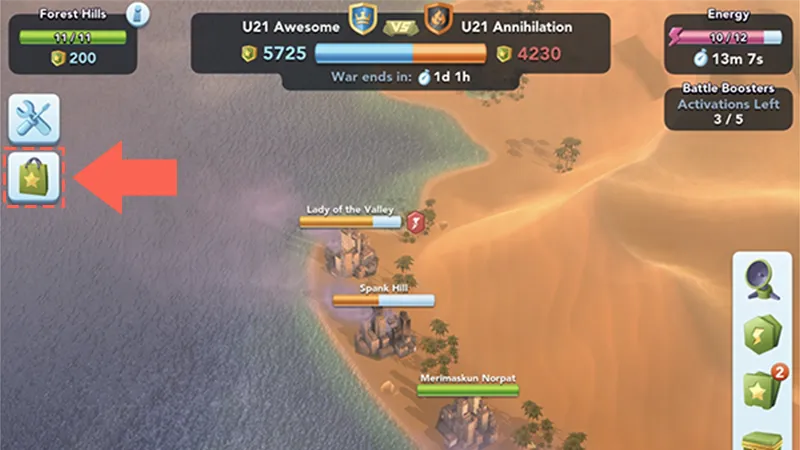
To start shopping, tap the shopping bag icon on the left-hand side of the Club Wars menu, below Settings. You can see how many War Simoleons you have next to the purple triangle icon at the top-right corner of the War Store menu.The items you see in the War Store depend on the Arena that you’re playing in.
War Delivery Items
Battle Boosters (Use these in higher Arenas)
Disaster Cards.
Each set of items is only available for a limited time. Always check the timer above each set to see how long it’ll be available. When timers run out, new sets of items become available.
Still having issues?
Get in touch with our customer support team for more help.