Overview
The Archaeology skill in The Sims 4: Jungle Adventure lets your Sim uncover ancient relics and authenticate artifacts while exploring the world of Selvadorada. Learn how to build the Archaeology skill from beginner to expert using dig sites, skill books, work benches, and other in-game tools. Whether you're chasing a complete collection or completing the Archaeology Scholar Aspiration, this guide will help you max out the skill.
About the Archaeology skill
- The Archaeology skill comes with The Sims 4 Jungle Adventure Game Pack, and is a 10 level skill.
- Elder, Adult, Young Adult, and Teen Sims can all build this skill.
- The Archaeology skill is needed to complete the Archaeology Scholar Aspiration.
- Looking to earn some extra Simoleons? Sims can sell artifacts they’ve discovered (these vary in value depending on how rare they are).
- Using the Archaeology skill to uncover treasures and artifacts helps your Sim to complete the following Household Collections:
- Omiscan Treasures - there are 13 to collect
- Ancient Omiscan Artifacts - there are 16 to collect
- Crystal and Rock Collections
How to build the Archaeology skill
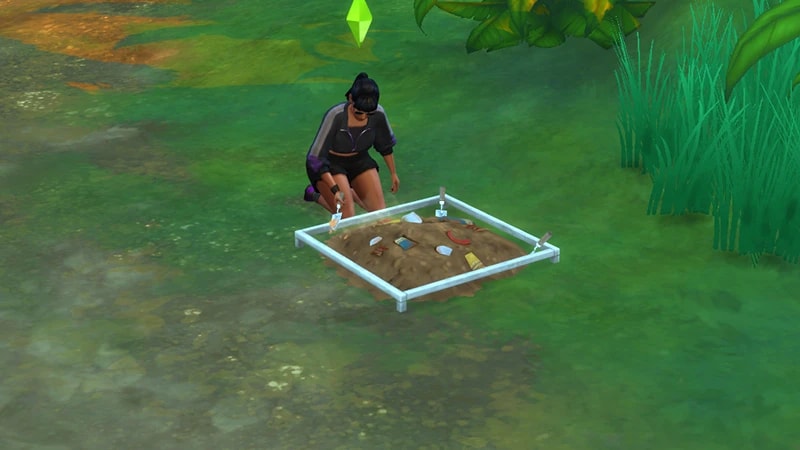
There are multiple ways for your Sim to build the Archaeology skill. Some interactions are only unlocked when your Sim reaches a certain level.To build skill and get some hands-on Archaeology experience, travel to the world of Selvadorada. Explore the world to find dig piles, which look like mounds of earth. These can only be found in Selvadorada. Select a dig pile and choose Excavate. Once your Sim reaches level 6, they can expand dig piles into excavation sites. Select a dig pile and choose Establish Excavation Site. This will take up a bigger area, and can be excavated by up to 4 Sims at the same time. They also contain more artifacts than a regular dig pile.As you Sim excavates, they’ll uncover relics and unauthenticated artifacts. These can later be authenticated and can be quite valuable.
Once your Sim reaches level three, they can use the Pop Up Archaeology Work Bench to authenticate, uncover, and analyze artifacts. All of these activities will build skill.
- When Sims discovers an artifact on a dig, it gets added to their Personal Inventory. Select the Pop Up Archaeology Work Bench and choose Authenticate Artifact. In the pop-up, select an artifact to authenticate.
- Sometimes Sims will dig up a clump of dirt. Select Uncover Artifact on the work bench to discover what’s inside.
- At level five, Sims can Practice Archaeological Analysis on authenticated artifacts using the work bench.
The ability to write an Archaeology book unlocks when your Sim reaches level eight. Doing this will build both the Archaeology and Writing skill.Using the computer, select More Choices > Write > Write Skill Book > Guidebook to Archaeology.
Reading skill books works towards building skills, but it is slower than other methods. Books will only get you as far as level 9 of a skill. To buy skill books:The Archaeology skill books are:
- 1Select a bookshelf and choose Purchase Books.
- 2In the pop-up, select the drop-down at the top-left that reads Show All.
- 3Choose Skill and scroll through to find the book you want to buy. These will be added to your Sim’s bookshelf.
- Archaeology Vol 1: Tiny Brushes and You
- Archaeology Vol 2: 101 Uses for a Bullwhip
- Archaeology Vol 3: Rock or Relic?
If you own The Sims 4 Jungle Adventure Game Pack, the Peace and Quiet Lot Trait helps your Sim build skill faster when reading skill books.
If you own The Sims 4 Discover University Expansion Pack, your Sim can attend skill-building classes. These are rabbit-holes, so your Sim will leave the Lot for some time and then come back when the class is over. Note: Skill Classes are only available between 9 a.m.– 9 p.m.
- 1In Live Mode, select your Sim’s phone.
- 2Open the Business app (the briefcase icon).
- 3Choose Sit in on Skill Class (§250).
- 4In the pop-up menu, choose Archaeology. Your Sim will leave the Lot and gain Archaeology skill while at the class.
If you own The Sims 4 Businesses & Hobbies Expansion Pack, your Sim can learn or teach the Archaeology skill using the Sharing is Caring Whiteboard. You’ll find this in Build Mode.
Archaeology skill levels
As your Sim builds the Archaeology skill, they’ll unlock new rewards, abilities, and interactions along the way. A green progress bar will appear above your Sim’s head and gradually fill up as they’re building a skill. You can also check their progress by:- 1Entering Live Mode.
- 2Selecting the Sim Panel (bottom left).
- 3Selecting the Skills tab.
At this level, your Sim can:
- Excavate Dig Piles in Selvadorada
- Uncover Artifacts using the Pop Up Archaeology Work Bench
At this level, your Sim can Study Art and Artifacts for Historical Insights
At this level, your Sim can Authenticate Artifacts themselves at the Pop Up Archaeology Work Bench
At this level, your Sim can Survey for Dig Piles in the jungle.
At this level, your Sim can:
- Analyze Genuine Artifacts as well as fossils and treasures
- Extract Elements from metals and crystals using the Pop Up Archaeology Work Bench
At this level, your Sim can Establish an Excavation Site to uncover even more artifacts
At this level, your Sim can Refine Crystals at the Pop Up Archaeology Work Bench
At this level, your Sim can Write an Archaeology Book on the computer
At this level, your Sim will get requests to help authenticate artifacts. These will come as packages in the mail from Sir Vincent and the Simsonian Institute.
At this level, your Sim can:
- Give an Archaeology Lecture
- Practice Analysis on collectibles and find higher-quality artifacts
Archaeology skill cheats
When using skill cheats, type in the number of the level you want to reach. For example, putting stats.set_skill_level Major_Archaeology 7 into the cheat bar will get your Sim’s Archaeology skill up to level 7.PC and Mac
PlayStation®
Xbox
- 1Press Control + Shift + C to open the cheat dialogue box.
- 2Type testingcheats true and press Enter to turn on cheats.
- 3Type stats.set_skill_level Major_Archaeology [skill level] and press Enter.