Genel Bakış
The Sims 4’te kariyer basamaklarını tırmanmak için yardıma mı ihtiyacınız var? The Sims 4’teki kariyerler hakkında bilmeniz gereken her şeyi öğrenmek için rehberimize göz atın.
The Sims 4’teki kariyer türleri
The Sims 4’te üç kariyer türü vardır:- Kariyerler (Careers): İşe gitme zamanı geldiğinde Sim’iniz Arsadan ayrılır ve vardiyası bittikten sonra geri döner. Buna bazen “tavşan deliği” denir çünkü Sim’iniz uzaktayken ne olduğunu görmezsiniz. Bu kariyerlerin birçoğunun dalları vardır. Yani Sim’iniz belirli bir dereceye terfi ettiğinde, uzmanlaşabileceği iki kariyer dalı arasından seçim yapabilirsiniz.
- Meslekler (Professions): Bunlar aynı zamanda aktif kariyerler olarak bilinir. Meslekler, Sim’inizle birlikte işe gitme ve onun görevlerini yerine getirmesine yardımcı olarak kariyerinde aktif rol oynama seçeneği sunar. Bu kariyer türü The Sims 4 Get to Work Expansion Pack, The Sims 4 Life & Death Expansion Pack ve The Sims 4 Dream Home Decorator Stuff Pack’te mevcuttur.
- Part-time işler: Kariyerler gibi bunlar da tavşan deliğidir. Sim’iniz işe gider ve vardiyası bittikten sonra geri döner. The Sims 4’teki çoğu part-time kariyer iki vardiya seçeneğine sahiptir: sabah veya akşam.
Kariyer rehberleri
The Sims 4’teki belirli bir kariyerle ilgili yardıma mı ihtiyacınız var? Terfi gereksinimleri, günlük görevler ve her kariyerin hilelerini kapsayan özel rehberlerimize göz atın.The Sims 4’te nasıl iş bulunur?
Sim’iniz hayalindeki kariyerin peşinden giderken veya yalnızca ev faturalarını ödeyebileceği düzenli bir gelire ihtiyacı varken bir iş bulmak için birkaç yolu vardır. Öncelikle iş bulmak istediğiniz Sim’i seçtiğinizden ve onunla oynadığınızdan emin olun. Ardından iş aramaya başlamak için bu seçeneklerden herhangi birini kullanın.- Telefon: Sim’inizin telefonunu açın ve Business > Find a Job’ı seçin.
- Bilgisayar: Sim’iniz bir bilgisayara sahipse Career> Find a Job’ı seçmek için onu kullanın.
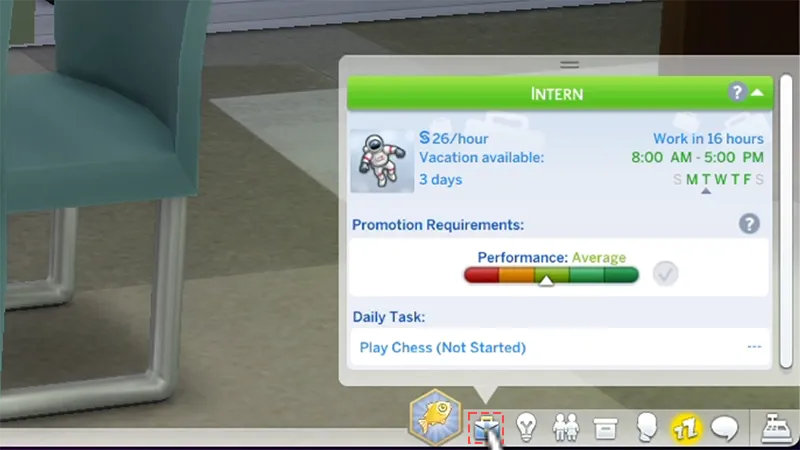
- Kariyer Paneli: Ekranınızın sağ altından Kariyer panelini (evrak çantası simgesi) seçin ve Join a Career’ı seçin.
The Sims 4'te nasıl terfi edilir?
The Sims 4’te terfi almak için Sim’inizin her kariyer seviyesinin terfi gereksinimlerini tamamlaması gerekir. Live Mode’da ekranınızın sağ altındaki Kariyer panelini (evrak çantası simgesi) seçerek Sim’inizin şu özelliklerini kontrol edin:- mevcut işi
- mevcut tatil günleri
- çalışma programı
- terfi gereksinimleri
- günlük görevler
Sim’inizin işe giderkenki ruh hali önemlidir. Bazı kariyerlerde Sim’inizin terfi etme şansını artırması için belirli bir duygu durumunda (Inspired veya Focused gibi) olması gerekir.
The Sims 4’te hangi kariyer en çok kazancı sağlar?
Mümkün olduğunca çok Simoleon mu kazanmak istiyorsunuz? Military kariyeri en yüksek kazancı sağlar ve The Sims 4 StrangerVille Game Pack ile birlikte gelir. Military kariyerin her dalı, Sim-in-Black veya Grand Marshal’a ulaştığınızda Sim’inize haftalık §16.880 kazandırır.Kariyer ödül ögeleri nasıl açılır?
Kariyer ödül ögeleri nasıl açılır?
- 1Hile diyalog kutusunu açmak için Control + Shift + C’ye basın.
- 1PlayStation’da: aynı anda L1, L2, R1 ve R2’ye basın.
- 2Xbox’ta: aynı anda LB, LT, RB ve RT’ye basın.
- 2Hileleri açmak için testingcheats true yazın ve Enter’a basın.
- 3Tüm kariyer ödülü ögelerini açmak için bb.ignoregameplayunlocksentitlement yazın ve Enter’a basın.
The Sims 4’te kariyerler nasıl bırakılır veya değiştirilir?
Sim’iniz kariyer değiştirmeye hazırsa veya günlük koşuşturmaya biraz ara vermeye ihtiyacı varsa işleri bırakmak veya değiştirmek kolaydır.İş nasıl bırakılır?
- 1İşinden çıkmasını istediğiniz Sim’i seçin.
- 2Sim’inizin telefonunu açın ve Business > Quit Job’ı seçin.
- Sim’iniz bir bilgisayara sahipse Career > Quit Job’ı seçerek de çıkabilirsiniz.
- 3Sim’inizin mevcut işini bırakmasını istediğinizi onaylayın
- daha önce o kariyerde çalışmış ve terfi etmiş olmaları
- yeni kariyerle ilgili üniversite diplomasına sahip olmaları.