Overview
Learn how to check your age via the EA app, EA.com, your console, or your mobile device.
Why do I have to check my age?
Confirming an Adult Account
When a player reaches 18, their account will be considered an adult account. In some countries, an age check is required to access certain 18+ content. An age check may also be triggered if you’re travelling or using a VPN.Impacted content may be labelled as Restricted on the EA app and EA.com until the player’s age is confirmed to be over 18.Brazil’s new ECA Digital Law is in effect. Players must confirm they’re an adult (18 or older) to access certain EA games and features.Where applicable, we offer a trusted method through which players can check their age.Access to social features (like voice or text chat and EA Forums) and a player's ability to create and consume user-generated content (UGC) may also be restricted to adult accounts. This only applies to players in Brazil at this time.
How to check your age on EA platforms
If you're asked to check your age, you will have several methods available, depending on your account registration country and the location where you are performing the age check.EA app
EA.com
Console
Mobile
- 1Select Learn more in the banner at the top of your screen.
- 2Scan the QR code or continue on your device.
- 3Carefully read the age check information, then select Start.
- 4Once you’ve successfully confirmed your age, select Close or Continue.
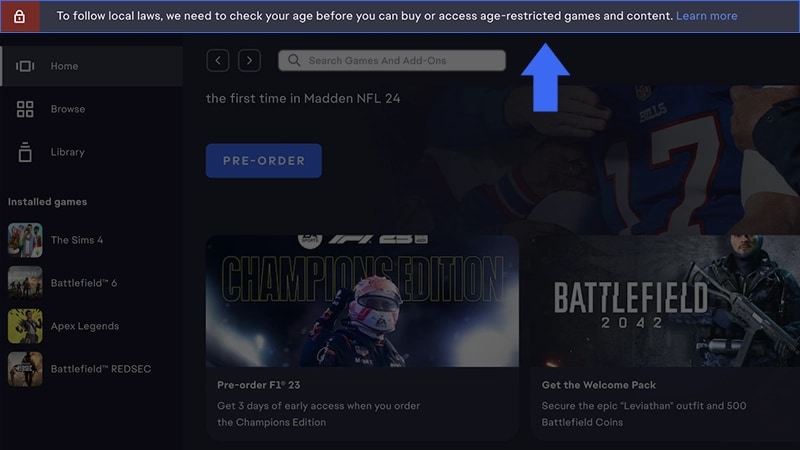
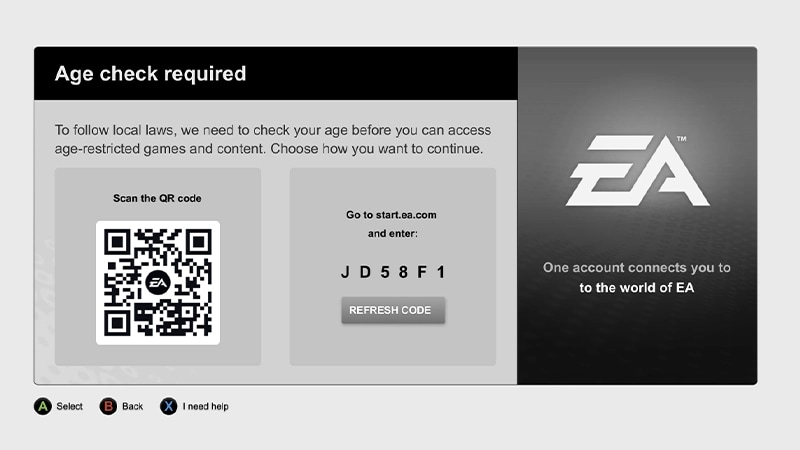
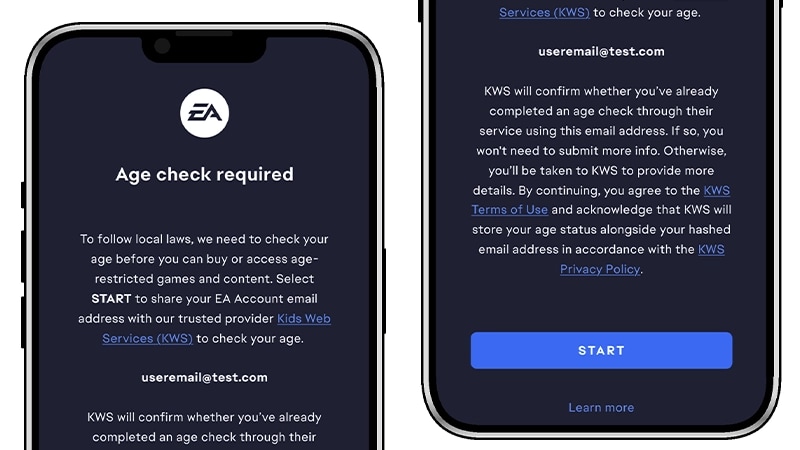
What happens when your age account is confirmed
Once confirmed, an adult EA Account will display an Adult label under the Date of birth section of the Account Information tab. This confirmation applies across all supported platforms and games.Confirmed players over 18 have access to all in-game features. Players under 18 will have certain in-game features restricted until they turn 18 and can reconfirm their age.Why we might ask you to reconfirm your age
You might need to reconfirm your age if:- you change the date of birth on your EA Account
- your account was compromised or recently recovered
- your previous age check method has expired
- we detect conflicting account info, like parental controls or device data
- another platform (like Xbox, PlayStation®, Apple, or Google) shows a different confirmed age
- you merge your EA Account with another account
- EA updates its age check policy.
What happens if I don’t confirm my age?
If you don’t confirm your age, you may not be able to:- access games that feature random content mechanics
- make purchases for those games
Even if a parent gave consent for a child to play, it doesn’t mean the account is confirmed as an adult. Without a confirmed age, the account may still be subject to content restrictions. Learn more about child accounts and age checks.
Troubleshooting EA age check issues
Here are some common issues and how to fix them.If you’re over 18 but can’t get verified:Still stuck? Go to the KWS support page for more help.
- try a different age check method
- double-check that your name and date of birth match your legal ID
- make sure your photo is clear.
- blurry or cropped images can cause processing errors.
- if you're using a passport, scan the photo page only
- for other IDs, include both front and back.
If your age check times out or you encounter an error message with no details, here are a few things you can try.
- Wait a few minutes, then try again.
- Make sure your internet connection is stable.
- If you're on mobile data, try switching to Wi-Fi.
- If it still doesn’t work, try switching devices or complete the check using a desktop browser at https://start.ea.com.
Sometimes we’ll switch you from a low-friction (like facial scan) to a high-friction method (like uploading ID). This can happen when your previous attempt couldn’t confirm your age.We’ll always try the easiest method first. If that fails, you’ll see prompts for the next option.