Your Apex Legends progress is tied to your EA Account. It can’t be moved to another EA Account. To see your progress, make sure you’re logged in to the EA Account you used to make your Apex Legends account and that your platform is linked to that EA Account. Follow these platform-specific steps for more help.
Need help with your EA Account? Check out these articles.
If you can’t find your Apex Legends progress on the EA app, check that you’re logged in to the right EA Account. You can see which account you’re logged in to in the top-right corner of the EA app. To find your progress, this needs to be the EA Account that’s linked to your Apex Legends account.Once you’ve logged in with the right EA Account, you should find your Apex Legends progress.
If you’ve recently started playing Apex Legends on Steam and your progress is missing or you’re incorrectly at Level 1:
your Steam account might not be linked to your EA Account
your Steam account might be linked to the wrong EA Account.
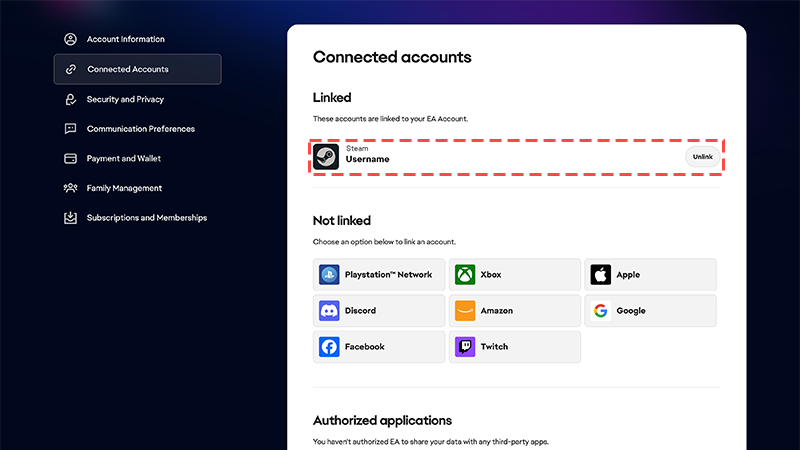
First, check your Connected Accounts to make sure your Steam account is linked to your EA Account. If they’re not, follow our steps to link your accounts. If your Steam account is linked to the wrong EA Account, unlink your account and relink the correct one.Once you’ve logged in with the EA Account that’s linked to Apex Legends, you should see your progress.
To find your Apex Legends progress on PlayStation®, Xbox, and Nintendo Switch™, make sure:
your platform account is linked to your EA Account
you’re logged in to your console with the platform account that’s linked to your EA Account.
If it’s your first time playing Apex Legends on a console, your platform account might not be linked to your EA Account. Follow these steps to link your accounts.
Lost progress and Cross Progression
If your accounts were merged because of Cross Progression, you might have lost some Apex Legends progress. Here’s why that might’ve happened and what you can do to fix it.
If you had multiple platform accounts linked to your EA Account when you got Cross Progression, your accounts have been merged together.Content was only merged from accounts that were linked. If you unlinked a platform account before Cross Progression happened, the content from that account wasn’t included in the merge. The content from that account won’t be available on your Cross Progression account—we can’t get it back for you.The Cross Progression merge only happens once. If you link a platform account after, it won’t be merged with your Cross Progression account.Check out this article for more info about Apex Legends account merging.
If you unlink your platform account from your EA Account at any time, you’ll lose access to your progress.To get your progress back, relink your platform account to your EA Account. Make sure you link to the EA Account that contains your Apex Legends progress.Follow our steps to link your platform account to your EA Account.
If you shared an account
Since the release of Cross Progression, a single EA Account can host just one Apex Legends account. If you used an EA Account to create multiple Apex Legends accounts, these accounts have been merged together. Merged accounts can’t be unmerged, and we can’t restore your lost progress.
Still having issues?
Get in touch with our customer support team for more help.