Přehled
Přizpůsobte si vhodné hráčské předměty pomocí evolucí (EVO) odemykáním nových možností vylepšení a zvyšováním jejich potenciálu. V závislosti na zvolené EVO můžete vylepšit atributy, odemknout cesty vylepšení, získat nové schopnosti, rozšířit možnosti synergie a další.
Jaká jsou EVO?
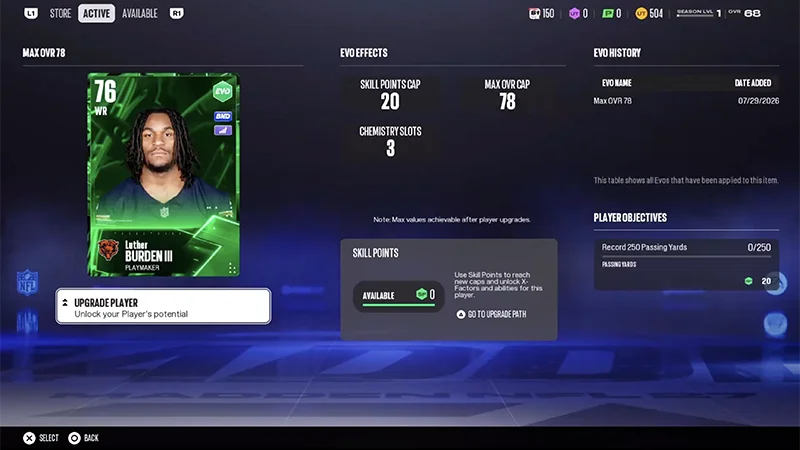
Evoluce je funkce v Ultimate Teamu, která vám umožňuje vylepšovat způsobilé hráčské předměty a pokračovat v jejich rozvoji postupem času. S evolucemi můžete:- zvýšit limity OVR hráčů
- odemknout nové cesty vylepšení
- přidat nebo vylepšit schopnosti
- prodloužit životnost hráčů ve vaší sestavě
- snížit náklady na Ability Point
- rozšířit možnosti sehranosti
- získat další vylepšení
- odemknout nové úkoly pro hráčské předměty.
Jak mám používat EVO?
Než použijete vylepšení, prohlédněte si náhled, abyste zjistili, co může změnit. V závislosti na vylepšení můžete vidět změny u věcí, jako jsou maximální OVR, cesty vylepšení, schopnosti, možnosti sehranosti nebo atributy.
Použijte EVO
Vylepšete EVO
- 1Z centra Ultimate Teamu přejděte do Obchod v horní nabídce
- 2Vyberte Obchod s evolucemi.
- 3Prohlédněte si dostupné evoluce.
- 4Vyberte vylepšení a prohlédněte si jeho požadavky a efekty.
- 5Vyberte způsobilý hráčský předmět.
- 6Potvrďte svůj výběr pro použití vylepšení.
Jak mohu najít hráče vhodné pro EVO?
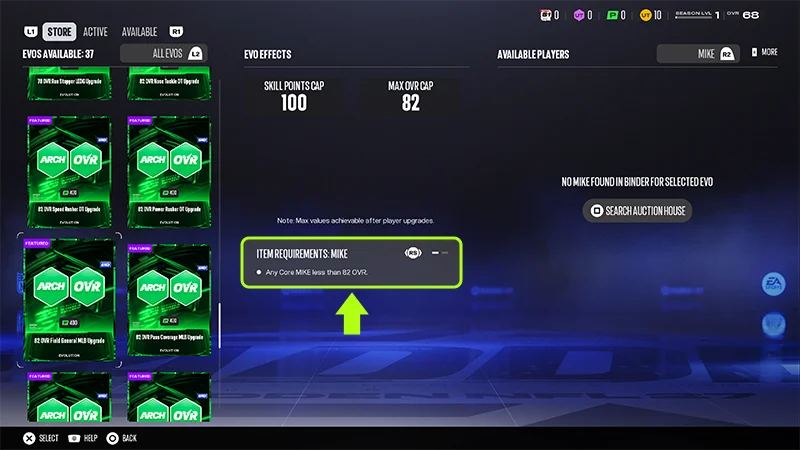
Ne každý hráčský předmět lze použít s každým vylepšením. Pokud se váš hráč nezobrazuje jako možnost, zkontrolujte požadavky vylepšení, abyste se ujistili, že váš hráč splňuje podmínky.
- 1Z centra Ultimate Teamu přejděte do Evolution Store.
- 2Prohlédněte si dostupné evoluce.
- 3Vyberte evoluci a prohlédněte si její požadavky.
- 4Prohlédněte si seznam způsobilých hráčů. Způsobilí hráči se objeví automaticky.
- pozice
- program
- požadavky na hráčský předmět
- další požadavky specifické pro vylepšení.
Časté dotazy k EVO
Ne. Předměty hráčů, které splňují požadavky způsobilosti evoluce, lze použít s danou evolucí.
Ne. Každá evoluce nabízí jiná vylepšení a efekty. Prohlédněte si detaily evoluce, než ji použijete, abyste zjistili, jaké změny může provést.
Ano. Před použitím evoluce si můžete prohlédnout detaily a zjistit, jaké účinky může mít na způsobilou hráčskou položku.