Overview
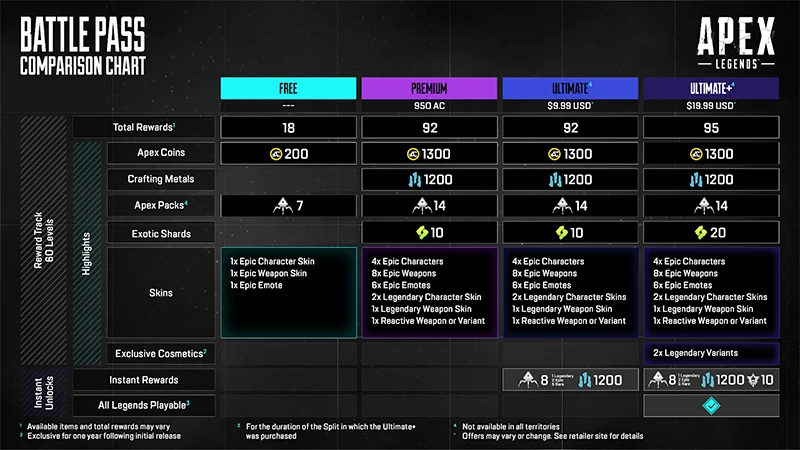
The Apex Legends Battle Pass has a Free Pass and Paid Passes, which are split into four tiers: Free, Premium, Ultimate, and Ultimate+. You automatically have access to the Free Track. Use this guide to learn more about what’s included and how to get a Paid Track Battle Pass.
What’s the Apex Legends Battle Pass?
With the Battle Pass, you can earn cosmetic content and rewards throughout a Season by increasing your Battle Pass level. You can level up your Battle Pass by completing Daily and Weekly challenges.There are two Battle Passes per Season: one for the first split of the Season and another for the second.How many Battle Pass tiers are available?
The Battle Pass has two Tracks, Free and Paid, and comes in four different tiers. Each Track has 60 levels.- Free Track
- Free
- Paid Track
- Premium
- Ultimate (includes extra rewards)
- Ultimate+ (includes 10 level skips, all Legends playable for the duration of the Battle Pass split, and additional rewards)
How do I get the Apex Legends Battle Pass?
You automatically have access to the Free Battle Pass. You can get the Premium Battle Pass for 950 Apex Coins. You can buy the Ultimate or Ultimate+ Battle Pass with real-world currency in the in-game Apex Legends store or the Apex Legends Official Store. Learn more in-game, or check out ea.com for more details.The Premium Battle Pass costs 950 Apex Coins. You can see the price of the Ultimate or Ultimate+ Battle Pass for your region in the in-game Apex Legends store or the Apex Legends Official Store.
If you have a Premium Battle Pass, you can upgrade it by buying the Ultimate or Ultimate+ Battle Pass. When you upgrade, you’ll get back some Apex Coins. The amount will be a similar value to any duplicate content between the Battle Passes.You can upgrade your Ultimate Battle Bass to Ult+ for more rewards.
You can gift the Premium Battle Pass to other players. Learn how to gift items in Apex Legends.