How to create a Road to Glory player in EA SPORTS™ College Football 27
4 min read
Overview
Create a custom Road to Glory player in EA SPORTS™ College Football 27 from scratch, or start from a Legend Build. This guide explains how to choose a journey, position, player build, Mental Abilities, and more. Plus, learn about Max Potential and how it influences your player’s long-term development.
In Road to Glory, you can create a custom player and shape their career from the very beginning.The choices you make during player creation help shape your player’s strengths, playstyle, and long-term development. From your position and physique to your Max Potential, each decision affects how your player grows throughout their career.To get started, open the main EA SPORTS™ College Football 27 menu and select Play. Then, choose Road to Glory and follow these steps.
Decide how your player will start their career. There are four Journeys to choose from:
Column 1
Column 2
Elite
Start with the highest ratings and the strongest foundation.
Blue Chip
Start as a highly regarded prospect with strong early potential.
Contributor
Start with a balanced build and earn your place through development.
Underdog
Start with fewer advantages and build your legacy from the ground up.
Your Journey affects your starting ratings and available Skill Points. Elite and Blue Chip players begin with a stronger foundation, while Contributors and Underdogs start with more room to grow.
2. Choose your position
Choose the position you want to play on the field. Your position is one of the most important choices you’ll make during player creation, as it determines the builds, abilities, and attribute caps available to your player. Each position offers different strengths and abilities, so choose one that matches your preferred playstyle.Available positions include:
Quarterback (QB)
Halfback (HB)
Wide Receiver (WR)
Tight End (TE)
EDGE
Middle Linebacker (MIKE)
Cornerback (CB)
Free Safety (FS)
3. Customize the basics
The Create a Player screen lets you customize your info, appearance, gear, and styles.
Choose your basic information.
First Name
Last Name
Handedness (Left or Right)
Home State
Home Town
Pipeline
High School Name
Mascot
Customize these elements of your player’s appearance.
Head & Skin
Hair
Choose the gear you want to equip your player with in these categories.
Head Gear
Torso
Arms
Lower Body
Feet
Styles affect how your player looks and moves on the field during key gameplay actions.The Styles available depend on the player position you chose, but some examples include:
Throw Style
Carry Style
Run Style
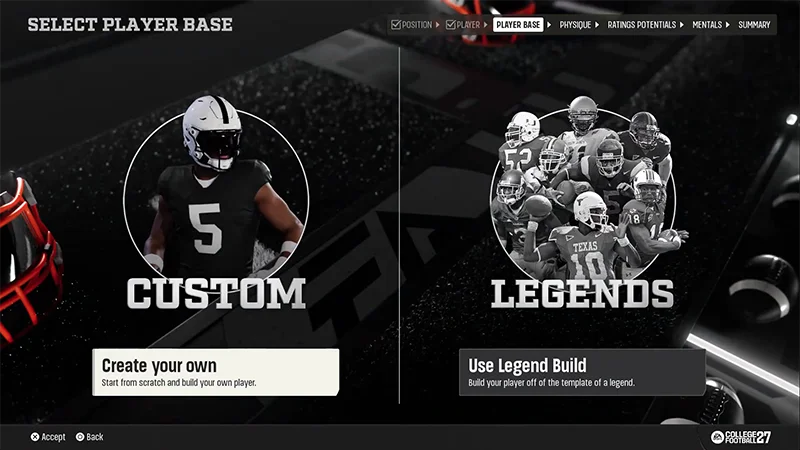
4. Select your Player Base
When you’ve finished customizing the basics of your player, it’s time to select your Player Base.There are two Player Base options to choose from.
Create Your Own
Start from scratch and build your own player from the ground up.
Use Legend Build
Start from a Legend Template inspired by some of college football’s most iconic players.
Choose Create Your Own if you want more control over your player’s build and long-term development.Build your player from the ground up by customizing their height, weight, body type, physique-driven attribute caps, and Max Potential allocation.If you choose Create Your Own,you’ll start with Physique Customization and determine your player’s height, weight, and body type.Physique Customization tips
For example, your player position determines the height ranges you can choose from. Your height choice then affects the available weight and body type options.
As you adjust your physique, your attribute caps will update to reflect the choices you make. Attribute caps represent the highest ratings your build can potentially reach.
Different physiques offer different strengths and tradeoffs. Heavier players may have more potential for strength and physical play, while lighter players may have more potential for speed and agility.
When you finish customizing your physique, you’ll set your Max Potential and long-term development path.
Choose Use Legend Build if you want to start from a Legend Template, which is a preset player build inspired by a college football legend. Each Legend Template is designed around the physical traits, archetype, and playstyle that made that player successful. They include preset height, weight, body type, physique-driven attribute caps, and Max Potential allocation.Legend Templates start your player off with a recognizable playstyle and strong foundation, while still allowing flexibility in shaping your player’s development.Tips for choosing a Legend Template
Browse the available Legend Templates for your position.
Review each template’s archetype, height, weight, and playstyle description.
Compare the attribute distribution and long-term strengths of each build.
Review each template’s Max Potential allocation to understand its strengths and long-term development path.
Select the template that best matches the type of player you want to create.
After you select a Legend Template, you can adjust your Max Potential to tweak the preset distribution of your player’s potential across different attributes.
5. Set your Max Potential
When you reach the Max Potential screen, you’ll use Max Potential Points to determine your player’s long-term potential across different attributes. The way you allocate those points influences your player’s strengths, weaknesses, and overall playstyle.
While your physique defines the maximum limit an attribute can reach, Max Potential determines how much of that limit your player can actually achieve.For example, if your physique allows a maximum Speed rating of 95, but you only allocate enough Max Potential to reach 92 Speed, then 92 becomes the highest Speed rating your player can reach.You’ll start with a set number of Max Potential Points. Spending those points lets you increase your player’s long-term potential in specific attributes and influence their strengths, weaknesses, and overall playstyle.As you spend your Points to adjust your Max Potential, your Overall Rating (OVR) and archetype update in real-time.
If you choose the Create Your Own player base option, you’ll allocate Max Potential Points to different attributes yourself. This shapes your player’s strengths, archetype, and long-term growth potential.While your physique determines the attribute caps available to your build, the way you spend Max Potential Points decides how close each attribute can get to those caps.Tips for determining your Max Potential
Review the attribute categories available for your position. Spend your Points on the attributes that best match the type of player you want to create.
You’ll find your player’s current Overall Rating (OVR), current archetype, and remaining Points at the top of the screen.
As you adjust attributes, your OVR and archetype will update to reflect the type of player you’re creating.
Remember that focusing your points on one area can help create a standout strength, but it may limit how much you can improve other attributes.
Check the Physical Abilities panel to understand which ones are available for your position and the requirements to unlock them.
Continue adjusting attributes until you’ve spent all your Points and are happy with your player’s strengths, weaknesses, and long-term development path.
If you choose the Use Legend Build player base option, your Max Potential starts with a preset allocation based on the strengths and playstyle of the Legend Template.When you reach the Max Potential screen, you can adjust that preset allocation to better match the type of player you want to create.
6. Choose your Mental Abilities
After you’ve set your Max Potential, you’ll choose your starting Mental Abilities.
In Road to Glory, Mental Abilities are unique traits applied to your student-athlete career—both on and off the field. They’re influenced by the choices you make throughout your career.All Mental Abilities start at the Bronze tier. You can upgrade them as you progress through your career by completing goals and meeting objectives.The better you perform and manage your career, the stronger your Mental Abilities can become over time.
When creating your Road to Glory player, you’ll choose three starting Mental Abilities. Each ability is tied directly to one of your core Weekly Agenda meters: Academics, Leadership, and Brand.You’ll choose:
1 x Mental Ability for Academics
1 x Mental Ability for Leadership
1 x Mental Ability for Brand.
To keep a Mental Ability active, make sure to maintain the Weekly Agenda meter it’s tied to. For example, if your Academics meter falls too low, your Academics-based Mental Ability will become inactive. If that happens, you’ll lose access to the benefits of the Mental Ability until you improve the meter and bring it back into good standing.
7. Finalize your player
Before you begin your career, you can review a final summary of your player build.Double-check these details to make sure you have a clear understanding of the player you created:
your archetype
your top attributes
your attribute caps and potential
your strengths and weaknesses.
Select Confirm & Save to begin your Road to Glory career.
Frequently asked questions about creating a player in Road to Glory
No, you can’t choose or change an archetype directly. Your archetype is determined by how you allocate your attributes and updates automatically as you spend your Max Potential Points.
The cost of an upgrade depends on the attribute you want to upgrade, your current rating, your position, and your player’s build. For example, larger players may need more Skill Points to improve Speed or Acceleration, while smaller players may spend more to improve Strength or Power Moves.
No. Max Potential determines how close your player can get to an attribute cap, but it doesn’t affect your starting rating.
While your Max Potential determines how much of an attribute’s potential your player can achieve, reaching that potential depends on what you accomplish throughout your career. That’s where Legacy Score comes in.Your Legacy Score reflects the impact you make as a player. Strong performances, major achievements, awards, championships, and other career milestones all contribute to your Legacy Score and help define the legacy you leave behind.
No. When an attribute reaches the limit set by your Max Potential allocation, it can’t be upgraded further unless you earn and use Cap Breakers.
Cap Breakers let you raise an attribute cap beyond the Max Potential you allocated during player creation. You can earn Cap Breakers during your career by reaching major milestones, winning awards, setting records, and other accomplishments.
You can earn up to 25 Cap Breakers throughout your career.
You can apply up to five Cap Breakers to a single attribute, but the increase you receive depends on that attribute’s current cap. For example, an attribute with a cap of 95 may only increase by one point, while an attribute with a lower cap may increase by more.
Still having issues?
Get in touch with our customer support team for more help.