Overview
Use different types of passes in EA SPORTS FC™ to keep possession, find teammates, and create chances. Learn when to use each pass type and how to practice passing in-game.
What are the controls for passing?
The controls depend on your platform and control configuration. To find your controls from the Main Menu:- 1Select Play.
- 2Select Learn to Play.
- 3Open Practice Arena.
- 4Pause the game.
- 5Select Button Help to view your controls, or Skill Moves Help to view Skill Move controls.
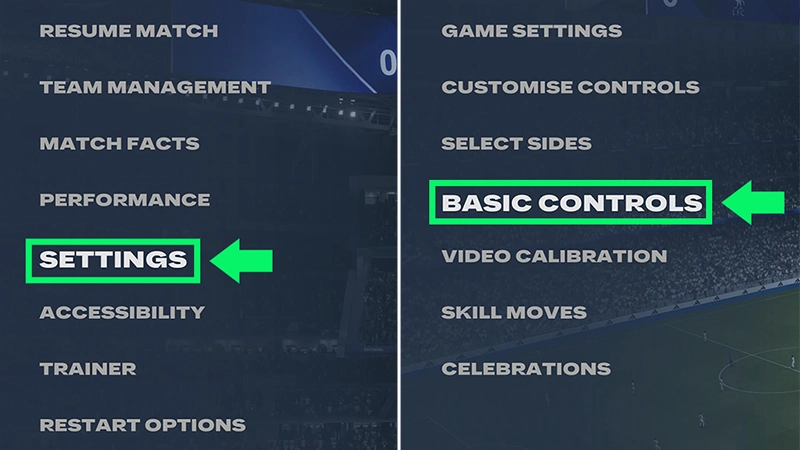
- 1Pause EA SPORTS FC™.
- 2Go to Settings.
- 3Select Basic Controls..
When to use basic passes
Use a ground pass to play the ball directly to a nearby teammate for short combinations and to keep possession.Aim toward your teammate and add enough power to reach them.
Use a through pass to play the ball into space ahead of a teammate making a run.Aim toward the space you want your teammate to run into. Through passes work best when there’s an open passing lane between defenders.
Use a lob pass to send the ball through the air to a teammate. You can use the same control to cross the ball from wide areas.Use more power for longer passes or switches across the pitch.When you’re near the side of the pitch, use a cross to play the ball toward teammates in or around the penalty area.
Use a lobbed through pass to send the ball over defenders and into space for a teammate making a run.Try a lobbed through pass when a defender is blocking the ground passing lane or there’s open space behind the defensive line.
Use a driven ground pass to send a faster ground pass directly toward a teammate.Driven ground passes can help you move the ball quickly through midfield, pass over longer distances, or find a teammate before a passing lane closes.The ball reaches your teammate with more speed, so consider how much space they have to receive it.
How to practice passing
Where to practice in-game
Use the Training Center and Skill Games to practice different types of passes and get used to their direction and power.To find the Training Center:- 1Open the Main Menu.
- 2Select Learn to Play.
- 3Open the Training Center.
- 4Select Passing.

Passing tips
Choosing your pass based on your teammate’s movement and the space around them can help you keep possession and create chances.- Use a Ground pass when your teammate is nearby with a clear passing lane.
- Use a Through pass when your teammate is running into open space.
- Use a Lobbed through pass when you want to play the ball over a defender.
- Use a Driven ground pass when you need to move the ball quickly.
- Adjust your pass power based on the distance to your target.
- Look for open passing lanes instead of forcing passes through defenders.