Overview
Stores in The Grounds let you buy gameplay items and customize your Street Appearance. Learn where to find stores, what you can buy, which currencies you can use, and how limited-time items, bundles, and purchase limits work.
Where are stores in The Grounds?
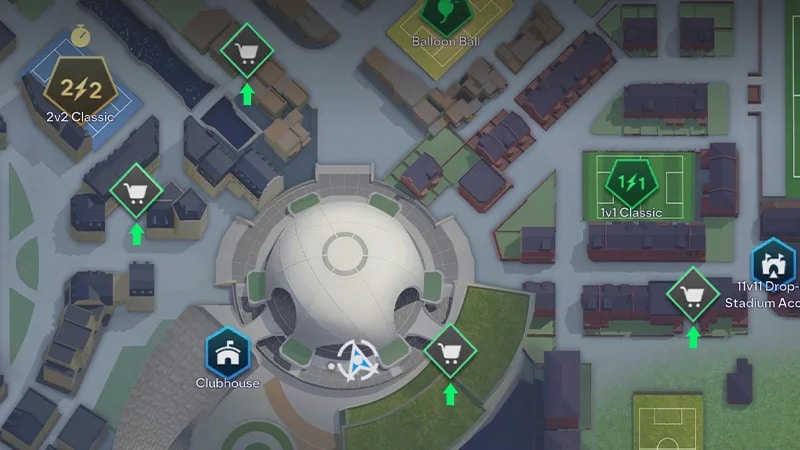
You can visit stores throughout The Grounds. You'll find World Stores in:- the Terrace
- Montclair
- Parkside
- Zeiza.
- 1Open the World Map.
- 2Go to the Store tab.
- 3Choose the Amp or Consumable you want to buy.
What currencies can you earn in The Grounds?
The currency you need depends on the item you want.You can earn Grounds Coins by playing games and completing Objectives in The Grounds. You can also buy items using EA SPORTS FC™ Points.Check an item's information before buying it to see its price and which currency you can use.You can also earn some items through Objectives and other gameplay rewards.What can you buy in The Grounds?
Stores offer gameplay items for your Archetype and cosmetic items for your Appearance.Available items can include:- Amps
- Consumables
- Authentic Kits
- Street Clothing
- Club and Street Items
- Emotes
- Featured Bundles.
Accelerated Match Performance items (Amps) are items in EA SPORTS FC™ 27 that give you more control over how your Archetype performs on the pitch. When equipped, they add specific benefits to your active Archetype for a limited time. Check an Amp's information before buying it to see its benefits, price, availability, and purchase limit.
Consumables can help with your Archetype progression, including items that give Archetype XP (AXP) or increase the AXP you earn.Some Consumables have requirements based on your Archetype or its level. Check the item's information before buying it to see how and when you can use it.
What is Street Appearance?
Street Appearance determines how your player looks while exploring and playing in The Grounds.You can use cosmetic items to customize your appearance and express your style or fandom. Street Appearance is separate from your Clubs Appearance, but you can use some items in both. Street Appearance items can include:- Tops
- Bottoms
- Hats
- Hairstyles
- Facial Hair
- Facial Accessories
- Gloves
- Archetype Card Backgrounds
- Tattoos
- Arm Sleeves
- Emotes.
How do Tops work?
Tops are cosmetic items you can use to customize your appearance in The Grounds.You can buy Tops from the Store, and some might also be available through Featured Bundles or as Objective rewards.When you get a Top, you can find and equip it under Street Appearance.How do Emotes work?
Emotes give you a non-verbal way to interact with other players in The Grounds.You can buy or earn Emotes and equip up to eight of them to your emote wheel.Some Emotes can also be earned through gameplay, including rewards tied to specific objectives or competitions.How do Featured Bundles work?
Featured Bundles group multiple items into one Store offer.Bundles can include vanity items, Consumables, Amps, and other content.Some bundles are available for a limited time. Check the bundle's expiry information before purchasing it.Bundles can also have purchase limits. When an Amp or Consumable is included in a bundle, its availability as part of that offer follows the bundle's purchase limit and expiration.Why can't I buy a certain item?
An item may be unavailable because:- you don't meet its Archetype Level requirement
- you've reached its purchase limit
- its Store availability has ended
- you don’t have enough Coins or Points..
Where do purchased items go?
Where you find an item after buying it depends on its type.All purchased Street vanity items are available through your Appearance Inventory. Amps and Consumables are available through their respective inventories in the Archetypes menu.Frequently asked questions
They can be. World Stores can offer vanity items and bundles specific to their location.
Yes. Some items can be earned by completing Objectives and through other gameplay rewards.
You can access Amps and Consumables through the game menus, World Stores, and the Clubhouse Store.
Authentic Kits appear with your Tops under Street Appearance. Equip your kit and save your changes to update how your player appears in The Grounds.
Authentic Kits come as designed, so you can’t edit their fit or sleeve style. The number on your Authentic Home Kit is based on the number you enter in the Edit Appearance tab.
Yes. Street Appearance items you buy or earn stay in your inventory and can't be traded or sold.
Some Store offers limit how many times you can make a purchase.Check the item's information to see its purchase limit and how many purchases you have remaining.
No. Items you own can't be sold or traded.You don't need to discard items to free up inventory space.
No. Items you get in The Grounds are for your own use and can't be traded or sold to other players.Appearance items you buy or earn stay in your inventory, so you can equip them again later.You also don't need to discard items to make room for new ones.