Overview
Coaches provide Coach Combinations and Boosts that give you more options when building your Hockey Ultimate Team™ (HUT) lineup. Learn how to get and change Coaches, and how their Boosts can affect your lineup.
What are Coaches in HUT?
Coaches are HUT Items that provide Line Combinations and Boosts for your lineup. Choosing a Coach whose combinations work with your players gives you more options when building your team.You can assign a different Coach to each of your HUT lineups, so you can choose Coaches that suit how each lineup is built.How do I get Coaches?
You'll get a Coach in your HUT Starter Pack when you first start building your team. Your Starter Coach is automatically added to your lineup so you can start using Coach Combinations and Boosts.You can also get Coach Items through Packs and the Auction House.- Packs: Coach Items can drop from HUT Packs.
- Auction House: search for and buy specific Coach Items using Coins. Filter by Team, Card Type, or Price to narrow your search.
How do Coach Boosts and Line Combinations work?
Your active Coach adds Line Combinations to your HUT lineup. Complete a Coach Line Combination to activate the Boost for the line that completes the combination.Coach Combinations can apply to Forwards or Defence/Goalies. Depending on the combination, Coach Boosts can increase:- Salary Cap
- Ability Point
- OVR.
Where can I find Coach Combinations?
Coach Combinations are shown in the Coach Info screen and in the Coach Combinations section of the Line Combinations screen. Your Coach can provide up to 4 Forward Combinations and 4 Defence/Goalie Combinations.Your Coach Combinations stay with that Coach across HUT Seasons and don't change with seasonal Line Combination updates.Your active Coach determines which Coach Combinations are available. Changing your Coach changes the Coach Combinations attached to your lineup.How do I change my Coach?
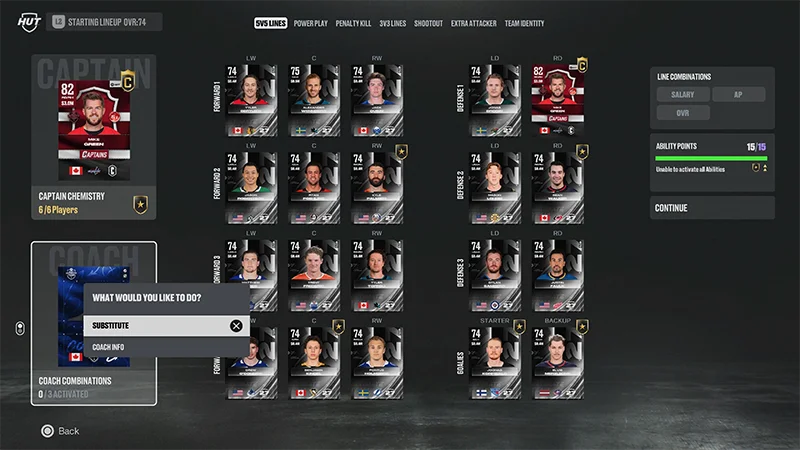
- 1Go to Edit Lines and open the 5v5 Lines tab.
- 2Select your active Coach.
- 3Select Substitute.
- 4Select the Coach you want to add to your lineup.