MySims™: Cozy Bundle beginner guide: Sims, houses, and Essences
5 min read
Overview
Learn the basics of MySims™: Cozy Bundle, like how to create a Sim, build houses and Workshops, understand Interests, collect Essences, and level up your town.
The MySims: Cozy Bundle includes retro re-releases of two games: MySims and MySims Kingdom. In these classic games, you can explore worlds, meet unique characters, and unleash your creativity.
In MySims, you help Mayor Rosalyn rebuild and transform a struggling town. From crafting furniture to adding new buildings, you can customize your town and show off your creativity. You’ll also meet interesting characters, complete fun requests for the townspeople, and attract new residents by improving the town.
In MySims Kingdom, you help King Roland transform his kingdom from a state of disrepair into a thriving, happy place for all his subjects. Take on epic quests, solve puzzles, and meet unique characters while unraveling the kingdom's mysteries.
How do I create a Sim in MySims: Cozy Bundle?
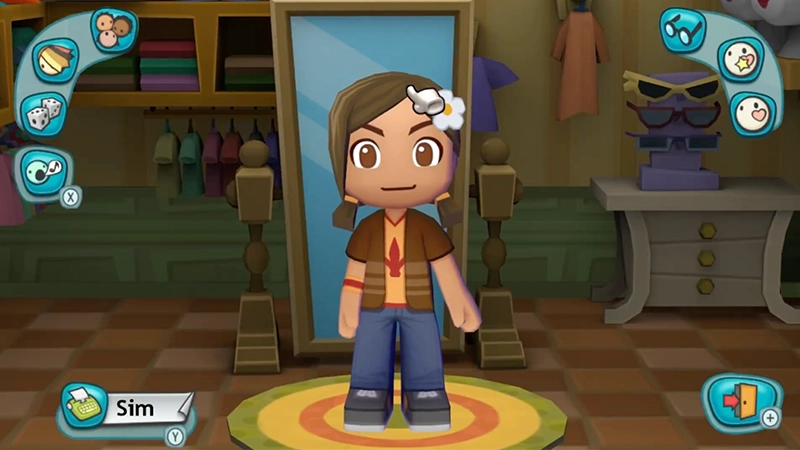
When you first launch either game, you start with a randomly generated Sim that you can customize.The on-screen position of the character customization buttons in MySims differs from MySims Kingdom, but here are some of the shared customization features in both games.
Column 1
Column 2
Sim hair, eyes, mouth, and outfit
Point the cursor on your Sim’s hair, eyes, mouth, or outfit to scroll through all options and choose the one you want to use.
Skin tone
Select the Skin Tone button to change your Sim’s skin tone.
Hair color
Select the Hair Color button to scroll through hair color options for your Sim.
Glasses
Select the Glasses button to choose glasses for your Sim.
Face paint
Select the Face Paint button to see options for makeup and face paint.
Voice
Choose what your Sim’s voice will sound like and use the sliders to adjust the pitch.
Sim name
Give your Sim a name before they start their big adventure.
Randomize your Sim
Select the Randomizer button (dice icon) to generate your Sim’s features randomly.
When you’re finished creating your Sim, select the Exit button (a door with an arrow) in the bottom-right corner to save.
How do I build my house and Workshop in MySims?
You can build and customize your house and Workshop using Build Mode.
Your house is your Sim’s personal residence.
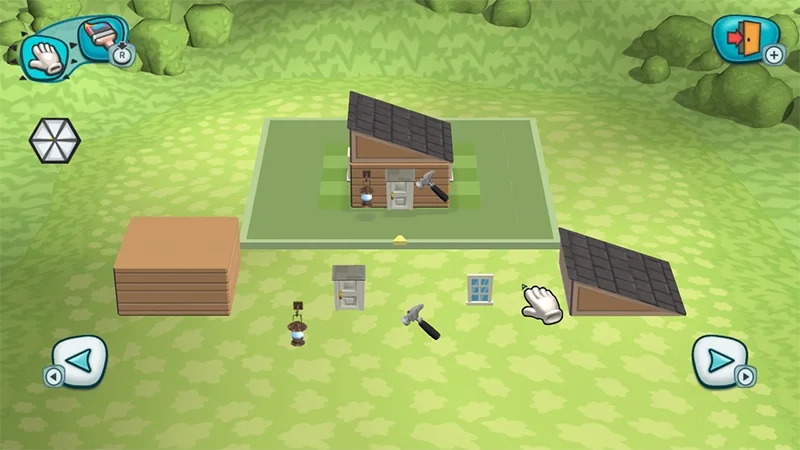
Your Workshop is your crafting hub, where you can craft furniture and other household objects.
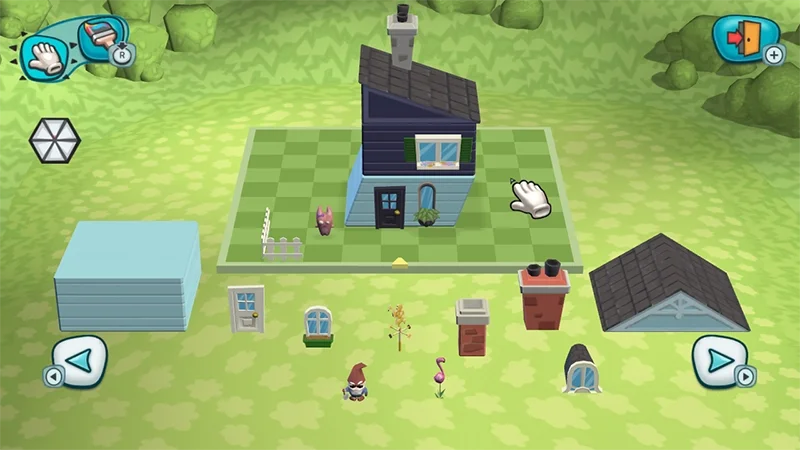
In Build Mode, the green grid outlines the limits of your workspace, showing you where you can build your house or Workshop.
1
Move the pointer to the base block and select it. Then, drag your base block to the workspace to place it.
You can use controls to resize your base block or to cycle through more building options.
2
Add the roof.
3
Add objects (door, window, etc.) to the exterior. Drag the object from the lawn to the workspace to place it.
The blue dots highlight where you can place objects.
4
To change the color of something, select the Paint button in the top left-hand corner. Then, move the pointer to the object you want to change the color of and select it.
5
When you finish building your house or Workshop, select the Exit button (a door with an arrow) in the top right corner to save.
Heads-up that you’ll need to add the following before you can save and proceed.
House: a door.
Workshop: the hammer sign.
After you give your resident registration form to Mayor Rosalyn, she’ll prompt you to build your house.
After you collect your first Essences, Mayor Rosalyn will ask you to build the Workshop.
To save what you’ve created in Build Mode, every building in your town (except your house) must have at least one of each of these objects:
a base block
a sign
a door.
When building and placing objects for other Sims, keep their Interests in mind. The Interests wheel on the left of your screen in Build Mode lets you know what Interests the building and objects you’re placing are meeting.
To change the look of an existing house, select the mailbox and choose Remodel. You’ll unlock more building blocks and decoratives as you play.
When building objects in the Workshop, use the green highlighted objects to fill in the ghost image of the object from the bottom up.
When you finish building an object in the Workshop, select the Exit button (a door with an arrow) in the top-right corner. The completed object can be found in your backpack.
How do I design a house in MySims?
You can design a house in MySims by using Build Mode and the Workshop to create custom homes for you or other Sims.In Build Mode, you can:
add or remove rooms
change walls, roofs, windows, and doors
move furniture and decorations
use the Paint button to change the color of certain objects (such as blocks and roofs).
In the Workshop, you can:
create furniture
use Essences to change colors or patterns.
In MySims, you can customize and design your house or other Sims’ houses in lots of creative ways. Whether you want to design around a favorite color scheme, add unique structural features, or create a specific aesthetic, customizing houses lets you put your own personal touch on your town.You can also create Interest-themed houses with matching furniture, decorations, and building styles that reflect a Sim’s favorite Interests.
Here are some house design ideas to try in MySims.
Column 1
Column 2
Cute houses
Include some pastel colors, flower decorations, heart patterns, and cozy furniture.
Spooky houses
Use darker colors, gothic windows, eerie decorations, and haunted-themed furniture.
Fun houses
Add bright colors, playful shapes, arcade-style decorations, and party-themed items.
Geeky houses
Blend modern designs with gadgets, gaming decorations, and science fiction-inspired furniture.
Studious houses
Incorporate libraries, desks, bookshelves, and classic furniture styles.
Tasty houses
Lean into kitchens, dining spaces, food decorations, and warm, welcoming layouts.
As you increase your Star Level, you’ll unlock more building blocks, decorations, and furniture options to create even more unique house designs.
How do I use the Workshop in MySims?
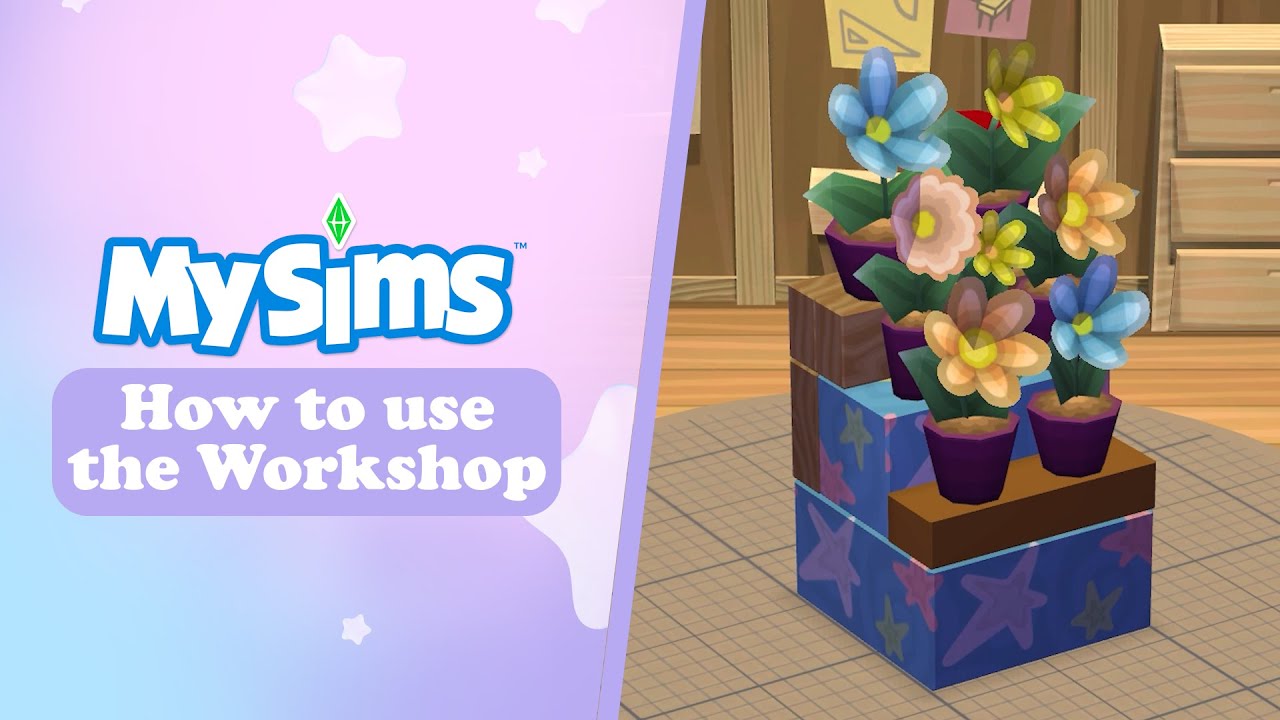
In the Workshop, you can build and customize furniture, decorations, and other objects for your home and other Sims using Essences you collect while exploring.To make objects in the Workshop, you’ll need blueprints, which are unlocked by interacting with Sims and completing their tasks or requests.To build an item in the Workshop:
1
Enter the Workshop and choose the blueprint you want to use.
2
Use the green highlighted objects to fill in the ghost image of the object from the bottom up.
3
Add Essences to customize your creation with different colors, patterns, and styles.
The object info wheel on the left side of the screen shows how your chosen Essences affect your creation and which Interests the object matches.
4
When you finish building, select the Exit button (a door with an arrow) in the top right corner to save.
When your object is complete, it’ll automatically be added to your backpack.
What are Interests in MySims: Cozy Bundle?
In MySims: Cozy Bundle, every character has Interests that shape their style and personality. These Interests affect what they like and how they interact with others. Interests also categorize objects in the game.
Want to find out what a Sim’s Interests are? Sims often express their likes and dislikes through interactions, so look for any hints they might give during conversations. You can also check if the Sim’s decoration style or owned objects have a specific theme, which may give clues about their Interests.
In MySims, Interests define a Sim’s likes and dislikes. Knowing a Sim’s Interests is useful for interactions and when deciding what to use or avoid when making furniture and buildings for them.Interests in MySims fall under five categories.
Cute
Sims with this interest usually have bubbly, cheerful personalities and like adorable things, such as cute animals, dolls, flowers, stylish clothes, and pastel colors.
Cute-themed decorations include stuffed animals and pastel furniture.
A Cute building style might include playful patterns, soft textures, and an overall cozy vibe.
Spooky
Sims with this interest usually have mysterious personalities and enjoy supernatural and gothic themes, creepy decorations, and spooky activities.
Spooky-themed decorations include haunted house furniture, eerie lighting, and Halloween-style ornaments.
A Spooky building style might include gothic architecture, dark wood, and an overall haunted vibe.
Fun
Sims with this interest usually have energetic personalities and love to be entertained. They enjoy dancing, sports, parties, and playing games.
Fun-themed decorations are bright and colorful with playful designs, like arcade machines and carnival-themed accessories.
A Fun building style might include whimsical shapes and interactive elements.
Geeky
Sims with this interest usually have intelligent or eccentric personalities and are passionate about science fiction, fantasy, and technology. They enjoy reading, video games, action figures, and building things.
Geeky-themed decorations include computers, robots, gaming consoles, and space-themed objects.
A Geeky building style might include sleek, modern designs with tech features and interactive elements.
Studious
Sims with this interest usually have thoughtful, curious personalities and enjoy learning, reading books, and solving puzzles.
Studious-themed decorations include desks, bookshelves, chalkboards, and scientific objects.
A Studious building style might include classic scholarly designs, elegant wood finishes, and an overall quiet vibe.
Tasty
Sims with this interest usually have warm, friendly personalities and enjoy cooking, baking, and eating delicious meals.
Tasty-themed decorations include kitchen appliances, dining furniture, and food displays.
A Tasty building style might include vibrant, appetizing designs, food motifs, ample cooking space, and welcoming dining areas.
Each Sim you meet will have an Interest they Love,Like, and Hate. For example, here’s how Chaz Mc Freeley’s Interests are ranked:
Loves Fun
Likes Spooky
Hates Geeky.
In MySims Kingdom, Interests work a little differently than in MySims. Interests are less important in character interactions—instead, they help you sort objects based on their theme or style. They’re more about organizing objects by category than defining a Sim’s personality.These Interests feature in both MySims and MySims Kingdom:
Fun
Cute
Spooky.
Other Interests in MySims Kingdom fall under these categories.
Domestic
Quests or tasks for Sims with this interest can include building or decorating their homes with cozy furniture, kitchenware, and plants to enhance comfort and functionality.
Elegant
Quests or tasks for Sims with this interest can include designing harmonious, opulent spaces by creating objects that reflect their style and elegance.
Food
Quests or tasks for Sims with this interest can include gathering specific Essences to help them create delicious dishes, or supplying objects that enhance their cooking spaces, like stoves, refrigerators, or dining sets.
Nature
Quests or tasks for Sims with this interest can include providing items that enhance natural settings, like benches, birdhouses, and fountains. You might also be tasked with growing specific types of flowers or creating animal habitats.
Structure
Quests or tasks for Sims with this interest can include providing them with items like bricks, beams, and blueprints to design and create sturdy, functional buildings.
Tech
Quests or tasks for Sims with this interest can include providing them with high-tech gadgets, building robots, or optimizing existing structures with technology.
What are Essences in MySims: Cozy Bundle?
Essences are collectible items that are used to customize furniture, buildings, and other objects. When you’ve collected the Essences needed for an object or building, you can craft it in the Workshop.
Essences can be:
objects, like metals, wood, stone, and household items
emotions, like happy, sad, or angry
living things, like fish, lizards, elephants, or puppies.
In MySims, Essences are categorized by Interests, like Cute, Spooky, Fun, etc.
For example, Essences like Garnet or Puppy fall under the Cute category, while Beach Ball and Diamonds fall under the Fun category.
You can collect Essences by taking part in different activities.
Socializing
Interact with Sims to get Essences related to emotions. For example, being mean to other Sims can result in you collecting the Angry Essence.
Fishing
Go fishing in ponds and lakes to collect Essences like fish, octopus, and crab, or physical objects like tires and beach balls.
Harvesting
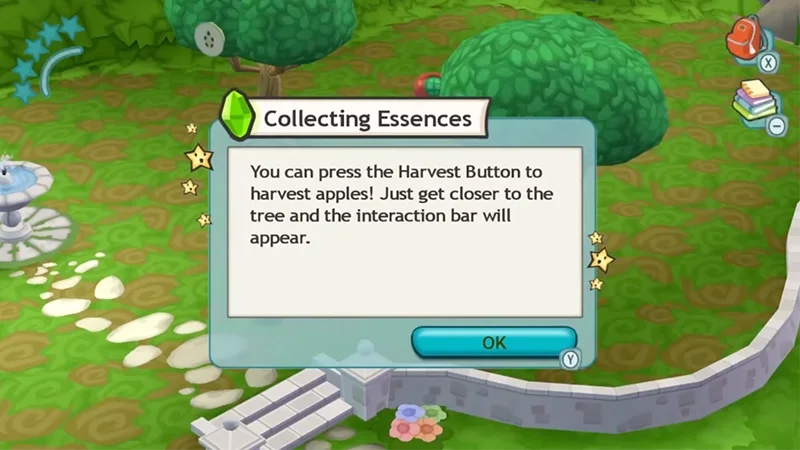
You can harvest items like fruit, trees, and flowers. Harvesting involves actions like shaking a tree or picking a flower.
Prospecting
Use a metal detector to search for Essences hidden underground.
Mining (in MySims Kingdom only)
Break rocks to collect Essences.
What are Star Levels and King Points?
In MySims, Star Levels measure the progress you’ve made in improving your town. Here’s how Star Levels work.
Your town's Star Level is an indication of its progression and popularity.
As you complete tasks, build structures, and attract new residents, your Star Level increases.
With each increase in your town's Star Level, you'll unlock new features, areas, blueprints, and characters.
You can find your Star Level in the top-left corner of the Live Mode screen.
To fill the progress bar in the top-left of your screen and reach the next Star Level, complete tasks or quests to earn points.
When you have enough points, your Star Level will increase and the progress bar will reset.
In MySims Kingdom, you’ll earn King Points by completing different tasks and building projects. Kings Points help you progress, unlock new islands, and expand the playable area. Here’s how King Points work.
King Points are earned by completing tasks, fulfilling requests, and building structures. You can then use these points to gain access to new islands and regions, letting you explore further.
When you have enough King Points, you’ll reach the next King Point Level. Your King Points Level measures your progress in the game.
Each new level lets you unlock additional islands and content.
You can find your King Points Level in the upper-left corner of the Live Mode screen.
To fill the progress bar below the crown and reach the next King Points Level, complete tasks to earn King Points.
When you have enough King Points, your King Points Level will increase and the progress bar will reset.
How do MySims: Cozy Bundle controls work?
Learn how to use MySims: Cozy Bundle controls on different platforms, like Nintendo Switch™, PC, PlayStation®, Xbox, and Apple Arcade.
Yes, you can remodel your house at any time.Select your mailbox and choose Remodel.
Prospecting lets you search for hidden Essences underground using the metal detector.
1
Equip the metal detector.
2
Walk around until the detector reacts.
3
Move slowly to locate the buried Essence.
4
Select the dig spot to collect it.
You can get Spooky Essences by collecting spooky-themed objects, prospecting, fishing, and interacting with Sims who have a Spooky Interest. Some decorations, furniture, and areas around town can also reward Spooky-themed Essences.
Try finding rare Essences through activities like prospecting, fishing, harvesting, mining, and interacting with Sims. Some Essences are tied to specific Interests or locations, so exploring different areas and completing tasks might help you discover harder-to-find items.
You can unlock more Workshop blueprints by talking to Sims and completing their requests and tasks. As your Star Level increases and more Sims move into town, you’ll unlock additional furniture, decorations, and building blueprints.
Using the wrong Interests when decorating homes or creating furniture can make Sims less happy with your designs. Paying attention to a Sim’s Likes and Dislikes can help you complete requests more successfully and improve relationships with other Sims.
You can unlock new islands in MySims Kingdom by earning King Points. Complete tasks, help Sims, and build structures to fill your King Points progress bar. As your King Points Level increases, you’ll gain access to new islands, characters, and quests.
Still having issues?
Get in touch with our customer support team for more help.