Overview
Learn about Amp Tiers and Archetype Affinity, where to get Amps, and how to equip and use them.
What are Amps?
Accelerated Match Performance items (Amps) are a type of item in EA SPORTS FC™ 27 that give you more control over how your Archetype performs on the pitch. When equipped, they add specific benefits to your active Archetype for a limited time. Depending on the Amp, these can include:- Attribute boosts
- PlayStyles or PlayStyle+
- Perks
- extra bonuses for matching Archetypes.
What are Amp Tiers?
Amps have four Tiers. Higher-Tier Amps can provide different combinations of benefits.Tier 1 and Tier 2 Amps
Tier 1 and Tier 2 Amps provide Attribute boosts for a limited number of matches.Check the Amp’s information to see which Attributes it boosts and how many match uses it has.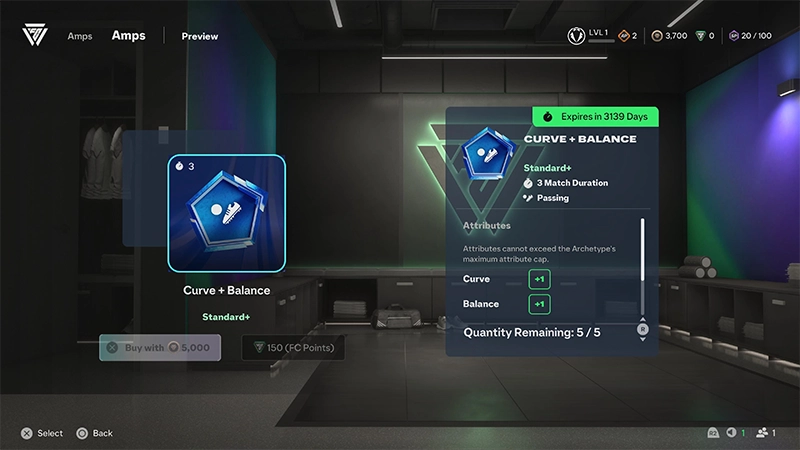
Tier 3 and Tier 4 Signature Amps
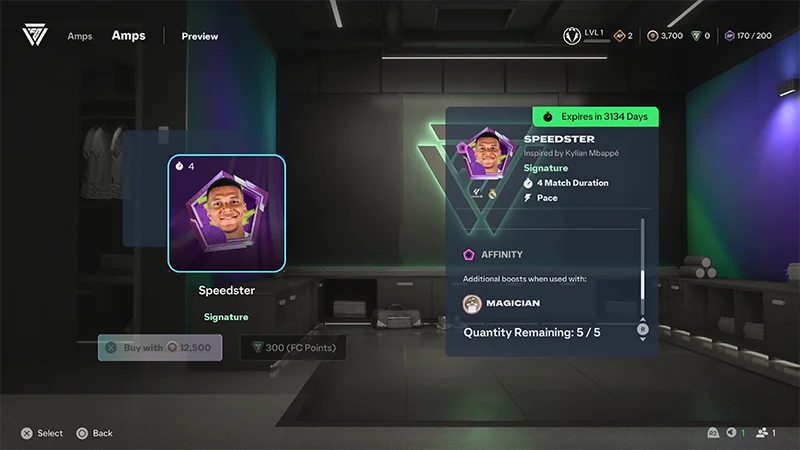
Tier 3 and Tier 4 Amps are Signature Amps and can be inspired by real-life players.Depending on the Amp, a Signature Amp can provide:- boosts to two Attributes
- a PlayStyle or PlayStyle+
- a Perk
- an Archetype Affinity bonus.
How does Archetype Affinity work?
Some Amps have an Affinity with a specific Archetype. Equip the Amp to its matching Archetype to get a bonus.For example, an Amp with Magician Affinity could give the Magician Archetype an additional Sprint Speed boost.Check the Amp information panel for its Affinity and a breakdown of the bonus.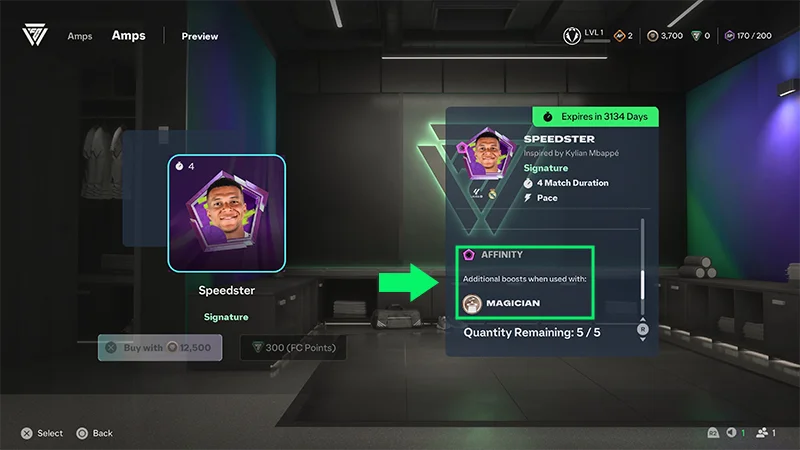
Where can you get Amps?
Amps can be available through:- the Stores using Coins or Points
- Objectives
- Live Game Modes
- Featured Bundles.
How do I equip an Amp?
Equip an Amp to your active Archetype to apply its gameplay benefits.- 1Go to the Archetypes menu.
- 2Navigate to the Amps tab.
- 3Choose an open slot and which Amp you want to use.
- There’s one Signature Amp slot and two Standard Amp slots.
- 4Check its boosts, Affinity, and remaining match uses.
- 5Select the option to equip the Amp to your active Archetype.
How long do Amps last?
Amps last for a limited number of matches. Check an Amp’s information to see how many match uses it has.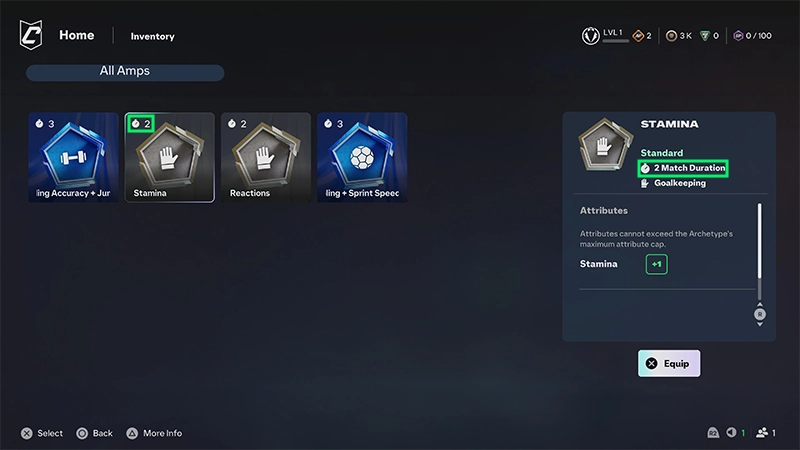
Yes. You can unequip an Amp before you’ve used all of its match uses.The Amp returns to your inventory with its remaining uses, so you can equip it again later.
- 1Go to Archetypes menu.
- 2Navigate to the Amps tab.
- 3Go to the Amp Slot with the Amp you want to unequip.
- 4Select the option to unequip the Amp.
How do Attribute boosts work?
Amps can temporarily increase specific Attributes, but an Attribute can’t go above its maximum cap.If an Amp would push an Attribute above its cap, you won’t get the full value of that boost.For example, if an Attribute is already close to its maximum, only part of the Amp’s boost may apply.Check the on-screen warning and the Amp’s Attribute boosts before equipping it. The Amp can still use its match durability even when you aren’t getting its full Attribute boost.Do Amps work everywhere?
No. Amps don’t apply in some activities, including Kickabouts.When Amps don’t apply, your Archetype card shows the equipped Amp as disabled. The information panel at the gameplay location can also tell you that Amps don’t apply.Playing a Kickabout doesn’t reduce your Amp’s remaining match uses.
How to get Amps
You can find available Amps in the Store.Amp information can include:- Tier
- Amp type
- Attribute boosts
- PlayStyles or PlayStyle+
- Perks
- Archetype Affinity
- Match Duration
- Price
- Purchase Limit
- Store Expiration.
FAQ
Equipping some consumables can replace one you already have active.For example, equipping a Party AXP Multiplier while another consumable is active replaces the active consumable. Any remaining matches or boosts on the replaced consumable are lost.Check what you have equipped before replacing an active consumable.
Your Archetype may already have an Attribute close to its maximum cap.Amp Attribute boosts only apply up to that maximum. Check the warning when applying the Amp to see if part of its boost won’t apply.
You may be entering an activity where Amps don’t apply.Check your Archetype card and the gameplay location’s information panel. For example, Amps are disabled during Kickabouts.
If you intentionally disconnect from an eligible match while using an Amp, one of its match uses is still consumed.
Yes. Unequip the Amp before all its uses are consumed. It returns to your inventory with its remaining match uses.
Check that the Amp’s Affinity matches the Archetype you’re using.You can still get the Amp’s standard benefits with a different Archetype, but the extra Affinity bonus only applies to its matching Archetype.