Overview
After scoring a goal in EA SPORTS FC™, you can perform your player's signature celebration, choose a random celebration, or use different button combinations for other celebrations. Learn the basic celebration controls and how to skip a celebration when you want to get back to the match.
What are the controls for different celebrations?
The controls depend on your platform and control configuration. To find your controls in-game:- 1Pause a match in EA SPORTS FC™.
- 2Go to Settings.
- 3Select Celebrations.
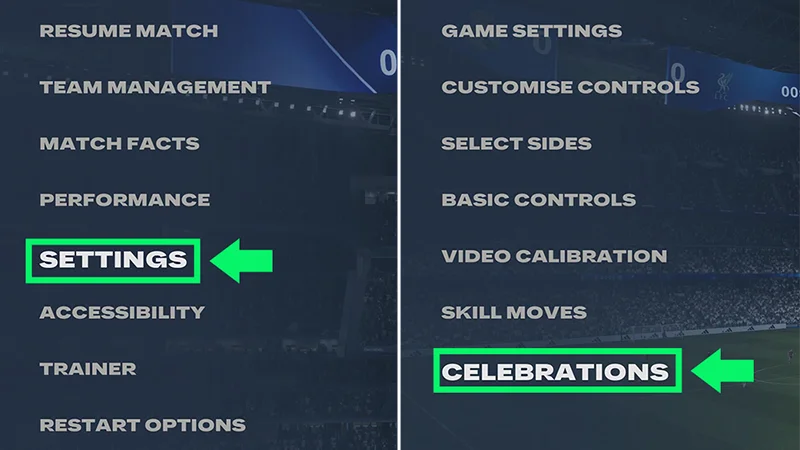
What are the different types of celebrations?
The exact combinations depend on the celebration you want to perform, and available celebrations can vary between EA SPORTS FC™ games.Some celebrations might need to be unlocked before you can use them.Signature Celebration
A Signature Celebration triggers a celebration associated with the player or situation.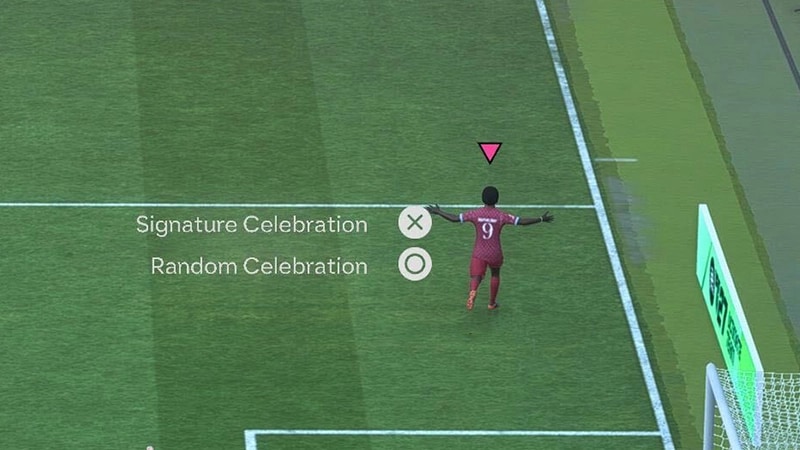
Random celebration
The game can choose a random celebration for you if you don’t want to use a specific one.Can I cancel a celebration?
You can cancel your celebration if you want to move on after scoring.This ends the celebration sequence early so the match can move toward the restart.The specific controls to cancel a celebration in your game can be found in Settings > Celebrations.Why can't I perform a celebration?
If a celebration isn't working, make sure you're entering the combination right after scoring.You can also check if:- the celebration is available in your EA SPORTS FC™ game
- you need to unlock the celebration first
- you've customized your controller configuration
- the celebration has specific requirements.