Overview
You can use different types of shots in EA SPORTS FC™ depending on your position, distance from the goal, and where the goalkeeper is. Learn how to take regular, Finesse, Chip, Power, Trivela, and Low Driven shots and when to use each one.
What are the controls for shooting?
The controls depend on your platform and control configuration.To find your controls from the Main Menu:- 1Select Play.
- 2Select Learn to Play.
- 3Open Practice Arena.
- 4Pause the game.
- 5Select Button Help to view your controls, or Skill Moves Help to view Skill Move controls.
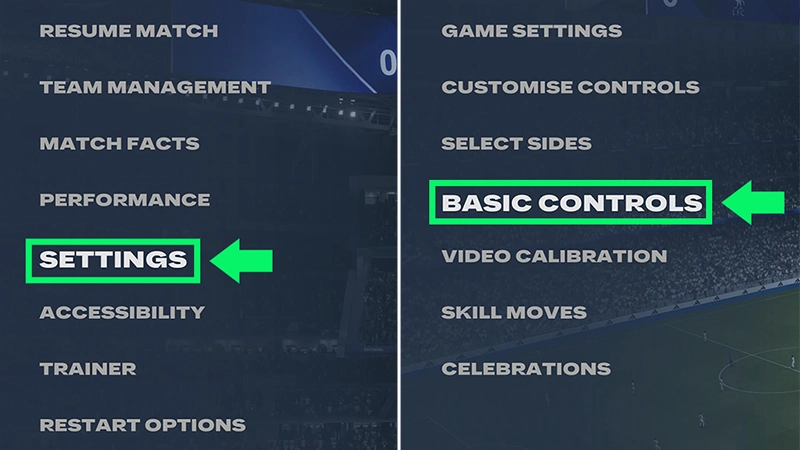
- 1Pause EA SPORTS FC™.
- 2Go to Settings.
- 3Select Basic Controls.
When to take a regular shot
Aim toward the part of the goal you want to target and add the amount of power you want.Use less power when you're closer to the goal and more when shooting from farther away. Your player's attributes, position, angle, and pressure from defenders can also affect the shot.When to take a Finesse Shot
Use a Finesse Shot when you want to curl the ball toward your target.Aim toward your target and add the amount of power you want.Finesse Shots can be useful when you have space to curl the ball around a defender or goalkeeper.When to take a Chip Shot
Use a Chip Shot to lift the ball over the goalkeeper.Try a Chip Shot when the goalkeeper has moved away from the goal line or is rushing toward your player.When to take a Power Shot
Use a Power Shot when you have space to set up a more powerful attempt.Aim carefully. Power Shots have a longer wind-up than regular shots, so defenders may have more time to challenge your player.When to take a Trivela Shot
A Trivela Shot uses the outside of the player's foot.Your player needs the Game Changer PlayStyle or PlayStyle+ to perform a Trivela Shot. Without it, they'll attempt a shot with the top of their foot.When to take a Low Driven Shot
In EA SPORTS FC™ 27 and EA SPORTS FC™ 26, you can add Low Driven to most shot types by pressing the shot input again after setting your shot power.Use a Low Driven Shot when you want to keep your shot low, especially for close-range or one-on-one chances.After setting your shot power, press the shot input again.You can also combine Low Driven with other shot types, like:- Low Driven Finesse Shot
- Low Driven Power Shot
- Use the Power Shot input to set your power, then press the shot input again.
- Low Driven Trivela Shot.
- Use the Trivela Shot input to set your power, then press the shot input again.
When to shoot when the ball is in the air
Use the regular shot input when the ball reaches your player in the air.Depending on the ball's height, position, and your player's movement, they may attempt a volley or header.To attempt a Low Driven volley or header, press the shot input again after setting your shot power.Tips for choosing the right shot
| Column 1 | Column 2 | ||
|---|---|---|---|
| Regular shot | For straightforward situations. | ||
| Finesse Shot | When you want to curl the ball toward your target. | ||
| Chip Shot | When the goalkeeper moves away from the goal line. | ||
| Power Shot | When you have enough space for the longer wind-up. | ||
| Low Driven Shot | When you want to keep the shot low, especially for close-range or one-on-one chances. | ||
| Volley or Header | When receiving the ball in the air |
How to practice shooting
The Training Center
Use the Training Center to practice different types of shots and get used to their aim and power:- 1Open the Main Menu.
- 2Select Learn to Play.
- 3Open the Training Center.
- 4Select one of the training options that work on shooting:
- Fundamentals
- Rush
- Attacking.

The Practice Arena
You can also use the Practice Arena to try out different shots without playing a full match.- 1Open the Main Menu.
- 2Go to Learn to Play.
- 3Select Practice Arena.
- 4Choose your settings and start practicing.