The Grounds is a social world in EA SPORTS FC™ 27 on PC, PlayStation 5, XBOX Series X|S and Nintendo Switch 2 where you can explore, meet other players, and find different ways to play. Learn how to navigate its districts, use the map, find other players, and access Street Football and Clubs experiences.
The Grounds expands the Clubs experience into an open social world built around your Archetype.Explore different districts, meet other players, play Street Football and other activities, or access larger Clubs matches.The Grounds is open for you to explore from the start, so you don’t need to level up to access different areas.
What are the districts in The Grounds?
The Grounds has three districts, each with its own setting and gameplay focus. The Terrace sits at the center and connects all three.
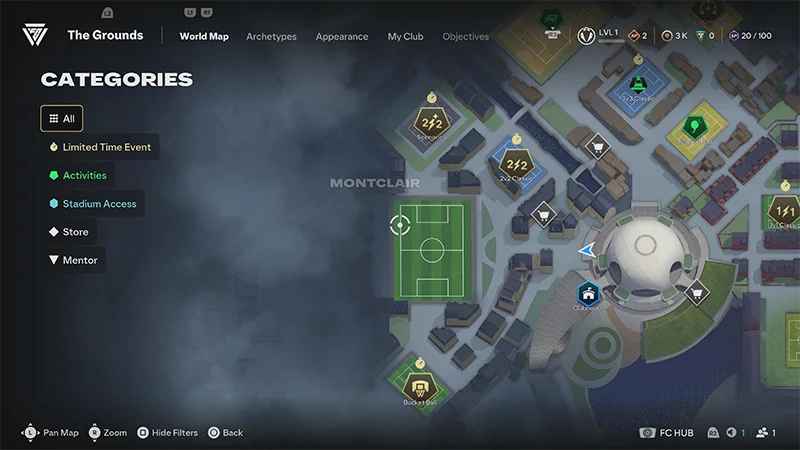
Montclair is inspired by France, and is located west of the Terrace.Montclair has 2v2, Rush, Scenarios, and Bucket Ball.
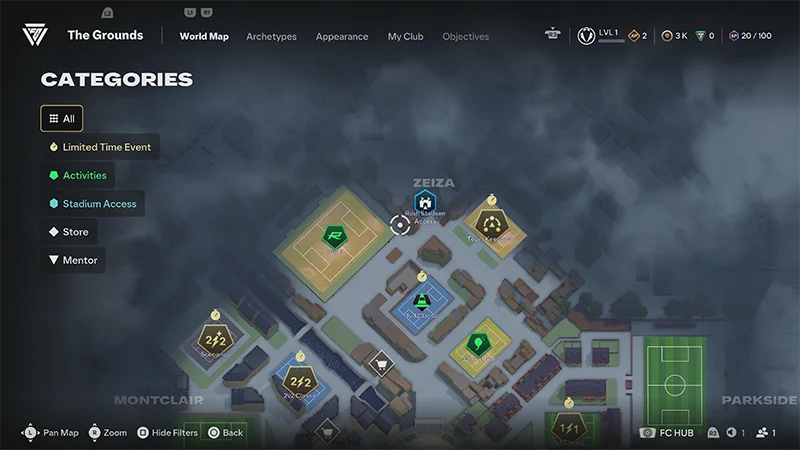
Zeiza is the district inspired by Argentina, located north of the Terrace.
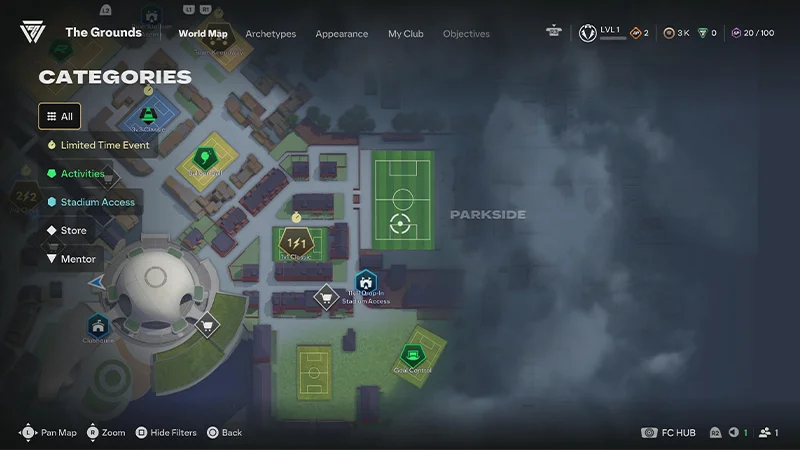
Parkside is the UK-inspired district, located east of The Terrace.You can also access Clubs 11v11 Drop-In from here.
The Terrace is the central hub connecting Montclair, Zeiza, and Parkside.You’ll start in The Terrace when you enter The Grounds. You can also access the Clubhouse from here.
How to get around The Grounds
Explore The Grounds on foot or use the map to find destinations around the world.You can set waypoints for locations like:
the Clubhouse
stores
Rush Drop-In
11v11 Drop-In
gameplay locations.
After setting a waypoint, follow its marker to your destination.
How to fast travel
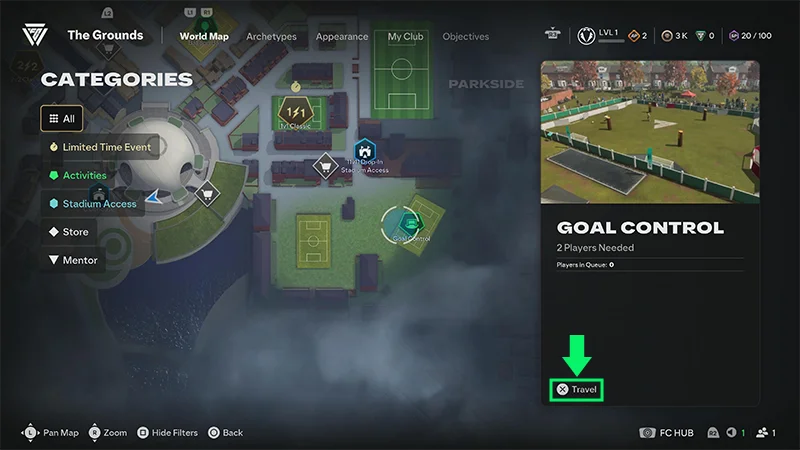
Open the Menu at the bottom left of your screen. Hover over a Street Football pitch or Kickabout, then select Travel to move there immediately.You can only use Travel for Street Football and Kickabout locations.
How to find other players
Check the map to see where other players are gathering.Player markers show who’s around The Grounds:
white dots represent other players
blue dots represent players in your Club
pink dots represent players in your party.
Look for areas with more player markers to find popular locations and games.
What can you play in The Grounds?
Gameplay locations are spread throughout The Grounds, giving you different ways to play.
Street Football
Street Football gives you small-sided football matches around The Grounds, including:
1v1
2v2
3v3.
Check the information board beside a pitch before joining.
Kickabouts
Kickabouts are short multiplayer activities with their own rules and objectives, including Bocce Ball, Balloon Ball, Bucketball, and more.Learn more in our dedicated Kickabouts article.
Rush and 11v11 Drop-In
You can access Ranked Rush and Rush Live Event Tournaments from locations in The Grounds.Find their locations while exploring or use the map to make your way there.Entering one of these modes can temporarily take you out of your current Grounds world while you play.
How to join a game in The Grounds
Gameplay pitches have an information board explaining the rules and a queue area for joining a match.
1
Find the Kickabout or Street Football pitch you want to play.
2
Check the information board for its rules.
3
Enter the queue zone and select Play.
4
Wait for the required number of players to join.
While you wait, you can watch live matches taking place on visible pitches from the sidelines.Some game types can start a separate match when enough players join, so you won’t always need to wait for the current pitch to become available.
How do Drop Kicks work?
You don’t need to join a match to kick a ball around The Grounds.Spawn a ball using the on-screen controls and use it while exploring. You can also find targets placed around the world to interact with.
What is the Clubhouse?
The Clubhouse is in the Terrace and gives you access to club-related experiences.From the Clubhouse, you can access:
League and Playoff matches
11v11 Live Event Tournaments
the Store for Consumables and Amps.
Ranked Rush and 11v11 Drop-In aren’t available from the Clubhouse. To play these modes, go to their separate access points in The Grounds.You also can’t get vanity items from the Clubhouse Store. Visit a World Store in The Grounds to browse and buy vanity items.
How do live events work?
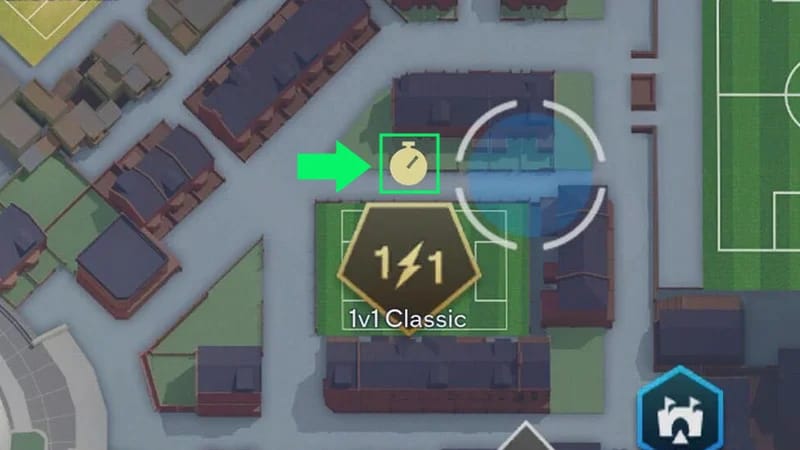
Look for a timer icon on a gameplay location to find an active live event.Live events can change the way you play at specific locations and give you additional objectives and rewards.Check the event details before joining to see its rules and requirements.
Can you cross-play in The Grounds with friends?
Yes. Use parties and game queues to play with friends in The Grounds.The Grounds supports cross-play across PC and Gen 5 platforms, except Nintendo Switch 2.Follow the on-screen party and queue instructions to join a game together.To find them in-game, look for blue dots (for players in your Club) and pink dots (for players in your party).
FAQs
Use EA Connect to invite friends to your party or accept their invite.If you’re already in The Grounds but you and your friends are in different worlds, send or accept an invite through EA Connect to join them.
You can use emotes to communicate with other players in The Grounds.To voice or text chat with friends, use EA Connect.
No. The Grounds doesn’t have proximity chat or an open mic for nearby players.To voice or text chat with friends, use EA Connect.
No. The Grounds is open for you to explore from the start.
Open the map to find Kickabouts or Street Football pitches, or explore the districts on foot.At a Kickabout or Street Football pitch, check its information board for the rules and enter the queue to play.
Yes. Open the map and use Travel when it’s available to move to a Kickabout or Street Football pitch.
Yes. You can watch live matches taking place on visible pitches from the sidelines.
Still having issues?
Get in touch with our customer support team for more help.